
Why does my inventory show the wrong numbers on Amazon and eBay?
Your inventory is probably showing the wrong numbers because three separate systems each hold their own copy of the number, and they update at different speeds. Your store knows immediately. Your app finds out on its next cycle. The marketplace applies the change whenever it finishes processing. Until all three align, at least one of them is selling stock you no longer have. A seller put the sequence better than most documentation manages, in a Shopify Community thread that ran for over a year:
A sale goes through on Amazon and Shopify doesn’t update fast enough, then the same item sells on Shopify, and we end up overselling.
That is the whole failure in one sentence. Nothing malfunctioned, nor did errors appear. The app did exactly what it was built to do, on the schedule it was built to run on, and two customers bought the same unit. This is why the problem feels so unfair when it happens. Sellers go looking for something broken, find nothing, and conclude they must have misconfigured something. Usually that is not the case.
The three places a sync can break
Your store. The quantity is wrong at the source, or the product is not tracked, or a variant was edited in a way the app does not read.
The app. It has not run yet, or it ran, and the listing is unlinked so it received no update, or the connection expired, and it has not run for days.
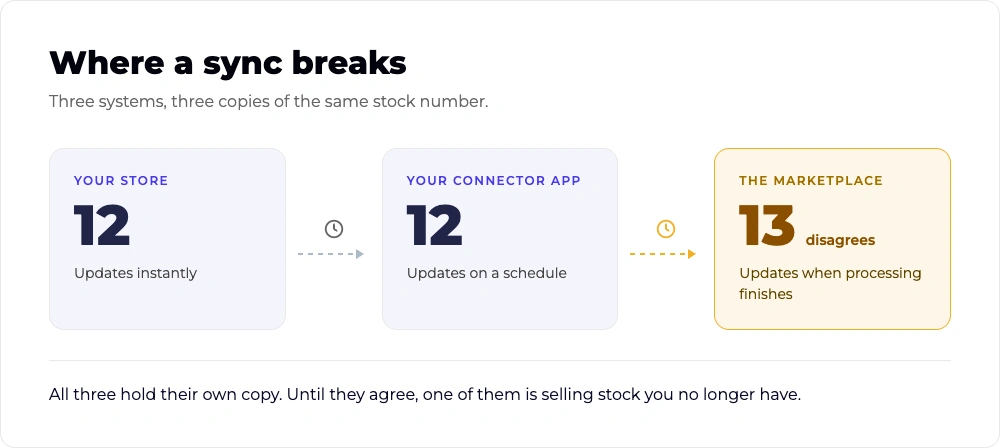
The marketplace. The app pushed the change and the marketplace has not applied it yet. This one is invisible from inside your app, which will report that the sync succeeded.
Most sellers only ever check the first (stores), as the second and third are where the expensive failures take place. If you run several channels through Shopify as your multichannel hub, you have one of these chains per channel, each with its own timing.
How often does your app actually sync?
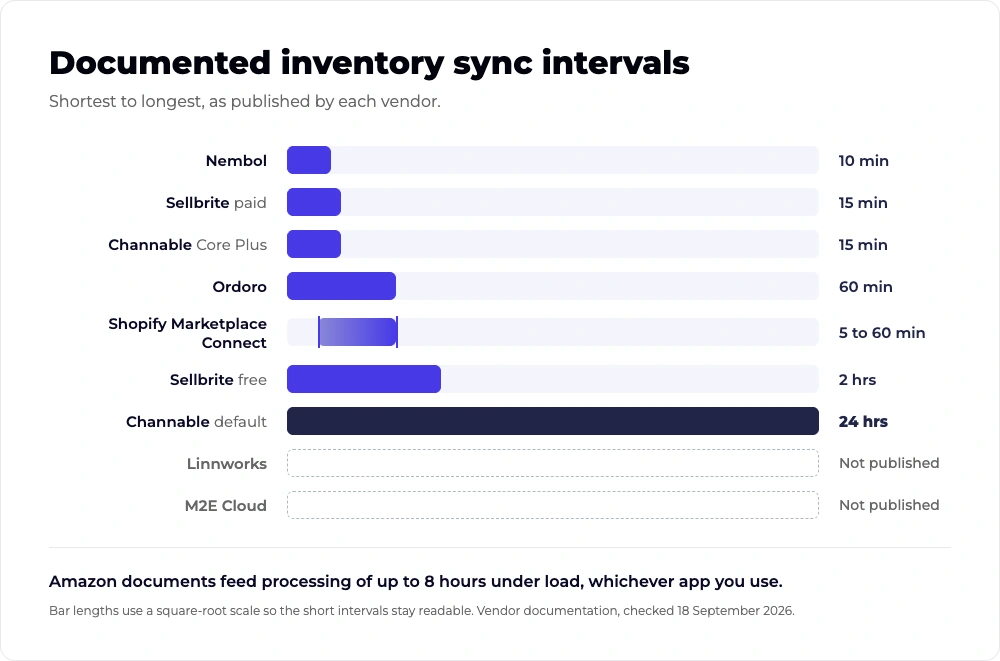
Check your help centre rather than your homepage. Several apps publish an exact interval. Several publish nothing at all and describe their sync as real time on their website and socials. The ones that publish a number are easier to plan around, whatever the number turns out to be. Every figure below comes from the platform’s own documentation [checked September 2026].
| App or platform | Documented interval |
|---|---|
| Marketplace Connect | Published immediately, then 5 to 60 minutes for the marketplace to process |
| Sellbrite, paid plans | Every 15 minutes |
| Sellbrite, free plan | Every 2 hours |
| Nembol | Every 10 minutes for orders, and for eBay, Etsy and Square stock |
| Channable, default | Once per day |
| Channable, Core Plus and Pro | Every 15 minutes, up to 24 slots per day |
| Ordoro | Hourly by default |
| Linnworks | Not published. Docs state sync cannot be triggered to run immediately |
| M2E Cloud | Not published in documentation |
However, if an import task takes 30 minutes to finish, scheduling it every 10 minutes achieves nothing. Effective sync frequency degrades as your catalog grows, so the number in the table is a ceiling rather than a promise.
What are the limits no app can get past?
Underneath every app in that table sit the marketplaces, and they publish limits of their own. Amazon’s feeds documentation tells developers to upload one feed of the same type no more than once every 20 minutes, and warns that under high load conditions it is not uncommon for feeds to take up to eight hours to process.
eBay’s API call limits are there too. The older Trading API allows 5,000 calls a day by default. The newer Inventory API allows two million. An app built on the older interface cannot refresh a 5,000 SKU catalog once a day inside default limits, and most sellers have no idea which interface their app uses.
Similarly, TikTok Shop caps new sellers at 100 product syncs a day, which surprises anyone arriving with a full catalog.
Not all third-party apps can work around these limits.
What to expect in reality
Every app works inside these limits, so the useful question is not whether your stock updates instantly. We have established it does not. The useful question is how wide your window is, and how many units you sell inside it. That number is knowable, and the rest of this post is about finding it.
What does a missed sync actually cost you?
When you have to cancel an order, you’re paying the cheapest part. What it does to your standing on the channel is where the money goes. For example, eBay’s order cancellation policy is blunt about it.
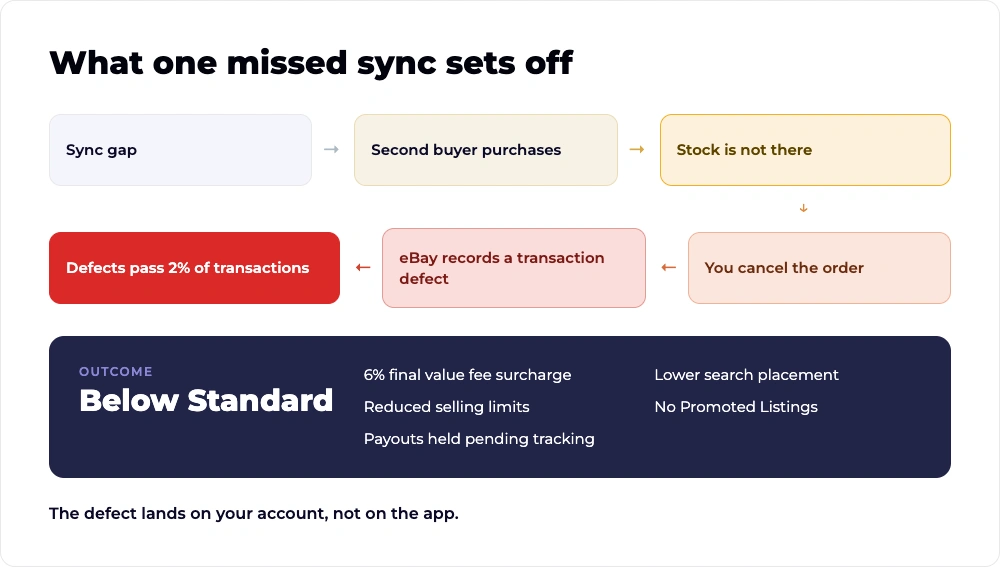
Cancelling an order because the item is out of stock will result in a transaction defect, as sellers are responsible for fulfilling the items they’ve sold.
Defects above 2% of your transactions drop you to Below Standard. That status adds a 6% final value fee surcharge, rising to 7% after four consecutive months, and it also places your items lower in search results, reduces your selling limits, blocks Promoted Listings, and can hold your payouts pending tracking confirmation. eBay also keeps part of the fee. On a seller-caused cancellation the category fee is credited back, but the per-order fixed fee is not, which is 30 cents on orders up to $10 and 40 cents above that.
For Amazon, its seller policies put the pre-fulfilment cancel rate ceiling at 2.5%, the order defect rate at under 1%, and the late shipment rate at under 4%. Breaching the cancellation rate deactivates your seller-fulfilled offers.
On the other hand, for TikTok Shop, the seller-fault cancellation policy, effective August 2026, uses the same 2.5% ceiling and lists out-of-stock first among the causes that qualify.
Two marketplaces with almost nothing else in common landed on the same number. Let’s run the arithmetic on a small seller. Say they get roughly forty (40) orders a week, four cancellations in a month because stock ran out between syncs, and they are at 2.5% on the nose. One bad weekend puts you over.
A seller who tried a connector and ended up on eBay’s wrong side described it plainly:
The third-party app caused the stockouts, and the strikes landed on their account.
How do I tell whether it’s my store, the app, or the marketplace?
Check the same SKU in all three places within the same minute, then compare. Whichever pair disagrees tells you which link in the chain failed. It takes about two minutes, and it saves you from opening a support ticket with the wrong company. That last part matters more than it sounds. The most common experience sellers report is being passed between two support teams who each blame the other.
One seller chasing a TikTok Shop sync failure shared:
Shopify support said it was TikTok’s fault, and TikTok never replied.
Perform checks in order:
- Open the SKU in your store. Note the quantity and the exact time. This will be your reference number.
- Open the same SKU inside your app. If the app disagrees with your store, the break is between them. Check whether the product is linked. Unlinked listings receive no updates.
- Check the app’s sync log or activity feed. Find the last successful run for that channel. If the last run is hours or days old, the connection is the problem and nothing downstream of it is worth investigating.
- Open the live listing on the marketplace. If your store and your app agree but the listing does not, the app has pushed the update and the marketplace has not applied it.
Pro Tip: Wait out the published window before doing anything else. - Check the marketplace’s own error surface. Amazon’s feed status and eBay’s listing errors both report rejections your app may have recorded as a successful submission.
If step two disagrees, it is a linking problem. If step three is stale, it is a connection problem. If everything agrees and the listing is still wrong, you are inside the processing window, and the wait is the answer. One warning before you start reinstalling things to fix it. Reconnecting an app can republish more than you expect. One reviewer described a reinstall that merged their account with a defunct one and published their entire catalog of over a thousand products to eBay without authorization. Hence, diagnose first.
How big a buffer do I actually need?
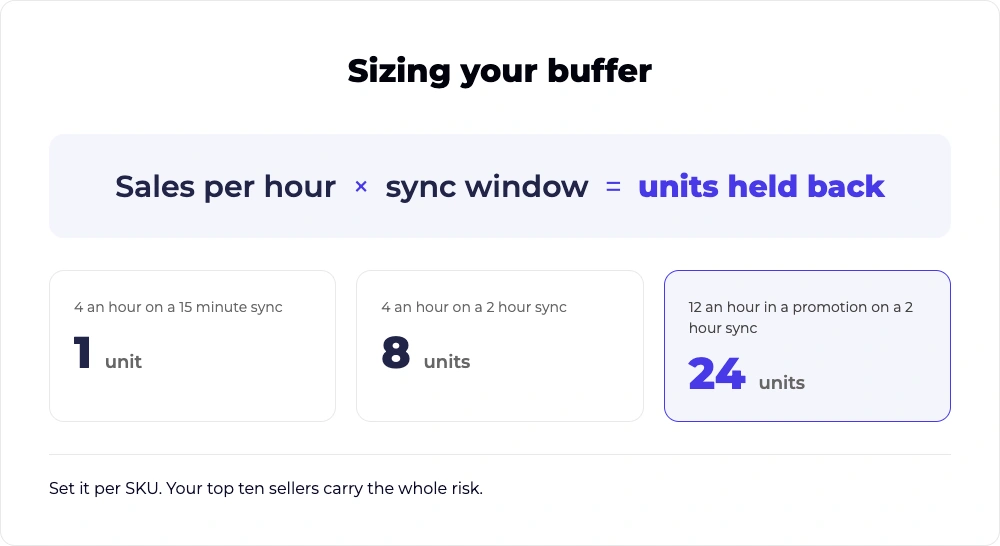
To ascertain your buffer time, multiply the SKU’s sales per hour by your sync window in hours, then round up. That is the number of units you have to hold back for that channel to stop a second buyer from reaching stock you have already sold.
Here is an example of how you can do the math yourself.
| SKU sells | Sync window | Buffer needed |
|---|---|---|
| 4 an hour | 15 minutes | 1 unit |
| 4 an hour | 60 minutes | 4 units |
| 4 an hour | 2 hours | 8 units |
| 12 an hour in a promo | 15 minutes | 3 units |
| 12 an hour in a promo | 2 hours | 24 units |
Did the math? Now let us tell you the two things that are not included in this table.
- A daily or two-hourly refresh is unworkable for anything that sells well, because the buffer invalidates the stock you were trying to sell.
- Your exposure is worst exactly when trading is best, since the window stays fixed while your sales rate climbs.
How to circumvent this? Set buffers per SKU rather than across the catalog. A slow mover needs nothing. Your top ten sellers during a promotion are where the whole risk sits, and they are also the ten you would least like to cancel on.
How would you know if your app stopped syncing?
Most sellers find out from a customer. One reviewer lost 17 orders across three days after an eBay token expired with no notification, and only noticed when the orders never arrived.
Hence, here are the three checks that take a few minutes each and catch almost everything.
- Keep a canary SKU.
Pick one product you control completely, change its quantity in your store every Monday, and check the live listing an hour later. If the change has not landed, your sync is down, and you know before your customers do. - Reconcile order counts weekly. Count the orders the marketplace says you received against the orders that reached your store. They should match. A gap means orders are being dropped, and it is worth knowing which ones before the dispatch deadline passes. TikTok Shop documents one version of this: if a product is out of stock when the order is placed, the order does not sync to Shopify at all, so an oversell can hide the very order it caused.
- Audit unlinked listings monthly. Every app has a view showing which listings are connected to a product and which are orphaned. Orphans receive no updates and generate no errors, which is what makes them expensive.
While none of this is rocket science, it is cheaper than cancelled orders or impacted Account Health.
What does a reliable multichannel syncing setup actually look like?
Safety buffers and weekly inventory checks help contain syncing problems. They can reduce the damage when something goes wrong, but they do not fix the underlying issue.
The real problem is usually simpler: too many systems are maintaining their own version of the same stock number.
If Amazon, eBay, TikTok Shop, Walmart, and your store are each connected through separate apps, every connector has its own sync cycle, its own failure points, and its own opportunity to fall behind.
That is how you end up managing five dashboards, five integrations, and five places where inventory can go wrong.
A more reliable multichannel setup has three things at its core:
- One inventory source across channels. A sale on one marketplace updates the available quantity everywhere else from the same source.
- Validation before products are published. Category, attribute, and listing-data problems are caught before they turn into marketplace errors.
- Centralized order and fulfillment management. Orders arrive in one place, while shipment, tracking, and fulfillment updates flow back to the marketplace without adding another disconnected tool.
This is the problem UniCon is built to solve
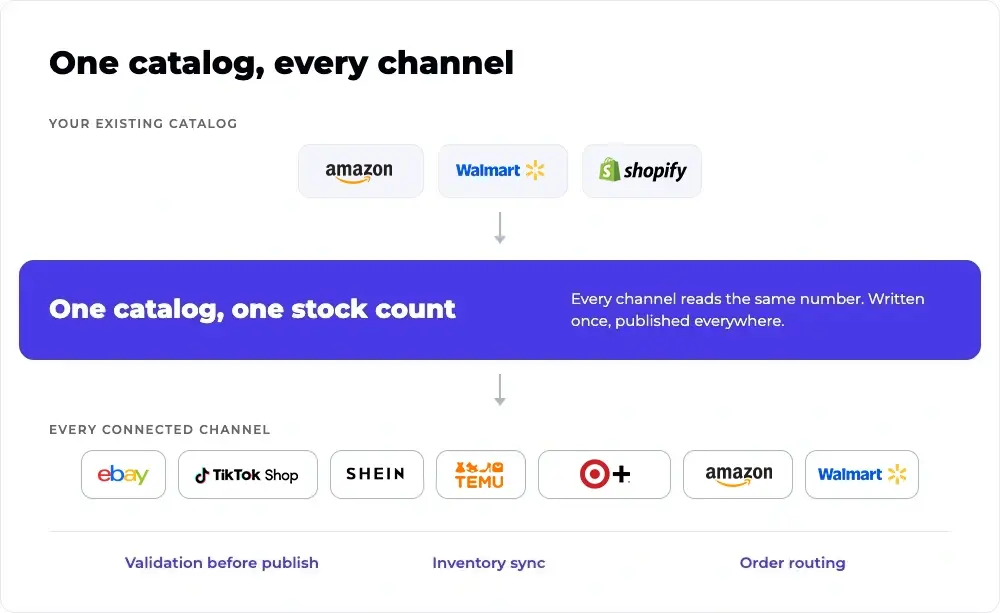
UniCon replaces the one-connector-per-marketplace setup with a single multichannel operation. Connect your Amazon, Walmart, or Shopify catalog and use it to expand to marketplaces such as TikTok Shop, eBay, SHEIN, Temu, Walmart, Amazon, Shopify, and Target Plus, depending on your source channel.
Instead of maintaining separate product and inventory connections for every marketplace, UniCon keeps those channels connected around the same operating layer. So when inventory changes, you are not waiting for five independent integrations to eventually agree with each other. And inventory sync is only part of it.
UniCon AI helps prepare products for each marketplace before they publish. It maps categories and attributes, flags missing or mismatched data, and can generate channel-specific titles, bullet points, and descriptions for you to review before publishing.
Your existing catalog also stays intact. Connecting a source channel does not require rebuilding the listings already selling there. You can bring those products into UniCon, prepare them for additional marketplaces, and control what gets published next.
Fulfillment becomes part of the same expansion strategy too. If eligible inventory is already stored with Amazon or Walmart, UniCon can help route orders from supported marketplaces through Amazon Multi-Channel Fulfillment (MCF) or Walmart Multichannel Solutions (MCS). That means testing another sales channel does not necessarily require creating a separate fulfillment operation or splitting stock across additional warehouses.
The result is a much simpler model: One catalog. One inventory layer. More marketplaces. Centralized orders and fulfillment.
UniCon will not make a marketplace API faster or eliminate every possible channel-side delay. What it does is remove many of the disconnected systems that make those delays harder to see, diagnose, and control.
Before adding another marketplace connector
Check your three fastest-selling SKUs across your store, marketplace, and current integration.
If those systems show different available quantities today, adding another standalone connector gives you one more place that can disagree.
Instead, see what your operation looks like when your catalog, inventory, orders, and fulfillment are managed through one multichannel system.
Key takeaways
- Your app syncs on a schedule, and most publish it. Marketplace Connect states 5 to 60 minutes for the marketplace to process, Sellbrite 15 minutes on paid plans and 2 hours on free.
- Amazon allows one feed of the same type every 20 minutes and warns feeds can take up to 8 hours to process under load. No app gets past that.
- eBay records a transaction defect when you cancel for being out of stock. Above 2% of transactions you become Below Standard, which adds a 6% fee surcharge.
- Amazon and TikTok Shop both cap seller-caused cancellations at 2.5%. Four bad orders in a month of 160 puts a small seller on the line.
- Your buffer is sales per hour multiplied by your sync window. Four an hour on a 2 hour cycle needs 8 units held back.
Frequently asked questions
How often does Marketplace Connect sync inventory?
Its help centre states updates are published immediately, then take 5 to 60 minutes for the marketplace to process, and it recommends a quantity buffer for fast-selling stock. The app does not control that window. Amazon separately documents feed processing of up to eight hours under load.
Why does my eBay quantity not drop when an item sells elsewhere?
Either your app has not pushed the update yet, or the listing is unlinked and receiving no updates at all. Unlinked listings are the failure sellers find last, because nothing alerts you and the app reports no error.
Does cancelling an out-of-stock order hurt my eBay account?
Yes. eBay’s policy states it results in a transaction defect, because sellers are responsible for fulfilling what they have sold. Defects above 2% of transactions drop you to Below Standard, which adds a 6% final value fee surcharge and lowers your search placement.
How much buffer stock do I need to stop overselling?
Roughly your sales per hour on that SKU multiplied by your app’s sync window, rounded up. A SKU selling four an hour on a 15 minute cycle needs one unit held back. On a two hour cycle it needs eight.
Does Shopify Marketplace Connect support TikTok Shop?
No. Shopify’s help centre lists Amazon, eBay, Walmart US, Target Plus and existing Etsy connections only. TikTok Shop, SHEIN and Temu are not supported, which is why sellers on those channels end up running a second app alongside it.
Can I manage multiple marketplaces without installing a separate connector for each one?
Yes. That is the alternative to the one-app-per-channel setup described above. UniCon is designed as a central multichannel layer for products, inventory, orders and fulfillment, so sellers can operate multiple connected marketplaces without managing each one as an isolated workflow.
Can I use the products I already sell on Amazon to expand to other marketplaces?
Yes. UniCon can use an existing Amazon catalog as the source rather than making you rebuild every product from scratch. Once Amazon is connected, products can be imported into UniCon and prepared for additional supported channels such as TikTok Shop, Walmart, SHEIN and Temu.
Do I have to change my existing marketplace listings when I connect UniCon?
No. Connecting a source marketplace is meant to bring the existing catalog into UniCon so it can be managed and reused across channels. For example, UniCon’s Walmart-to-SHEIN workflow imports the Walmart catalog through a read-only source connection, so the existing live Walmart listings are not changed simply because the account is connected.
Can I fulfill orders from another marketplace using inventory already stored with Amazon?
For supported routes, yes. If your products already have inventory in Amazon’s fulfillment network, UniCon can route eligible orders through Amazon Multi-Channel Fulfillment instead of requiring a separate inventory pool for the new channel. UniCon’s current documentation, for example, describes TikTok Shop and Walmart orders being routed to Amazon MCF, with shipment and tracking information synced back through UniCon.
Can I use Walmart WFS inventory to fulfill orders from another marketplace?
Yes, on supported routes through Walmart Multichannel Solutions. One documented UniCon workflow lets an existing Walmart seller route eligible SHEIN orders to Walmart MCS, which then fulfills them using the corresponding inventory already stored in WFS. Tracking and shipment details flow back through UniCon.
What happens when orders start coming from several marketplaces at once?
Instead of checking each marketplace separately, UniCon brings synced orders into one order-management view. Sellers can see order status, fulfillment method and tracking from the same operating layer, including orders routed through services such as Amazon MCF.
What if my products already exist on both marketplaces? Will UniCon create duplicates?
UniCon can identify and link products using identifiers such as SKU or barcode rather than automatically treating every marketplace listing as a new product. Its channel setup also exposes partially linked products so mismatched variants or incomplete connections can be identified and corrected instead of silently remaining disconnected.
Does Shopify Marketplace Connect support TikTok Shop, SHEIN and Temu in the same Marketplace Connect app?
No. Shopify Marketplace Connect currently lists Amazon, eBay, Walmart US and Target Plus as its supported new marketplace connections. Shopify does offer separate native sales channels for TikTok Shop and Temu, but those sit outside the Marketplace Connect app. For sellers expanding across several of these channels, the operational question becomes whether they want to manage multiple channel-specific connections or centralize those workflows in a multichannel system such as UniCon.