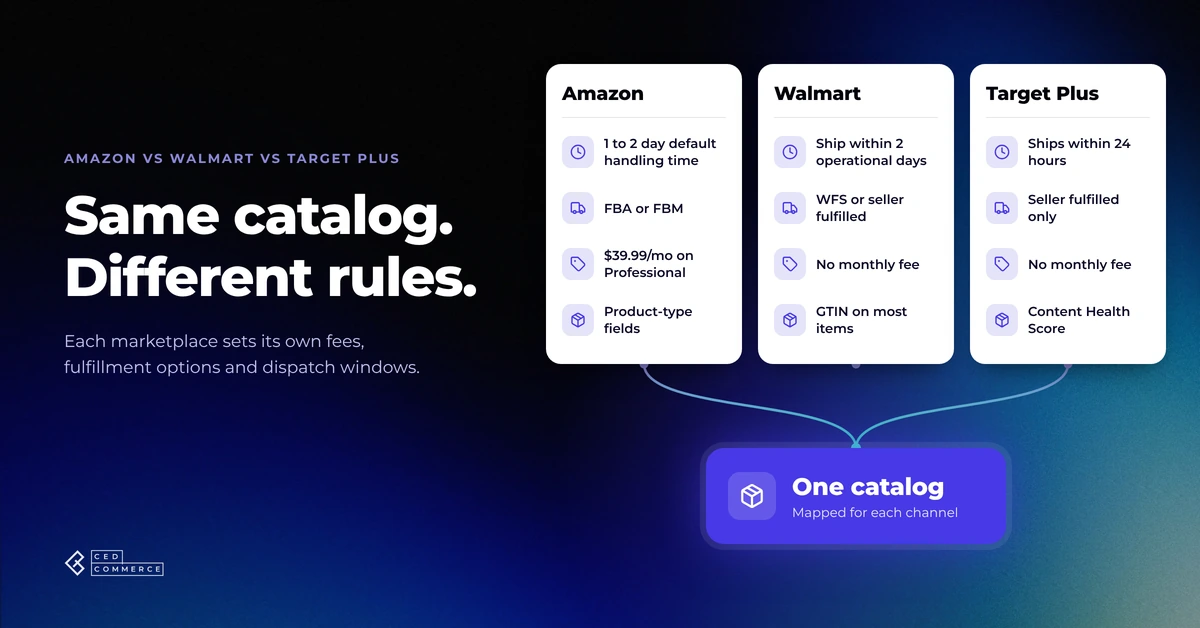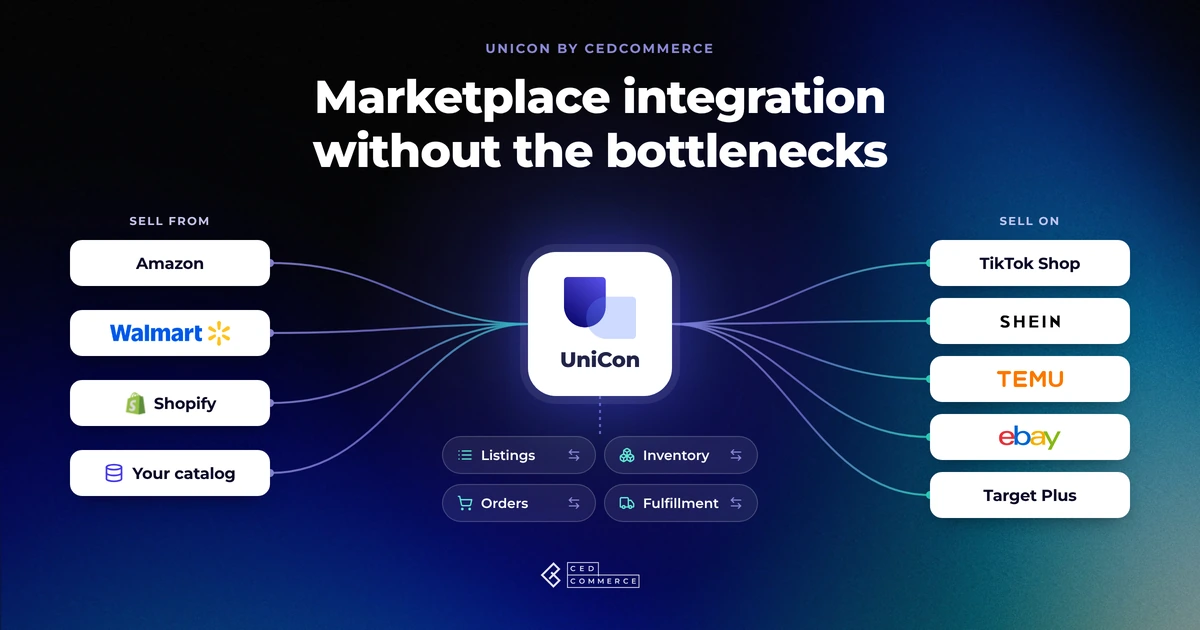

Selling on another marketplace sounds straightforward when you already have a catalog that works. Take the products you sell on Amazon, Walmart, or Shopify. Put them on another channel. Start taking orders.
In practice, that is only the beginning. A product that is ready for Amazon may need different categories, attributes, images, or variation data for TikTok Shop, SHEIN, Temu, Walmart, or eBay. The same SKU can end up carrying different inventory numbers across channels. Orders start arriving in different dashboards. Fulfillment rules vary. Pricing that works on one marketplace may leave little margin on another.
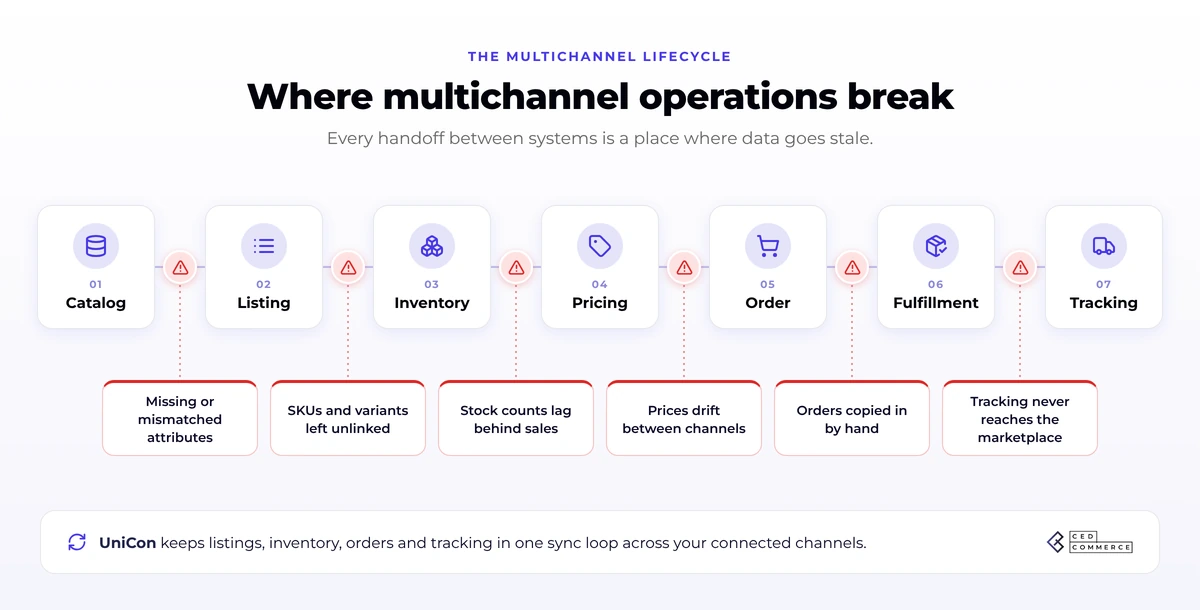
This is where marketplace integration becomes more important than simply being present on multiple marketplaces. A good multichannel setup connects the operational pieces behind every sale: product data, listings, inventory, pricing, orders, warehouses, fulfillment, and tracking.
And the more marketplaces you add, the more expensive disconnected processes become.
Here are 7 common integration bottlenecks sellers encounter when selling on multiple marketplaces and how to fix them before they slow down growth.
What does marketplace integration actually mean?
Marketplace integration connects the systems and sales channels that run your ecommerce business so information can move between them without your team repeatedly updating each marketplace by hand.
At a practical level, that means connecting:
- Product catalogs
- Marketplace listings
- SKUs and variants
- Inventory
- Pricing
- Orders
- Warehouses
- Fulfillment
- Shipping and tracking
Selling on Amazon, Walmart, TikTok Shop, SHEIN, Temu, eBay, or another marketplace at the same time makes you a multichannel seller.
But that does not automatically mean you have an integrated multichannel operation.
The distinction matters.
| Multichannel bottleneck | What the seller sees | What is actually breaking |
|---|---|---|
| Product setup | Rebuilding listings | Marketplace-specific product data |
| Existing listings | Duplicate or disconnected products | Product linking |
| Inventory | Wrong quantities or overselling | Inventory synchronization |
| Pricing | Margin erosion | Channel-specific price logic |
| Orders | Too many dashboards | Fragmented order management |
| Fulfillment | More warehouses and shipping work | Disconnected fulfillment routing |
| Expansion | Every marketplace becomes another project | No reusable operating workflow |
Fix these layers, and marketplace expansion becomes much easier to repeat.
1. Your existing catalog does not automatically become a marketplace-ready catalog
One of the first mistakes in marketplace expansion is assuming that an existing listing can simply be copied to another marketplace.
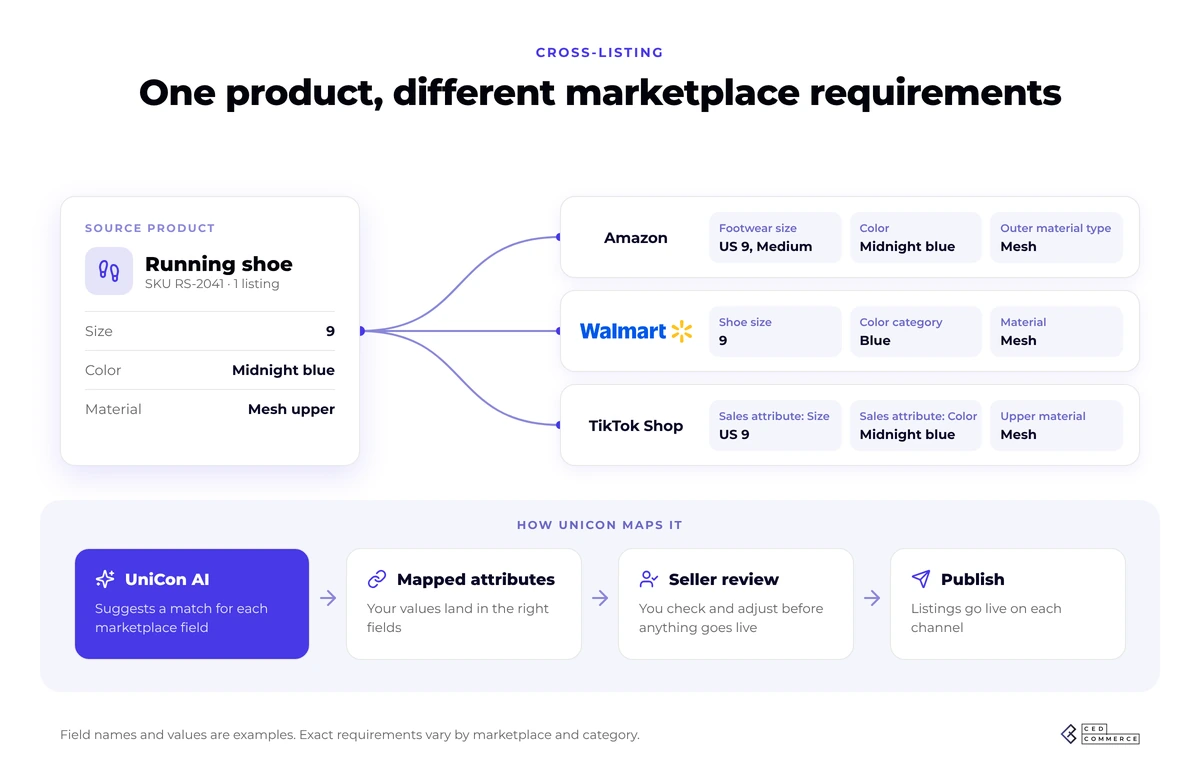
The product itself is the same. The data structure often is not. Amazon, Walmart, TikTok Shop, SHEIN, Temu, eBay, and other marketplaces can ask for different:
- Categories
- Required attributes
- Accepted attribute values
- Product identifiers
- Variation structures
- Titles
- Images
- Descriptions
- Marketplace-specific fields
A seller may have complete product information on Amazon and still discover missing information when preparing that same SKU for another channel. That creates a common expansion cycle:
Export catalog → upload to marketplace → receive errors → correct fields → upload again → discover another issue.
Repeat this across hundreds or thousands of SKUs, and what looked like a channel expansion project becomes a product-data cleanup project.
The fix: separate your source catalog from destination requirements
Keep one reliable source product record, then translate that information into the format each target marketplace expects. That means separating two things:
Reusable product facts: SKU, brand, dimensions, materials, images, product identity, variants.
Marketplace-specific requirements: category mapping, required fields, accepted values, title structure, listing rules, and channel-specific content.
If your team is preparing a catalog for several marketplaces, our deeper guide to marketplace product data requirements explains what needs to be standardized before expansion and what still needs to be adapted channel by channel.
Where UniCon fits
UniCon starts with an existing catalog from a source channel such as Shopify, Amazon, or Walmart and helps prepare that product information for destination marketplaces instead of forcing sellers to rebuild the catalog every time.
Marketplace-specific category and attribute mapping, required-field validation, and listing preparation become part of the same cross-listing workflow.
The goal is to make the same catalog marketplace-ready without recreating it from zero.
2. Your products are listed everywhere, but are they actually connected?
Getting a listing live does not necessarily mean the underlying product records are linked correctly.
This becomes especially important when a seller already has products on multiple marketplaces before connecting a multichannel system. Imagine SKU SHOE-BLK-10 already exists on Amazon and TikTok Shop.
The titles may differ. One marketplace might use a different internal product ID. The variant structure may not look exactly the same.
If the system treats the two listings as different products rather than two marketplace versions of the same SKU, downstream operations can break.
Inventory may not update correctly, or your orders may not map to the right product. A new integration may create a duplicate listing instead of connecting to the one already live.
The fix: establish a dependable product-linking layer
Your multichannel system needs to know:
This Amazon item, this TikTok Shop item, and this Walmart item represent the same sellable product.
SKU or barcode can act as the common identifier, depending on how the catalog is structured.
But sellers also need visibility into products that are:
- Fully linked
- Not linked
- Partially linked
- Incorrectly matched
UniCon’s product-linking workflow specifically separates linked, unlinked, and partially linked products because accurate linking supports inventory synchronization and order routing while helping prevent duplicate SKUs.
Think of product linking as the plumbing behind multichannel ecommerce. Customers may never see it but inventory, orders, and fulfillment all depend on it.
3. Your inventory has discrepancies on different marketplaces
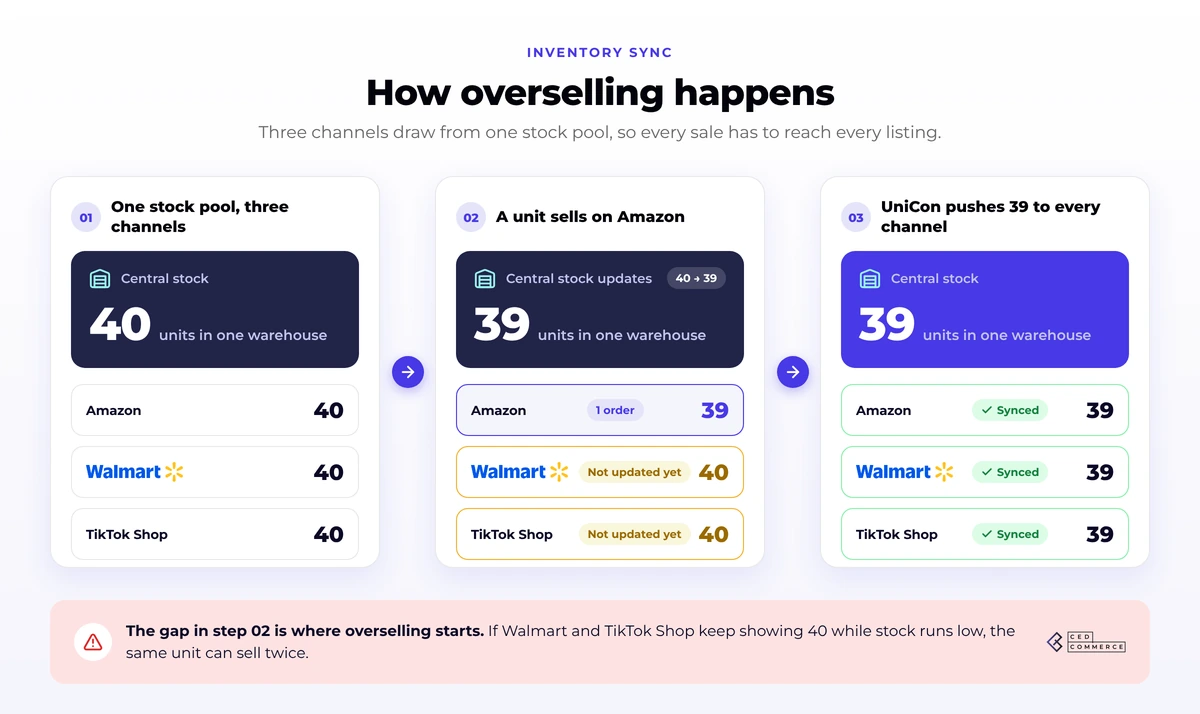
Inventory is where disconnected multichannel systems become dangerous. Suppose you have 40 units of one SKU available.
Your systems show:
- Amazon: 40
- Walmart: 40
- TikTok Shop: 40
- SHEIN: 40
You do not have 160 units. You have 40 units exposed to buyers across four marketplaces.
Now imagine several units sell on Amazon, but the other marketplaces continue showing the old quantity. That stock drift can eventually lead to:
- Overselling
- Cancelled orders
- Stockouts
- Manual inventory corrections
- Poor customer experience
- Marketplace performance issues
The problem gets more complicated when inventory sits across multiple warehouses or fulfillment networks.
The fix: create one reliable inventory picture
Connected marketplaces should not independently guess how much stock is available.
Your system needs an authoritative inventory source and a clear way to distribute that availability across connected channels.
That requires more than periodically uploading a spreadsheet. The system needs to understand:
Available stock – what can currently be sold.
Committed stock – inventory already reserved for orders.
Unavailable stock – inventory that physically exists but should not be sold.
Warehouse availability – where inventory actually sits and whether that location can fulfill an order.
UniCon’s inventory management, for example, distinguishes available, committed, unavailable, and on-hand inventory across warehouse locations.
Warehouse mapping can then connect that inventory to the marketplaces using it.
If inventory drift is already happening in your business, read our breakdown of what inventory sync problems are really costing you and how to fix them. Inventory sync is not simply a convenience. Once the same SKU is exposed across several marketplaces, it becomes part of your risk control.
4. One product does not always need one price
Centralizing multichannel operations does not mean every marketplace should receive the exact same selling price.
Consider everything that can change from one channel to another:
- Marketplace commissions
- Fulfillment fees
- Shipping costs
- Promotions
- Return economics
- Advertising costs
- Competitive pricing
- Required margins
A product that is profitable at $39.99 on one marketplace might perform very differently at $39.99 somewhere else. This creates another integration trap.
Teams often start by copying a source marketplace’s price along with the product catalog, then manually adjust exceptions later. As the catalog grows, nobody remembers which SKUs have special pricing rules on which marketplace.
The fix: centralize pricing control, not necessarily the price itself
A good marketplace integration should give sellers one place to control pricing while still allowing destination-specific decisions.
For example:
Source price: $40
Marketplace A: Source price
Marketplace B: Source price + 5%
Marketplace C: Fixed promotional price
Marketplace D: Individually managed price
This keeps pricing intentional without requiring teams to open five marketplace dashboards every time the base price changes. That distinction becomes increasingly important as channel count grows:
Centralized operations should create consistency of control instead of forcing identical commercial decisions everywhere, without informed decision-making.
5. More marketplaces create more orders, as well as more places to lose track of them
Marketplace expansion creates a simple operational problem that becomes more painful over time:
Where do you check orders? Amazon Seller Central? Walmart Seller Center? TikTok Shop Seller Center?
SHEIN? Temu? eBay? Your Shopify store?
A seller working with two channels may manage this manually. At five or six channels, marketplace hopping becomes an operating process of its own.
And merely importing an order into another dashboard does not completely solve the problem. The full order flow looks more like:
Marketplace order → correct product → correct inventory deduction → correct fulfillment method → shipment → carrier → tracking → marketplace status update
Break any link in that chain, and the order requires intervention.
The fix: centralize the order lifecycle
A marketplace integration should answer four questions immediately:
- What was ordered?
- Where should it be fulfilled?
- What stage is the order currently in?
- Has the required shipping and tracking information made it back to the marketplace?
UniCon centralizes orders from connected channels and tracks fulfillment states such as unfulfilled, partially fulfilled, fulfilled, on hold, failed, and completed. It can also identify whether an order is being handled by the seller, Amazon MCF, or applicable marketplace fulfillment.
The benefit goes simply having “one dashboard.” It is having one operational flow connecting the order with the product, inventory, fulfillment, and tracking behind it.
For Amazon sellers considering TikTok Shop specifically, our guide to selling from Amazon to TikTok Shop shows how catalog preparation, inventory, and fulfillment come together when moving from one marketplace to another.
Want to add marketplaces without adding another manual operating process?
UniCon brings listings, inventory, orders, and fulfillment into one connected multichannel workflow.
6. You build a second fulfillment operation when you may already have one
This is one of the biggest missed opportunities in multichannel selling.
Many established Amazon sellers already hold inventory inside Amazon’s fulfillment network.
Walmart sellers may already use WFS. Then the seller adds another marketplace and assumes another pool of inventory, warehouse relationship, and shipping process must be created.
Not always. The more useful question is: Can the fulfillment infrastructure I already use support orders coming from another channel?
Amazon MCF changes the equation for FBA sellers
Amazon Multi-Channel Fulfillment allows sellers to use inventory in Amazon’s fulfillment network to fulfill eligible orders originating outside Amazon.
For a seller expanding from Amazon to another marketplace, that means the growth path can potentially become:
Existing Amazon inventory → listing on another marketplace → external order → Amazon MCF → shipment and tracking
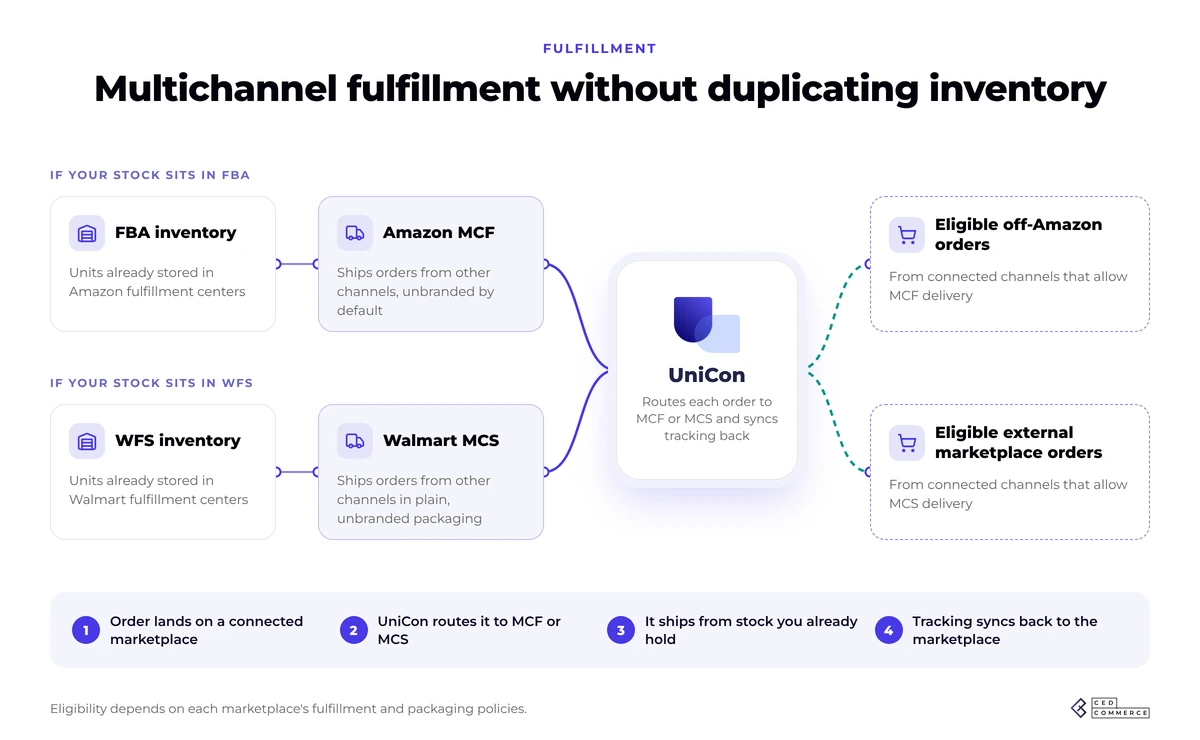
UniCon can connect an Amazon account, synchronize products and inventory, and route orders to Amazon MCF where required.
That makes fulfillment part of the marketplace integration instead of a separate project.
For two practical examples, see:
- How to sell on SHEIN and fulfill orders with Amazon MCF
- How to sell on Temu and fulfill orders with Amazon MCF
Walmart sellers should think the same way
The same principle applies to sellers already using Walmart’s fulfillment ecosystem.
UniCon documentation currently covers Walmart Multichannel Solutions workflows where eligible external-channel orders can use inventory held through Walmart’s fulfillment setup; its SHEIN workflow, for example, connects source inventory, target-channel warehouses, carrier mapping, and MCS fulfillment.
The larger lesson is simple: Do not assume each new sales channel requires a new fulfillment stack.
Before duplicating inventory or adding another warehouse workflow, check whether your existing network can fulfill the new channel. That can make marketplace expansion operationally much lighter.
7. You approach every marketplace like a separate project
This is the bottleneck that appears after the first six have been solved.
Marketplace one goes live, then two requires another project. Marketplace three brings another catalog file, and the fourth one introduces another set of mappings.
Someone builds another spreadsheet, and you end up owning another dashboard. Eventually, “multichannel” really means several independent businesses being operated by the same team.
The fix: build a repeatable expansion workflow
Your next marketplace should reuse as much of the existing operational foundation as possible. The process should look something like:
1. Start with your existing catalog
Use the product information that already works on Amazon, Walmart, or Shopify.
2. Select the next marketplace
Determine eligibility and operational fit before preparing the catalog.
Some channels may have very different onboarding models. Target Plus, for example, requires sellers to go through Target’s application and approval process rather than treating launch as a simple listing upload. If Target is on your roadmap, use our Target Plus eligibility, application, and seller guide before planning the integration itself.
3. Map the catalog
Translate source categories, attributes, and values into the destination marketplace’s requirements.
4. Validate listings
Find incomplete products or missing marketplace fields before submission.
5. Link existing listings
Where products already exist on the destination marketplace, connect them instead of creating duplicates.
6. Connect inventory
Define the inventory source, warehouses, and synchronization rules.
7. Configure orders and fulfillment
Choose self-fulfillment, marketplace fulfillment, Amazon MCF, Walmart MCS, or the appropriate combination for your operation.
8. Keep the workflow connected after launch
Listings change.
New SKUs get added.
Products go out of stock.
Orders get split.
Carriers change.
Tracking needs to return to the marketplace.
The integration needs to manage the operation after launch, in addition to publishing the first listing. That is the difference between a listing importer and a multichannel operating layer.
What a properly integrated marketplace operation looks like
The best marketplace integration is largely invisible. Hence, your team should not spend the day moving information between systems. A healthy multichannel setup should look closer to this:
One existing catalog
↓
Marketplace-specific product preparation
↓
Products correctly linked across channels
↓
Inventory synchronized from reliable stock sources
↓
Channel-specific pricing rules
↓
Orders collected centrally
↓
Fulfillment routed to the appropriate network or warehouse
↓
Shipment and tracking returned to the marketplace
That is the operating model UniCon is designed around.
Its dashboard brings connected products, listings, orders, inventory, and channel activity together, while individual configurations control product linking, inventory behavior, warehouse mappings, and fulfillment.
Rather than building a separate connector and operating process for every marketplace combination, sellers can use an existing Shopify, Amazon, or Walmart catalog as the starting point for expansion into supported marketplaces.
For the complete workflow, see our guide on how to cross-list on marketplaces with UniCon.
Marketplace integration checklist: Are you ready for the next channel?
Before adding another marketplace, answer these questions.
Product data
- Do your products have consistent SKUs or identifiers?
- Are important attributes complete?
- Are variants structured correctly?
- Can destination-specific fields be mapped without changing your source catalog?
Listings
- Do any of these SKUs already exist on the destination marketplace?
- Can those listings be linked instead of recreated?
- Can you identify incomplete or rejected products easily?
Inventory
- Which system owns the authoritative stock number?
- Which warehouses contribute sellable inventory?
- How quickly do sales on one channel affect availability elsewhere?
- Do you need safety stock or channel-specific availability rules?
Pricing
- Will each marketplace use the same price?
- Have marketplace fees and fulfillment costs been considered?
- Can pricing rules be updated centrally?
Orders
- Can orders from every connected marketplace be viewed together?
- Can the system identify failed or partially fulfilled orders?
- Are marketplace statuses updated automatically?
Fulfillment
- Will orders be seller-fulfilled?
- Can Amazon MCF or Walmart MCS handle eligible external-channel orders?
- Are warehouses and carriers mapped correctly?
- Does tracking return to the originating marketplace?
If most of those questions currently require a spreadsheet, manual check, or separate marketplace login, the bottleneck is the right integration for your business.
Add marketplaces instead of another layer of manual work
Selling on multiple marketplaces should give your products access to more customers.
It should not require your team to rebuild product data, reconcile inventory, copy orders, update five dashboards, and recreate fulfillment operations every time another channel is added.
The real goal of marketplace integration is not simply connecting APIs.
It is creating one dependable flow from:
Catalog → listing → inventory → order → fulfillment → tracking.
UniCon brings those workflows together so sellers can take an existing catalog, prepare it for more marketplaces, keep inventory and orders connected, and use the fulfillment infrastructure that fits their business.
Your next marketplace should just add another source of demand. Let us handle the rest.
Ready to connect your next marketplace?
See how UniCon can fit your catalog, channels, inventory, and fulfillment setup.
Frequently asked questions about selling on multiple marketplaces
What is the biggest challenge when selling on multiple marketplaces?
The biggest challenge is keeping operations consistent after listings go live. Product data, inventory, pricing, orders, fulfillment, and tracking all have to remain aligned as activity occurs across different marketplaces.
What is marketplace integration?
Marketplace integration connects a seller’s product, inventory, order, pricing, and fulfillment systems with the marketplaces where they sell. The goal is to reduce repeated manual work and keep operational data synchronized across channels.
What is the difference between multichannel selling and marketplace integration?
Multichannel selling means offering products through more than one sales channel. Marketplace integration is the infrastructure connecting those channels so sellers do not have to independently manage every product, stock update, order, and fulfillment event.
How do you manage inventory across multiple marketplaces?
Start with a reliable inventory source, connect products using consistent identifiers, map the warehouses that supply each channel, and synchronize sellable inventory as orders or stock changes occur. Sellers should also distinguish available inventory from committed or unavailable stock.
Can I use the same product catalog on multiple marketplaces?
Yes, but the same catalog usually needs to be adapted. Marketplaces can have different category structures, required attributes, variation rules, and content requirements. A strong integration reuses reliable source data while mapping it into each destination marketplace’s required structure.
How can sellers prevent duplicate listings across marketplaces?
Product linking is critical. Existing marketplace listings should be matched to the corresponding source products using dependable identifiers such as SKU or barcode before new listings are created.
Can Amazon inventory fulfill orders from other marketplaces?
Eligible off-Amazon orders can be fulfilled through Amazon Multi-Channel Fulfillment when the seller’s setup and destination channel support that workflow. A marketplace integration can connect the incoming order with MCF and return the resulting fulfillment information to the originating channel.
Do I need separate software for every marketplace?
Not necessarily. Point-to-point connectors can work when only two systems need to communicate. As the number of marketplaces increases, however, a centralized multichannel system can reduce the number of separate catalogs, sync rules, order dashboards, and fulfillment workflows the seller has to maintain.