
Adobe Sees 520% Jump in AI-Assisted Holiday Shopping
Reading Time: 2 minutes Key Highlights AI-driven traffic to U.S. retail sites will increase by…

Running short of time? Get PDF of the blog in your mail.
In this post we will tell you how to create a Shipping Module in Magento 2. If you have created shipping extension in Magento 1 then it would be easy for you to understand it in Magento 2. Let’s begin with an example,
To create a Shipping Module in Magento 2 you need to follow 5 simple steps and your shipping method will be ready.
Here “Cedcommerce” is our workspace and “Ship” is our extension name.
1. Create app/code/Cedcommerce/Ship/registration.php
<?php

\Magento\Framework\Component\ComponentRegistrar::register(

\Magento\Framework\Component\ComponentRegistrar::MODULE,

'Cedcommerce_Ship',

__DIR__

);
2. Create app/code/Cedcommerce/Ship/etc/module.xml
<?xml version="1.0"?>

<config xmlns:xsi="http://www.w3.org/2001/XMLSchema-instance" xsi:noNamespaceSchemaLocation="../../../../../lib/internal/Magento/Framework/Module/etc/module.xsd">

        <module name="Cedcommerce_Ship" setup_version="1.0.0" schema_version="1.0.0"></module>

</config>
After that you to run following command to register your module:
For Linux users-
/opt/lampp/bin/php bin/magento setup:upgrade
For Windows Users-
php bin/magento setup:upgrade
3. Create app/code/Cedcommerce/Ship/etc/adminhtml/system.xml
We create system.xml to bring our shipping module settings in stores>configurations>sales>shipping methods section.
<?xml version="1.0"?>

<config xmlns:xsi="http://www.w3.org/2001/XMLSchema-instance" xsi:noNamespaceSchemaLocation="../../../../Magento/Config/etc/system_file.xsd">
<system>

<section id="carriers" translate="label" type="text" sortOrder="320" showInDefault="1" showInWebsite="1" showInStore="1">

<group id="cedship" translate="label" type="text" sortOrder="2" showInDefault="1" showInWebsite="1" showInStore="1">

<label>Ced Ship Shipping</label>

<field id="active" translate="label" type="select" sortOrder="1" showInDefault="1" showInWebsite="1" showInStore="0">

<label>Enabled</label>

<source_model>Magento\Config\Model\Config\Source\Yesno</source_model>

</field>

<field id="name" translate="label" type="text" sortOrder="3" showInDefault="1" showInWebsite="1" showInStore="1">

<label>Method Name</label>

</field>

<field id="price" translate="label" type="text" sortOrder="5" showInDefault="1" showInWebsite="1" showInStore="0">

<label>Price</label>

<validate>validate-number validate-zero-or-greater</validate>

</field>

<field id="sort_order" translate="label" type="text" sortOrder="100" showInDefault="1" showInWebsite="1" showInStore="0">

<label>Sort Order</label>

</field>

<field id="title" translate="label" type="text" sortOrder="2" showInDefault="1" showInWebsite="1" showInStore="1">

<label>Title</label>

</field>

<field id="sallowspecific" translate="label" type="select" sortOrder="90" showInDefault="1" showInWebsite="1" showInStore="0">

<label>Ship to Applicable Countries</label>

<frontend_class>shipping-applicable-country</frontend_class> <source_model>Magento\Shipping\Model\Config\Source\Allspecificcountries</source_model>

</field>

<field id="specificcountry" translate="label" type="multiselect" sortOrder="91" showInDefault="1" showInWebsite="1" showInStore="0">

<label>Ship to Specific Countries</label>

<source_model>Magento\Directory\Model\Config\Source\Country</source_model>

<can_be_empty>1</can_be_empty>

</field>

<field id="specificerrmsg" translate="label" type="textarea" sortOrder="80" showInDefault="1" showInWebsite="1" showInStore="1">

<label>Displayed Error Message</label>

</field>

</group>

</section>

</system>

</config>
After creating system.xml you can see this section by going to admin>stores>configurations>sales>shipping methods.

4. Create app/code/Cedcommerce/Shipping/etc/config.xml for adding the default values of fields and call the model for the respective shipping carrier.
<?xml version="1.0"?>

<config xmlns:xsi="http://www.w3.org/2001/XMLSchema-instance" xsi:noNamespaceSchemaLocation="../../Store/etc/config.xsd">

<default>

<carriers>

<cedship>

<active>1</active>

<sallowspecific>0</sallowspecific>

<model>Ced\Ship\Model\Carrier\Cedship</model>

<name>Cedcommerce Shipping</name>

<price>0.00</price>

<title>Cedcommerce Shipping</title>

<specificerrmsg>Ced Ship Shipping is not available for your area. Please contact us.</specificerrmsg>

</cedship>

</carriers>

</default>

</config>
5. After that create app/code/Cedcommerce/Shipping/Model/Carrier/Cedship.php
<?php

namespace Cedcommerce\Ship\Model\Carrier;

use Magento\Quote\Model\Quote\Address\RateRequest;

class Cedship extends \Magento\Shipping\Model\Carrier\AbstractCarrier implements

\Magento\Shipping\Model\Carrier\CarrierInterface

{

/**

* @var string

*/

protected $_code = 'cedship';

protected $_logger;

/**

* @var bool

*/

protected $_isFixed = true;

/**

* @var \Magento\Shipping\Model\Rate\ResultFactory

*/

protected $_rateResultFactory;

/**

* @var \Magento\Quote\Model\Quote\Address\RateResult\MethodFactory

*/

protected $_rateMethodFactory;

/**

* @param \Magento\Framework\App\Config\ScopeConfigInterface $scopeConfig

* @param \Magento\Quote\Model\Quote\Address\RateResult\ErrorFactory $rateErrorFactory

* @param \Psr\Log\LoggerInterface $logger

* @param \Magento\Shipping\Model\Rate\ResultFactory $rateResultFactory

* @param \Magento\Quote\Model\Quote\Address\RateResult\MethodFactory $rateMethodFactory

* @param array $data

*/

public function __construct(

\Magento\Framework\App\Config\ScopeConfigInterface $scopeConfig,

\Magento\Quote\Model\Quote\Address\RateResult\ErrorFactory $rateErrorFactory,

\Psr\Log\LoggerInterface $logger,

\Magento\Shipping\Model\Rate\ResultFactory $rateResultFactory,

\Magento\Quote\Model\Quote\Address\RateResult\MethodFactory $rateMethodFactory,

array $data = []

) {

$this->_rateResultFactory = $rateResultFactory;

$this->_rateMethodFactory = $rateMethodFactory;

$this->_logger = $logger;

parent::__construct($scopeConfig, $rateErrorFactory, $logger, $data);

}

/**

* @param RateRequest $request

* @return \Magento\Shipping\Model\Rate\Result|bool

*/

public function collectRates(RateRequest $request)

{

if (!$this->getConfigFlag('active')) {

return false;

}

/** @var \Magento\Shipping\Model\Rate\Result $result */

$result = $this->_rateResultFactory->create();

$shippingPrice = $this->getConfigData('price');

$method = $this->_rateMethodFactory->create();

$method->setCarrier($this->_code);

$method->setCarrierTitle($this->getConfigData('title'));

$method->setMethod($this->_code);

$method->setMethodTitle($this->getConfigData('name'));

$method->setPrice($shippingPrice);

$method->setCost($shippingPrice);

$result->append($method);

return $result;

}

/**

* @return array

*/

public function getAllowedMethods()

{

return [$this->_code=> $this->getConfigData('name')];

}

}
Your Shipping Method is ready now. You can place an order and check that your shipping rates are applicable or not.
When you will order any product you will see this shipping method on checkout page.
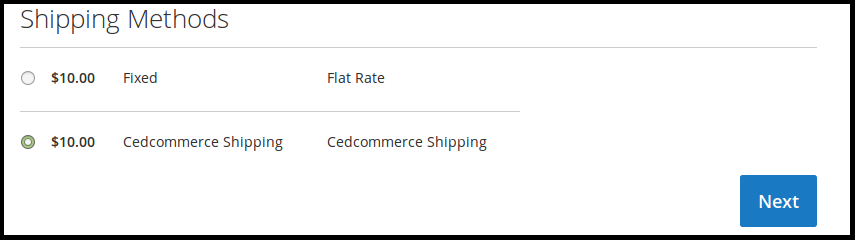
This is all about shipping module creation. If you have any suggestions or comments then please share with us.


Reading Time: 2 minutes Key Highlights AI-driven traffic to U.S. retail sites will increase by…

Reading Time: 2 minutes Critical security alert for Adobe Commerce & Magento merchants. Adobe has…

Reading Time: 4 minutes Magento is a powerful platform for eCommerce websites. However, with two…

Reading Time: 13 minutes By 2025, retail eCommerce sales are projected to account for over…

Reading Time: 16 minutes E-commerce is constantly expanding, with an accelerating pace of development in…

Reading Time: 3 minutes We at CedCommerce are happy to share some exciting news for…

Reading Time: 3 minutes Portland, Oregon [October 12, 2022]: CedCommerce is a leading eCommerce solution…

Reading Time: 3 minutes Prepare yourself with a list of the Magneto Integrations you’ve always…

Reading Time: 3 minutes Portland Oregon [September 5, 2022]: CedCommerce, a Magento marketplace solution provider,…

Reading Time: 4 minutes Have you heard that Shopee OpenAPI 2.0 has replaced the 1.0…