
Amazon vs Walmart vs Target Plus: What Changes Operationally for Sellers?
Reading Time: 11 minutes If you already sell on Amazon, adding Walmart or Target Plus…

Running short of time? Get PDF of the blog in your mail.
Jet expects from its retail partners, which are willing to sell on Jet, to follow the certain product guidelines in order to drive positive consumer experience. For this Jet requires Product Content for the parameters defined by it.
Jet.com is not functional anymore. If you want to continue selling your Jet.com inventories, we can assist you in shifting them to Walmart till July 16, 2020. This is not an automatic process, sellers will have to place a request through the Walmart Seller Center or Contact us. If you are a new seller wishing to sell on Jet.com, don’t be disheartened, we can help you sell on Walmart.com instead.
Therefore, all the Jet Retail Merchants are expected to abide by the product listing guidelines in order to create a product at Jet.com and provide all the required and optional information for each item to be listed, to sell on Jet.
Therefore, following the rules laid down by Jet.com constitutes the core of best practices to adopt for configuring your inventory at Jet.com. And the required information is:
Merchant SKU:
Item Details:
To configure inventory on Jet, it expects at max 500 characters for the product title and title can have Brand name, manufacturer Name, the most relevant keyword and the most noticeable feature of the product.
This requires the detailed explanation of the item being listed on Jet.com. It includes all the features and specifications, application and other important aspects. Also, it is expected that sellers use the most relevant keywords to their items here as well to configure inventory on Jet. And, the long description of the item shouldn’t exceed 2000 characters.
Here the Jet Retail partners are expected to enter at least two or more product features that compels users to make purchase decision and distinguishes the items from the similar ones. This shouldn’t exceed 500 characters. This configures inventory on Jet.
Jet expects from its partner to provide additional images to the main images all of 1500*1500 pixels or higher. The accepted formats are .JPEG, .JPG, and .GIF. This is one of the most important step to configure inventory on Jet.
Along with it, merchants need to provide the dimensions of the package when the item is finally packed (Length, width and height, in inches) and ready to be shipped.
Apart from the weight, online sellers are expected to provide the weight of the package (in pounds) when ready to be shipped.
Jet Browse Node ID: The unique ID that defines the Jet Category and where the product will be found in the Jet.com browse structure[1].
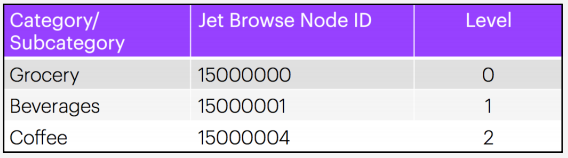
To configure inventory on Jet, it wants merchant sellers to provide all the attributes and map them with the most relevant Jet.com attribute.
Product variation information, if an item has several variants either as a variation relationship or an accessory relationship (if applicable).
Information concerning the attributes that identifies items listed on Jet.com as parent-child SKUs.
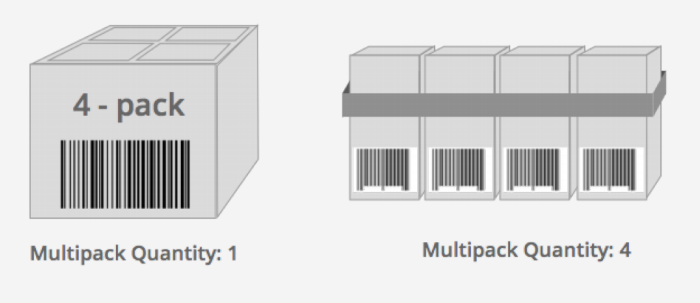
This is a little tricky to configure inventory on Jet. It constitutes the no of items within a package based on Standard Product Code (Unique ID) that makes up your merchant SKU.
It is important that Retailer Partners specify the correct multipack quantity based on the product UPC (or other unique identifiers). If the UPC represents a 4-pack of and individual item, then the multi-pack quantity is 1. If the UPC represents a single item, but your merchant sku is a pack of 4, the multi-pack quantity is 4[2].
Price:
Thus, by providing all the necessary information above correctly, best practices to adopt for configuring Your Inventory at Jet.com can be easily implemented.
1. Information Source: Jet Product Catalog
2. Information Source: Jet Product Listing Guidelines

Reading Time: 11 minutes If you already sell on Amazon, adding Walmart or Target Plus…
Reading Time: 13 minutes Selling on another marketplace sounds straightforward when you already have a…

Reading Time: 18 minutes If you’re an established third-party brand or authorized reseller looking for…
Reading Time: 6 minutes Your marketplace stack may be connected, but your attention is still…
Reading Time: 2 minutes Intro Summary The European Union’s new €3 customs duty on low-value…

Reading Time: 3 minutes Major global marketplaces, including Temu, SHEIN, eBay, Amazon, and AliExpress, are…

Reading Time: 9 minutes Your buyers are not shopping in one place anymore. They search…

Reading Time: 2 minutes Alibaba’s latest update shows that AI is becoming a much bigger…

Reading Time: 2 minutes Google is expanding AI Mode’s role in eCommerce, pushing shopping deeper…

Reading Time: 10 minutes Did you end 2025 with excess stock and tighter margins, even…