
Adobe Sees 520% Jump in AI-Assisted Holiday Shopping
Reading Time: 2 minutes Key Highlights AI-driven traffic to U.S. retail sites will increase by…
Running short of time? Get PDF of the blog in your mail.
We hope now you have a basic idea of the module. Now we will directly move to files required for implementation of GraphQl.
First Create a file “schema.graphqls” inside folder app/code/Ced/GraphQl/etc and write below code in a file. Here GraphQl is the module name
type Query {

book (

     id: Int @doc(description: "Id of the book")

): Book @resolver(class: "Ced\\GraphQl\\Model\\Resolver\\Book") @doc(description: "This Will Return Query of the book")

}


type Book @doc(description: "Defines All data of book") {

book_name: String @doc(description: "Name of Book")

isbn_no: String @doc(description: "ISBN no of book")

author: Int @doc(description: "author id of book")

publish_date: String @doc(description: "Publish Date of book")

language:String @doc(description: "Language of Book")

mrp: Float @doc(description: "Max Price of Book")

authorData:[Author] @doc(description: "Array of Author")


}


type Author @doc(description: "This will define author details") {

author_name: String @doc(description: "Display Name of Author")

author_email: String @doc(description: "Display Email of Author")

affliation: String @doc(description: "Display Affliation of Author")

age: String @doc(description: "Display age of Author")

}
Now create file Book.php inside folder app/code/Ced/GraphQl/Model/Resolver and write the following code. From this file, we will return the data of Book and its Author.
  <?php

  declare(strict_types=1);

  namespace Ced\GraphQl\Model\Resolver;

   use Ced\GraphQl\Model\Resolver\DataProvider\BookData as BookDataProvider;

   use Ced\GraphQl\Model\Resolver\DataProvider\AuthorData as AuthorDataProvider;

   use Magento\Framework\Exception\NoSuchEntityException;

   use Magento\Framework\GraphQl\Config\Element\Field;

   use Magento\Framework\GraphQl\Exception\GraphQlInputException;

   use Magento\Framework\GraphQl\Exception\GraphQlNoSuchEntityException;

   use Magento\Framework\GraphQl\Query\ResolverInterface;

   use Magento\Framework\GraphQl\Schema\Type\ResolveInfo;

 /**

 * Book field resolver, used for GraphQL request processing

 */

  class Book implements ResolverInterface

{

/**

 * @var BookDataProvider

*/

  private $bookDataProvider;

/**

 * @var AuthorDataProvider

*/

 private $authorDataProvider;

/**
*
* @param BookDataProvider $bookDataProvider
* @param AuthorDataProvider $authorDataProvider
*/

  public function __construct(
     BookDataProvider $bookDataProvider,
     AuthorDataProvider $authorDataProvider
) {
     $this->bookDataProvider = $bookDataProvider;
     $this->authorDataProvider = $authorDataProvider;
}
/**
* @inheritdoc
*/

  public function resolve(
     Field $field,
     $context,
     ResolveInfo $info,
     array $value = null,
     array $args = null
) {
     $bookId = $this->getBookId($args);
     $bookData = $this->getBookData($bookId);
     return $bookData;
}

/**
* @param array $args
* @return int
* @throws GraphQlInputException
*/

   private function getBookId(array $args): int
{
     if (!isset($args['id'])) {
         throw new GraphQlInputException(__('"book id should be specified'));
     }
     return (int)$args['id'];
}

/**
  * @param int $bookId
  * @return array
  * @throws GraphQlNoSuchEntityException
*/

  private function getBookData(int $bookId): array
{
     try {
         $bookData = $this->bookDataProvider->getData($bookId);
     } catch (NoSuchEntityException $e) {
         throw new GraphQlNoSuchEntityException(__($e->getMessage()), $e);
     }
     $authorId = $bookData['author'];
     $bookData['authorData'] = $this->getAuthorData((int) $authorId);
     return $bookData;
}

/**
  * @param int $authorId
  * @return array
  * @throws GraphQlNoSuchEntityException
*/

  private function getAuthorData(int $authorId):array{
     try {
     $authorData = $this->authorDataProvider->getData($authorId);
     } catch (NoSuchEntityException $e) {
     throw new GraphQlNoSuchEntityException(__($e->getMessage()), $e);
     }
     return $authorData;
}

}
Now Create the file BookData.php inside the folder app/code/Ced/GraphQl/Model/Resolver/DataProvider and write the following code.
<?php

declare(strict_types=1);

 namespace Ced\GraphQl\Model\Resolver\DataProvider;

 use Ced\GraphQl\Model\Book;

 use Magento\Framework\Exception\NoSuchEntityException;

 use Magento\Widget\Model\Template\FilterEmulate;

/**
 * BookData data provider
 */

  class BookData
 {
  /**
  * @var FilterEmulate
  */
  private $widgetFilter;

  /**
  * @var Book
  */
  private $book;

  /**
  *
  * @param Book $book
  * @param FilterEmulate $widgetFilter
  */

   public function __construct(
     Book $book,
     FilterEmulate $widgetFilter
) {
     $this->book = $book;
     $this->widgetFilter = $widgetFilter;
}

  /**
  * @param int $bookId
   * @return array
  * @throws NoSuchEntityException
*/

  public function getData(int $bookId): array
{
     $bookData = $this->book->load($bookId);
     if (false === $bookData->getId()) {
         throw new NoSuchEntityException();
     }
     $bookLoadedData = $bookData->getData();
     return $bookLoadedData;
}

}
Now Create another file AuthorData.php inside folder app/code/Ced/GraphQl/Model/Resolver/DataProvider and write the following code.
  <?php
  declare(strict_types=1);

  namespace Ced\GraphQl\Model\Resolver\DataProvider;

  use Ced\GraphQl\Model\Author;

  use Magento\Framework\Exception\NoSuchEntityException;

  use Magento\Widget\Model\Template\FilterEmulate;

 /**
 * AuthorData data provider
 */

  class AuthorData
{
/**
 * @var FilterEmulate
*/
 private $widgetFilter;

/**
* @var Author
*/
private $author;

/**
  * @param Author $author
  * @param FilterEmulate $widgetFilter
*/

  public function __construct(
     Author $author,
     FilterEmulate $widgetFilter
) {
     $this->author = $author;
     $this->widgetFilter = $widgetFilter;
}

/**
  * @param int $authorId
  * @return array
  * @throws NoSuchEntityException
*/

  public function getData(int $authorId): array
{
     $authorData = $this->author->load($authorId);
     if (false === $authorData->getId()) {
         throw new NoSuchEntityException();
     }
     $authorLoadedData[] = $authorData->getData();
     return $authorLoadedData;
}
}
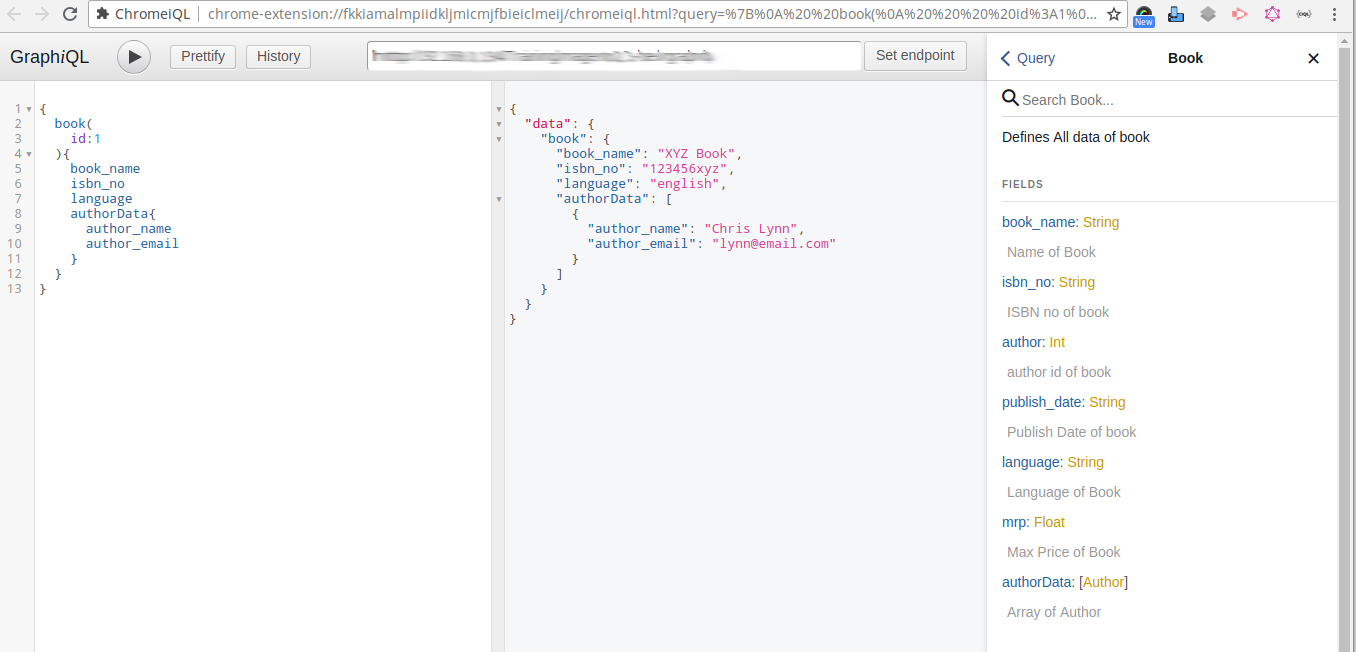
Now we have finished the Query Schema part. Now you need to run the query in your browser.Use ChromeIQL extension for this.For running query you need to set endpoint which will be <your magento url>/graphql and run the below query in ChromeIQL
{

  book(

  id:1

  ){

  book_name

  isbn_no

     language

  authorData{

   author_name

   author_email

}

  }

}
You will get the response like this
{

  "data": {

  "book": {

   "book_name": "XYZ Book",

   "isbn_no": "123456xyz",

   "language": "english",

   "authorData": [

     {

       "author_name": "Chris Lynn",

       "author_email": "lynn@email.com"

     }

   ]

}

  }

}
Here is the query we are passing book id and retrieving its data from the server and in the request, we specified the fields we want and it will return only the specified fields value.
Now Implementation of Mutation in Magento2.3. Since we have told you that it is used to create or update operation in GraphQl hence will create the Author from mutation.
To implement a Mutation, now you need to add some code to the schema.graphqls file which we have created above and add the below code.
  type Mutation {
  createAuthor(author_name: String!,author_email: String!, age: Int!,affliation: String!): AuthorCreate @resolver(class: "\\Ced\\GraphQl\\Model\\Resolver\\Author\\CreateAuthor") @doc(description:"Create Author and returns its Id and corresponding message")
}

  type AuthorCreate {
  message: String @doc(description: "Success or error Message")
  id: Int @doc(description: "The author id")
}
Now create file CreateAuthor.php inside folder app/code/Ced/GraphQl/Model/Resolver/Author and write the below code. In this file, we will create the Author and return the array of some fields.
  <?php

  declare(strict_types=1);

  namespace Ced\GraphQl\Model\Resolver\Author;

  use Magento\Framework\Exception\AuthenticationException;

  use Magento\Framework\GraphQl\Config\Element\Field;

  use Magento\Framework\GraphQl\Exception\GraphQlAuthorizationException;

  use Magento\Framework\GraphQl\Query\ResolverInterface;

  use Magento\Framework\GraphQl\Schema\Type\ResolveInfo;

  use Ced\GraphQl\Model\Author;

/**
 * CreateAuthor Class
 */
  class CreateAuthor implements ResolverInterface
{

/**
* @var Author
*/
 private $author;

/**
*
* @param Author $author
*/

  public function __construct(
     Author $author
) {
     $this->author = $author;
}

/**
* @inheritdoc
*/

  public function resolve(
     Field $field,
     $context,
     ResolveInfo $info,
     array $value = null,
     array $args = null
) {

     try {
         if (!isset($args['author_email'])) {
             throw new GraphQlInputException(__('"author_email" value should be specified'));
         }

         if (!isset($args['author_name'])) {
             throw new GraphQlInputException(__('"author_name" value should be specified'));
         }

         if (!isset($args['age'])) {
         throw new GraphQlInputException(__('"age" value should be specified'));
         }

         if (!isset($args['affliation'])) {
         throw new GraphQlInputException(__('"affliation" value should be specified'));
         }

         $this->author->addData($args);
         $this->author->getResource()->save($this->author);
         if($this->author->getId())
          return ['message'=>'Author Successfully Created', 'id' => $this->author->getId()];
         else
          return ['message'=>'Not Able To Create Author'];
     } catch (AuthenticationException $e) {
         throw new GraphQlAuthorizationException(
             __($e->getMessage())
         );
     }
}
}
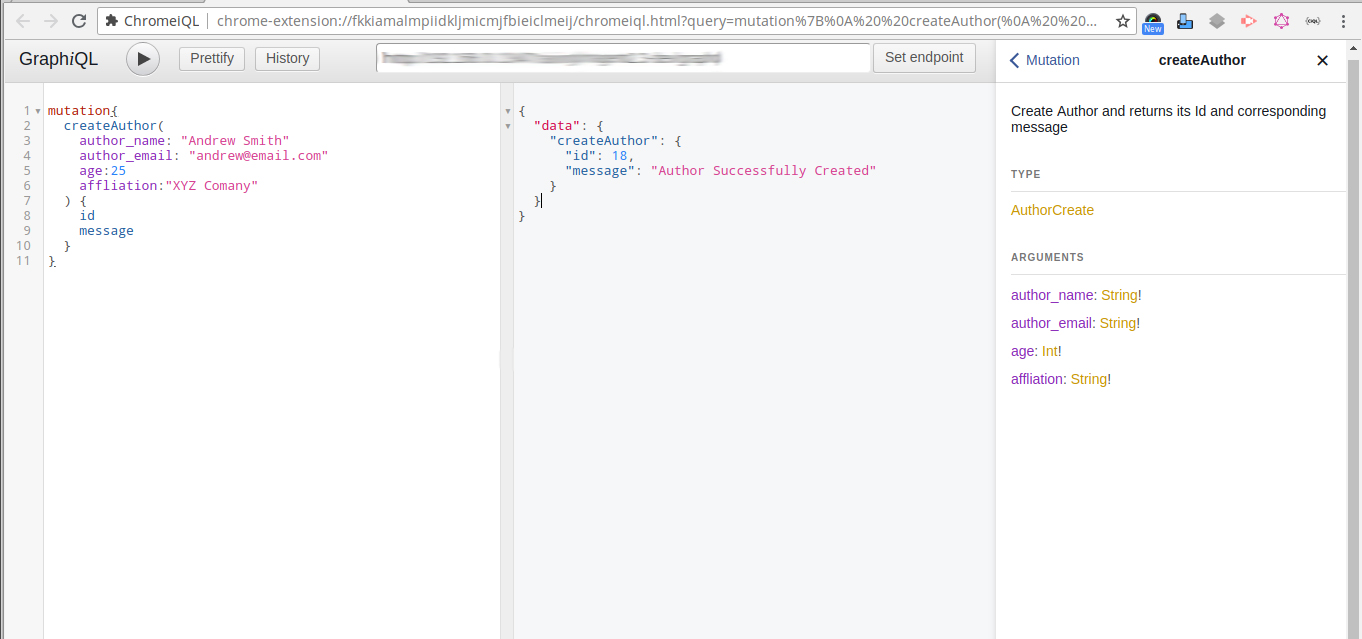
That’s it for Mutation. Now you need to run the below query in ChromeIQL.
  mutation{
  createAuthor(
  author_name: "Andrew Smith"
  author_email: "andrew@email.com"
  age:25
  affliation:"XYZ Comany"
  ) {
id
message
  }
}
And you will get the following response
{
  "data": {
"createAuthor": {
   "id": 18,
   "message": "Author Successfully Created"
}
  }
}

Now we have finished with the GraphQl tutorial in Magento2.3.Since we have only told you the process of implementation of GraphQl in Magento2.3, we have made a complete module for this. So when you use that module then you will be able to get the response. Here is the module link which you may check and use.


Reading Time: 2 minutes Key Highlights AI-driven traffic to U.S. retail sites will increase by…

Reading Time: 2 minutes Critical security alert for Adobe Commerce & Magento merchants. Adobe has…

Reading Time: 4 minutes Magento is a powerful platform for eCommerce websites. However, with two…

Reading Time: 13 minutes By 2025, retail eCommerce sales are projected to account for over…

Reading Time: 16 minutes E-commerce is constantly expanding, with an accelerating pace of development in…

Reading Time: 3 minutes We at CedCommerce are happy to share some exciting news for…
Reading Time: 3 minutes Portland, Oregon [October 12, 2022]: CedCommerce is a leading eCommerce solution…

Reading Time: 3 minutes Prepare yourself with a list of the Magneto Integrations you’ve always…

Reading Time: 3 minutes Portland Oregon [September 5, 2022]: CedCommerce, a Magento marketplace solution provider,…
Reading Time: 4 minutes Have you heard that Shopee OpenAPI 2.0 has replaced the 1.0…