
TikTok Launches UK’s First Official BookTok Bestseller List Amid Reading Revival Push
Reading Time: 3 minutes TikTok has announced a major initiative in the UK publishing ecosystem…

Running short of time? Get PDF of the blog in your mail.
The shift from traditional eCommerce storefronts to creator-led, social-first shopping has been rapid. Platforms like TikTok Shop have moved commerce directly into discovery, allowing sellers to reach millions of buyers at the exact moment of intent.
For sellers across the US, UK, and EU, TikTok Shop offers something few marketplaces can: high-velocity demand, native content-driven discovery, and checkout without friction.
But with speed comes complexity.
Unlike conventional marketplaces, TikTok Shop operates across multiple validation layers—catalog structure, inventory authority, regional pricing, tax logic, and fulfillment readiness. When any of these layers fall out of alignment, sellers encounter sync issues that can quietly stall growth.
To understand these issues better, we spoke with TikTok Shop sellers and CedCommerce integration specialists who manage thousands of TikTok Shop operations globally. Below is a no-frills, expert-led breakdown of the most common TikTok Shop sync problems and how to resolve them efficiently using the CedCommerce TikTok Shop integration.
Most TikTok Shop issues do not start after onboarding, but during it.
Sellers often assume that connecting TikTok Shop to Shopify is a simple authorization step. In reality, setup defines how TikTok will interpret your catalog, inventory, pricing, and fulfillment for the rest of your lifecycle on the platform.
The most common mistakes at this stage include:
These gaps may not trigger immediate errors. Instead, they create instability that surfaces later as failed syncs, missing orders, or zero inventory.
How CedCommerce prevents this
CedCommerce’s TikTok Shop integration treats onboarding as a structural alignment process, not a checkbox. Sellers are guided through SKU validation, region mapping, inventory authority, and shipping readiness before the first product sync occurs. This ensures TikTok receives clean, interpretable data from day one.
This is one of the most common and most misunderstood searches.
“Sync” is not a single operation. TikTok Shop runs separate sync pipelines for:
A failure in one pipeline does not necessarily stop the others. This is why sellers see partial success in products sync, but inventory does not; orders appear in TikTok but not in Shopify.
The root cause is usually permission gaps, catalog mismatches, or region conflicts, not platform downtime.
CedCommerce advantage
CedCommerce exposes sync activity at a granular level, allowing sellers to identify which pipeline failed and why. Instead of retrying blindly, sellers fix the specific structural issue causing the breakdown.
Product sync failures typically occur before TikTok evaluates creative or performance.
TikTok validates products against:
If any of these checks fail, the product does not sync fully.
Many sellers repeatedly attempt to re-publish products without addressing missing data, creating a loop of silent failures.

How CedCommerce helps
CedCommerce uses category-specific templates that surface mandatory attributes before syncing. This reduces trial-and-error publishing and ensures products meet TikTok’s baseline requirements from the start.
Products stuck in review are rarely waiting on a human moderator.
In most cases, TikTok is validating product structure, safety fields, or category-specific requirements. If the required data is incomplete or inconsistent across variants, the product remains in a review state.
This often happens when sellers:
CedCommerce impact
CedCommerce pre-validates product data against TikTok’s category rules, reducing review delays and preventing repeated submission loops.
Rejections feel abrupt, but they usually point to predictable gaps. Common rejection triggers include:
Re-uploading without correcting the underlying issue rarely works.
CedCommerce helps sellers identify the structural reason for rejection and correct it at the catalog level, not per listing.
Variants introduce complexity that many sellers underestimate.
TikTok requires consistent attribute naming, complete variant data, and logical SKU mapping across all variations. When attributes differ or are incomplete, TikTok cannot reliably reconcile variants.
This leads to:

CedCommerce approach
CedCommerce enforces variant-level consistency, ensuring every SKU carries the required attributes and mappings before sync.
Image rejections are often dismissed as cosmetic issues, but on TikTok Shop, they function as trust signals, not design preferences.
TikTok Shop operates inside a feed-driven environment where buyers make decisions in seconds. Because of this, TikTok applies automated image validation rules to protect buyer clarity and reduce misleading listings. When images contain watermarks, promotional overlays, excessive text, or inconsistent backgrounds, TikTok does not treat them as branding choices — it treats them as risk.
What makes this issue especially frustrating for sellers is that image rejections are not always surfaced clearly. Products may sync successfully, appear “complete” in the backend, yet never reach visible circulation because image trust checks fail post-sync.
Many sellers attempt to fix this by re-uploading the same images, compressing files, or changing formats. None of these actions addresses the core issue: TikTok’s automated trust filters are rejecting the content, not the file.

How CedCommerce addresses this
CedCommerce helps sellers align image standards at the catalog level, not listing by listing. By ensuring image consistency across variants and surfacing compliance expectations early in the sync process, sellers avoid silent visibility suppression caused by image trust failures.
When such a case arises, the sellers usually assume something went wrong during sync. In reality, the sync often succeeded — TikTok simply chose not to surface the listing.
TikTok Shop separates data acceptance from listing eligibility. A product can exist inside TikTok’s system while being restricted from display due to pricing logic, fulfillment readiness, or category validation gaps. This is why sellers see products marked as synced but invisible in the storefront.
The most common reasons include:
Repeated syncing does not resolve this, because the issue is not transmission — it is eligibility enforcement.
How CedCommerce addresses this
CedCommerce makes post-sync eligibility blockers visible. Instead of guessing why a product isn’t live, sellers can identify which requirement is unmet and correct it systematically.
This is one of the most damaging sync issues because it shuts down sales without warning.
TikTok Shop does not simply read inventory numbers. It evaluates inventory authority. When multiple systems can update stock — multiple Shopify locations, warehouses, or connected marketplaces — TikTok must decide which signal to trust. If trust breaks down,
TikTok defaults to zero inventory to protect buyers from overselling scenarios.
This often appears suddenly during campaigns, live selling, or peak periods, leading sellers to assume there is a bug. In reality, TikTok is behaving conservatively in response to ambiguous inventory signals.
Manual stock edits or repeated sync attempts usually worsen the problem by introducing more conflicting updates.
How CedCommerce addresses this
CedCommerce allows sellers to explicitly define a single source of truth for inventory. Warehouse mappings, location priorities, and sync rules are structured so TikTok receives one consistent signal, even under load.
Inventory sync issues are rarely solved by quick fixes because they are not mechanical failures — they are governance failures.
The underlying causes typically include:
When sellers react by manually adjusting stock or disabling sync temporarily, they often create longer-term instability.
How CedCommerce addresses this
CedCommerce treats inventory sync as a controlled system, not a reactive process. By enforcing inventory authority, mapping warehouses correctly, and managing update frequency, sellers achieve stable inventory behavior across TikTok Shop and other marketplaces.
When sellers encounter this requirement, it often feels unnecessary or bureaucratic—especially if shipping is already configured in Shopify or another eCommerce platform. The assumption is that TikTok should simply “inherit” existing shipping logic.
That assumption is incorrect.
TikTok Shop treats fulfillment configuration as a precondition for trust, not an operational afterthought. Before a product is allowed to scale, TikTok must be confident about three things:
where the product ships from, how long delivery will take, and what the buyer should expect at checkout. Warehouses and shipping templates are how TikTok formalizes those answers.
If warehouses are not mapped, TikTok does not know which inventory location fulfills orders.
If shipping templates are missing, TikTok cannot validate delivery timelines or shipping costs.
In either case, TikTok restricts listing eligibility—not because the product is invalid, but because fulfillment risk is undefined.
Many sellers respond by repeatedly syncing products or reauthorizing the integration. That never resolves the issue, because the blocker is not sync-related; it is eligibility enforcement.
How CedCommerce addresses this
CedCommerce treats warehouses and shipping templates as part of the core integration setup, not optional add-ons. Warehouse data is aligned with inventory sources, and shipping templates are structured to match TikTok’s fulfillment expectations. This ensures that products are not only synced but also eligible to go live and scale.
This question usually surfaces during periods of urgency—campaign launches, live selling events, or high-traffic sales windows like BFCM—when sellers expect inventory to update instantly.
TikTok Shop does not guarantee real-time inventory updates.
Behind the scenes, TikTok prioritizes platform stability over immediate responsiveness, especially during traffic spikes. Inventory updates are processed in batches, and during high load, updates may be delayed intentionally to prevent system-wide inconsistencies or overselling.
What makes this difficult for sellers is that delayed inventory sync looks identical to broken inventory sync. Stock changes do not reflect immediately, dashboards appear unchanged, and sellers assume something is wrong.
In response, sellers often:
These actions usually compound the problem by creating conflicting signals.
How CedCommerce addresses this
CedCommerce is designed to work with TikTok’s batching behavior, not against it. Inventory sync runs on controlled cycles, ensuring accuracy even when updates are delayed. Sellers gain predictability, not false expectations of instant updates that the platform itself does not promise.
Price sync issues are among the most misunderstood TikTok Shop problems because pricing looks deceptively simple on the surface.
From TikTok’s perspective, pricing is not just a number—it is a consistency signal. TikTok cross-checks price data across the store backend, the listing, promotions, and checkout. If any of those layers conflict, TikTok does not always reject the product outright. Instead, it may quietly block updates or suppress visibility.
Common causes include:
Sellers often attempt to “force” pricing updates by resyncing or editing prices repeatedly. This rarely works because TikTok is rejecting the inconsistency, not the update itself.

How CedCommerce addresses this
CedCommerce centralizes price logic so that the value TikTok receives is consistent across systems. Base prices, promotional rules, and region-specific adjustments are aligned before sync, reducing silent pricing failures that sellers struggle to diagnose.
Currency errors typically surface when sellers expand beyond a single market.
TikTok Shop enforces fixed-currency expectations per region. When automatic currency conversion tools are used—whether inside the eCommerce platform or through third-party apps—TikTok often receives prices that do not match its expected currency format or precision.
This creates validation failures that may appear as vague pricing errors or failed updates.
The underlying issue is not conversion accuracy. It is a currency authority. TikTok expects sellers to define prices explicitly in the currency of the selling region, not derive them dynamically.

How CedCommerce addresses this
CedCommerce supports SKU-level, region-specific pricing, allowing sellers to define explicit prices per market. This removes ambiguity, ensures compliance with TikTok’s validation logic, and prevents recurring currency-related sync errors.
Price rejections in the UK and EU almost always relate to VAT logic, not pricing strategy.
In these regions, TikTok enforces VAT-inclusive pricing consistency. That means the price shown to the buyer must already include VAT, and that price must match exactly across:
If any discrepancy exists, even a small rounding difference, TikTok treats it as a trust issue. Listings may be rejected, visibility reduced, or pricing updates blocked.
Many sellers assume TikTok always collects VAT on their behalf. That is only true in specific scenarios. In others, VAT responsibility sits with the seller, and pricing must reflect that accurately.
How CedCommerce addresses this
CedCommerce supports VAT-aware pricing workflows for UK and EU sellers. Prices are validated at the SKU level to ensure VAT inclusion and consistency before syncing to TikTok Shop. This reduces rejections, improves approval speed, and strengthens trust signals in regulated markets.
When sellers search for this, it is usually because orders are clearly visible inside TikTok Shop, but nothing appears in Shopify. From the seller’s perspective, this feels like a broken order pipeline.
In reality, order sync failures almost never originate at the order stage.
TikTok Shop only pushes orders downstream when it can confidently map each order line item back to a known product and SKU in the connected store. If that mapping fails, TikTok does not partially sync orders or guess. It simply stops the order from moving.
The most common reasons this happens include:
What makes this particularly difficult is timing. Sellers often discover the issue only after multiple orders accumulate inside TikTok Shop, creating fulfillment delays and customer risk.
Attempts to manually recreate orders or resync them individually usually fail because the underlying SKU relationship remains unresolved.
How CedCommerce addresses this
CedCommerce maintains persistent SKU-to-order mapping across systems. If a SKU changes, is deleted, or becomes inconsistent, the issue is surfaced before orders pile up. This keeps the order pipeline intact and prevents silent order isolation.
Orders stuck in processing are rarely a payment issue, despite how they appear.
In TikTok Shop, “processing” often means that one or more downstream conditions have not been met. This can include:
TikTok will not advance the order state until it is confident the order can be fulfilled correctly. This is a deliberate safeguard designed to protect buyer experience and marketplace trust.
Sellers frequently try to resolve this by updating order statuses manually or contacting support immediately. Neither approach fixes the structural issue causing the stall.
How CedCommerce addresses this
CedCommerce ensures that fulfillment rules, warehouse mappings, and carrier logic are aligned before orders are created. This allows orders to transition smoothly through processing into fulfillment without stalling at validation checkpoints.
Order status mismatches typically emerge when sellers operate across multiple systems with different order lifecycles.
TikTok Shop, Shopify, and third-party fulfillment tools often employ different status definitions and transition rules. If these workflows are not aligned, order updates may fail to propagate correctly.
For example:
When this happens, sellers see orders stuck in outdated states, even though fulfillment has progressed.
Repeatedly refreshing, re-pushing tracking, or manually editing statuses often introduces more inconsistency.

How CedCommerce addresses this
CedCommerce allows sellers to explicitly align order lifecycle rules between TikTok Shop and the store backend. Status transitions are governed, not inferred, ensuring updates flow correctly and predictably across systems.
This is one of the most alarming experiences for sellers, as it often occurs without warning.
In most cases, the integration has not “broken.” It has lost authorization.
TikTok periodically refreshes security tokens and permissions to maintain platform integrity. When these tokens expire, are revoked, or lose scope, sync pipelines stop quietly. Products may remain visible, but inventory, pricing, or orders stop updating.
Because there is no obvious error message, sellers often assume a system outage or data issue.
How CedCommerce addresses this
CedCommerce monitors authorization health and alerts sellers when permissions lapse. Reauthorization is guided and simplified, minimizing downtime and preventing extended periods of silent sync failure.
Reauthorization is the only way to restore a broken permission layer, but it must be done carefully.
Improper reconnection—such as disconnecting without preserving mappings—can lead to:
This is why some sellers experience new issues after reauthorizing, even though sync resumes.
How CedCommerce addresses this
CedCommerce structures reauthorization to preserve existing mappings, catalog relationships, and order continuity. Sync resumes without resetting the underlying system state, allowing sellers to recover cleanly instead of triggering secondary issues.
This issue commonly appears when sellers expand from one market into another.
The assumption many sellers make is that TikTok Shop operates uniformly across regions. In reality, each region enforces its own validation logic across pricing, tax handling, fulfillment expectations, and compliance requirements.
For example:
When sellers reuse configurations across regions, sync may succeed in one market while failing quietly in another.
How CedCommerce addresses this
CedCommerce supports region-specific workflows rather than cloned setups. Pricing, tax logic, warehouses, and category mappings are handled independently per region, ensuring TikTok receives data that aligns with local expectations. This makes multi-region expansion predictable instead of trial-and-error.
Review timelines vary significantly, which is why sellers often feel approvals are inconsistent or unpredictable.
In practice, approval speed depends less on volume and more on structural completeness. TikTok reviews listings against category rules, safety fields, pricing logic, fulfillment readiness, and, in regulated regions, compliance metadata. Listings that meet these requirements pass quickly. Incomplete listings may cycle through review repeatedly without a clear explanation.
What slows sellers down is not rejection—it is rework. Each resubmission without fixing the underlying data issue resets the review clock.
How CedCommerce addresses this
CedCommerce enhances approval timelines by ensuring listings are structurally complete before submission. Required attributes, pricing logic, and fulfillment configuration are validated upfront, reducing avoidable review loops and accelerating time to live.
TikTok Shop integration issues are fewer platform failures and more alignment failures.
Every sync error points to a system asking for clarity:
Sellers who treat these issues as one-off technical problems often find themselves fixing the same failures repeatedly. Sellers who treat integration stability as an operational discipline build systems that scale smoothly, even under peak demand.
CedCommerce’s TikTok Shop integration exists to provide that discipline. By aligning catalog data, inventory logic, pricing rules, and order workflows into a single operational layer, sellers keep their products moving along the modern trade route instead of stalled at unseen checkpoints. In commerce, past or present, the route matters as much as the goods.


Reading Time: 3 minutes TikTok has announced a major initiative in the UK publishing ecosystem…
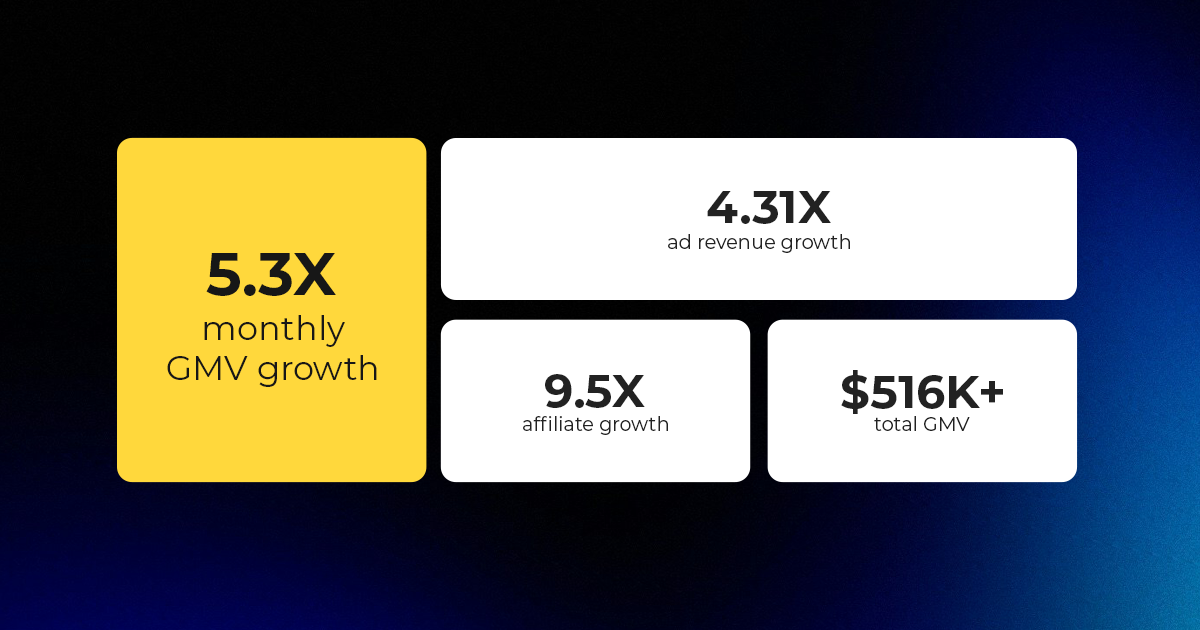
Reading Time: 3 minutes About the Client The Drive Clothing is a lifestyle apparel brand…
Reading Time: 2 minutes Walmart is doubling down on creator-driven social commerce, turning influencer content…
Reading Time: 4 minutes TikTok Shop has officially launched its first-ever Fine Art category, marking…
Reading Time: 4 minutes Social commerce is no longer confined to the platform where discovery…

Reading Time: 4 minutes TikTok Shop has formally secured its position as the UK’s fourth-largest…

Reading Time: 7 minutes The Future of Social Commerce in 2026 won’t be defined by…
Reading Time: 4 minutes TikTok’s role in Europe’s digital economy is no longer confined to…
Reading Time: 5 minutes TikTok Launches “TikTok Next”: A 2026 Trend Forecast Redefining How Brands…

Reading Time: 3 minutes TikTok Shop is raising its sales commission for merchants across five…