
Amazon vs Walmart vs Target Plus: What Changes Operationally for Sellers?
Reading Time: 11 minutes If you already sell on Amazon, adding Walmart or Target Plus…

Running short of time? Get PDF of the blog in your mail.
Learning how to sell on Amazon is not hard. Building a profitable Amazon business is. Most sellers discover the gap between the two a few months in, when the listings are live, the orders are coming in, and the numbers start telling a less flattering story. You can open a Seller Central account in 15 minutes, and can publish your first listing within an hour. Inventory can be moved into Amazon’s fulfillment network by the end of the week. Amazon makes it easy to start.
What takes longer is learning how much has to go right for the business to stay profitable. Your pricing has to cover seven different fee types, while fulfillment choice has to fit your real margin structure. Additionally, ad spend has to work for products with no reviews and no sales history. A product showing a 40% margin on your website can narrow to 18% on Amazon once referral fees, FBA fees, storage costs, ad spend, and return rates settle in. CedCommerce sees the same pattern across marketplace expansion repeatedly: sellers who map costs to reality during setup tend to operate profitably. Sellers who wait until after launch to work backwards from margin often stay unprofitable longer than their capital can handle.
This guide walks you through Amazon setup in 2026: account creation, selling plans, fulfillment decisions, fee structures, listing mechanics, and first-sale tactics. It starts where more Amazon guides should start, with what Amazon costs before getting into how Amazon works.
Before diving into setup, it helps to understand what you are actually working with. When you sell on Amazon, you are listing products in a marketplace where Amazon controls the traffic, but you control your listings, pricing, and fulfillment through Seller Central (Amazon’s dashboard for managing your store).
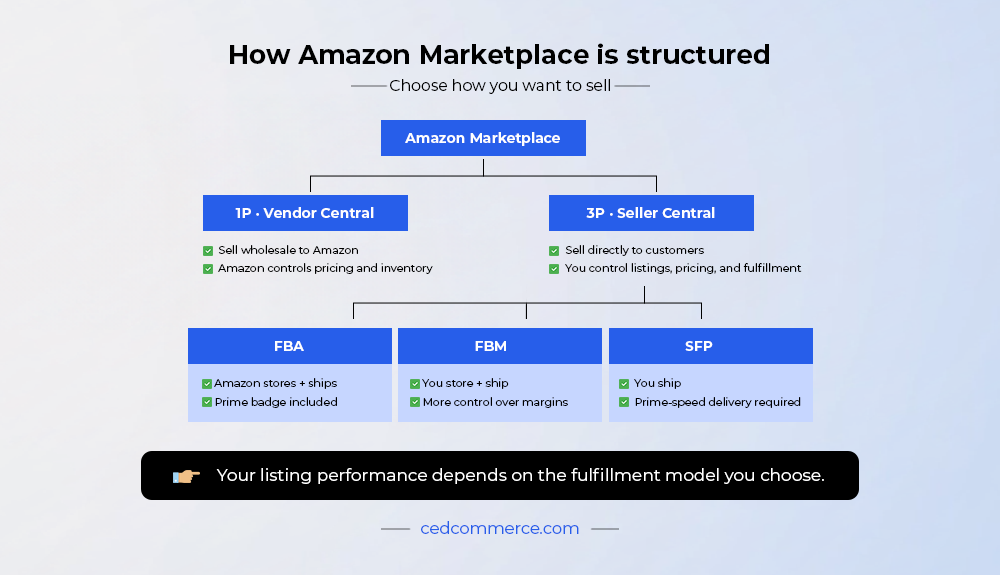 You may come across two models:
This guide focuses on 3P, which is how most brands sell on Amazon today. How your products get visibility, i.e., how customers find your products and what Amazon ranks products based on:
Fulfillment options
Amazon converts well because customers search with intent, have saved payment details, and expect fast delivery. That advantage only works if your listings, pricing, and fulfillment meet Amazon’s requirements. Amazon operates across 20+ marketplaces globally, allowing sellers to expand internationally from a single account.
This only works if your catalog, pricing, and fulfillment meet Amazon’s requirements. If they don’t, your products will either not rank or not convert. That’s exactly why the next section helps you decide if Amazon fits your business before you invest in setup.
Amazon works best for sellers who can meet its pricing, catalog, and operational requirements, and that is worth being honest about before you invest time in setup. It does not suit every product or margin structure.
Amazon is a good fit if:
Amazon is harder if:
If you checked more boxes in the second list than the first, that is not a reason to walk away yet. However, it is a reason to validate before you commit. Most Shopify catalogs are not Amazon-ready by default. Product data, attributes, and variation logic need restructuring before listing.
If you are unsure, validate your catalog first before committing to setup. Talk to the Amazon team today.
Here is something most setup guides skip: the problems that hurt Amazon sellers the most do not show up during account creation. They show up after you go live.
However, these problems are predictable. If you know what they look like, you can avoid them early.
What goes wrong
This leads to
What to check early
What goes wrong
ASIN (Amazon Standard Identification Number) is a unique identifier Amazon assigns to each product listing.
This leads to
What to check early
What goes wrong
This leads to
ACOS (Advertising Cost of Sales) is the percentage of ad spend compared to ad-driven revenue. TACoS (Total Advertising Cost of Sales) is the percentage of ad spend compared to total revenue.
What to check early
These problems are not independent. In practice, they compound each other, and the next section is built to help you avoid all three from the start.
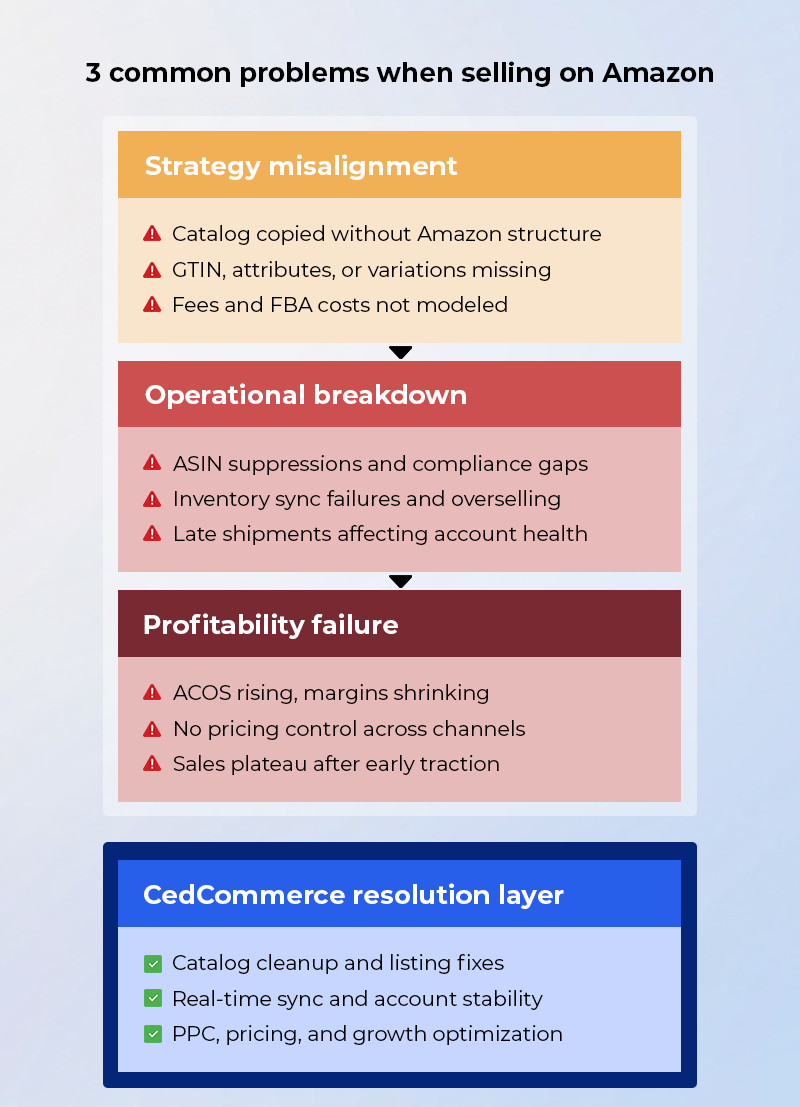
Every step in the next section, from account setup to listing creation, directly affects these three areas.
These problems are not separate. They affect each other.
The next section walks through setting up your Amazon seller account. Follow it as a checklist, as each step directly affects how your listings perform, how your operations hold up, and whether your Amazon business is profitable from the start.
The temptation when starting on Amazon is to list everything. The better move is to list strategically. Before you list generic top-selling products on Amazon, decide which SKUs deserve to launch first. Your Shopify best-sellers are not automatically your best Amazon products.
Then review competition density, which means looking at:
This is why launching your full catalog too early usually slows growth. Start with products that already show demand, can survive Amazon’s fee structure, and are not entering an overcrowded search result.
Getting this right before launch saves you from the much harder task of rebuilding momentum on a listing that opened weak. Also factor in seasonal timing. A product entering Amazon before peak demand cycles performs better than one listed after the category spike.
For a deeper product discovery framework, AI validation, and demand checks, read the full Amazon product discovery guide.
The account setup itself is more straightforward than most sellers expect. What slows people down is documentation gaps and catalog readiness, both of which are covered below.
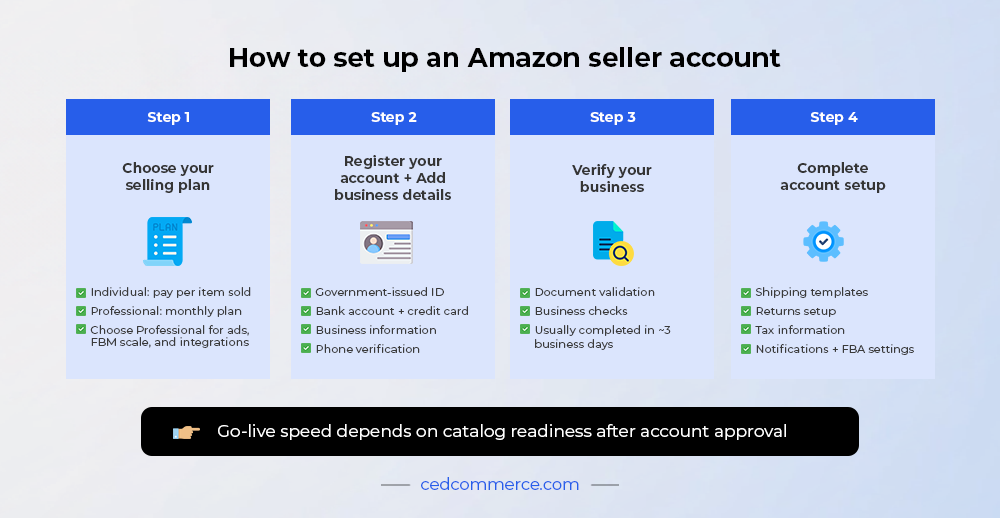 To set up an Amazon seller account, you need to choose a selling plan, complete registration, verify your business details, and configure the account before you start listing products. Amazon currently offers an Individual plan at $0.99 per item sold and a Professional plan at $39.99 per month, both in addition to category-based referral fees.
If you plan to use ads, integrations like CedCommerce, or run FBM at scale, the Professional plan is the practical choice as it gives you access to advanced selling tools and workflows.
Individual plan means you pay per unit sold and is usually better for low-volume testing. Professional plan means you pay a monthly subscription and get access to advanced selling tools.
Use the Individual plan if:
Use the Professional plan if:
Amazon’s own guidance uses the same break point: the Individual plan usually makes sense below 40 units a month, while the Professional plan becomes the better fit above that level.
Amazon seller registration starts at Seller Central. During registration, Amazon asks for your business and identity details so it can verify who is selling in the store. Amazon’s registration guide says sellers should be ready with:
You do not need to be incorporated to start. Amazon states that individual sellers can register by selecting the relevant business type during signup.
Amazon says the verification process typically takes about three business days when documents meet requirements, though it can take longer if additional clarification is needed. That matters if you are planning a launch date, a migration, or a catalog upload window.
Verification is the part aspiring sellers underestimate most. If your documents are incomplete, mismatched, or hard to validate, setup slows down immediately.
For international sellers, review requirements carefully before submitting. Delays usually come from documentation quality, not from the account form itself. Amazon’s registration flow and regional selling guides both point sellers back to business verification, shipping setup, and tax setup as the key early-stage requirements.
Once verification clears, the instinct is to start listing immediately. Resist that. Step 4 is essential to the process.
Once the account is approved, Seller Central still needs configuration before products go live.
Amazon says sellers should review and complete:
This step matters because shipping templates, returns setup, and tax information affect how your account functions once orders start coming in. Skipping this work creates avoidable problems later.
Your go-live timeline depends on two things: how quickly Amazon verifies the account, and how clean your catalog is once the account is ready.
On Amazon’s side, verification can take about three business days if the documentation is complete. To give you a realistic picture of timelines, here is what CedCommerce sees across onboarding:
That means the account setup itself is only one part of launch. The real speed difference comes from how ready your product data is once the account is approved.
Now that you know all about getting the account ready, this section will teach you how to get your products ready. They are different tasks, and conflating them is one of the most common reasons listings go live but do not perform.
A GTIN is a unique product identifier such as a UPC, EAN, or ISBN that Amazon uses to identify products in its catalog. [LINK BLOG]
Amazon Brand Registry is a program that gives brand owners control over listings and access to features like A+ Content and Sponsored Brands. [LINK BLOG]
Some product categories on Amazon require approval before listing.
The product title includes your primary keyword, brand name, and key product details.
Bullet points highlight product benefits and key features.
Backend keywords are hidden search terms used by Amazon to match your product to customer searches.
Images directly impact conversion rate.
A+ Content replaces the standard product description with visual modules such as banners, comparison charts, and brand storytelling.
Even sellers who follow the structure above often run into the same handful of errors.
These issues result in:
If you are managing more than a few dozen SKUs, doing this manually becomes a real bottleneck. Here is how CedCommerce handles it at volume.
Variation (product parent-child relationship) is how Amazon groups similar products (e.g., sizes, colors) under one listing.
Incorrect variation setup leads to:
CedCommerce uses rules-based variation mapping to ensure correct grouping and avoid these issues.
Before going live, check:
If any of these are incomplete, your listing will either not perform or require rework after launch.
Managing catalog structure, attributes, variations, and A+ Content across multiple products is a full-time task. CedCommerce handles listing setup from import to optimization so your team can focus on growth.
Once your listings are live, the next question is: who ships the order? Your fulfillment model affects delivery speed, costs, Buy Box (featured offer) eligibility, and account health. This is not a backend decision. It directly impacts how your products perform on Amazon. 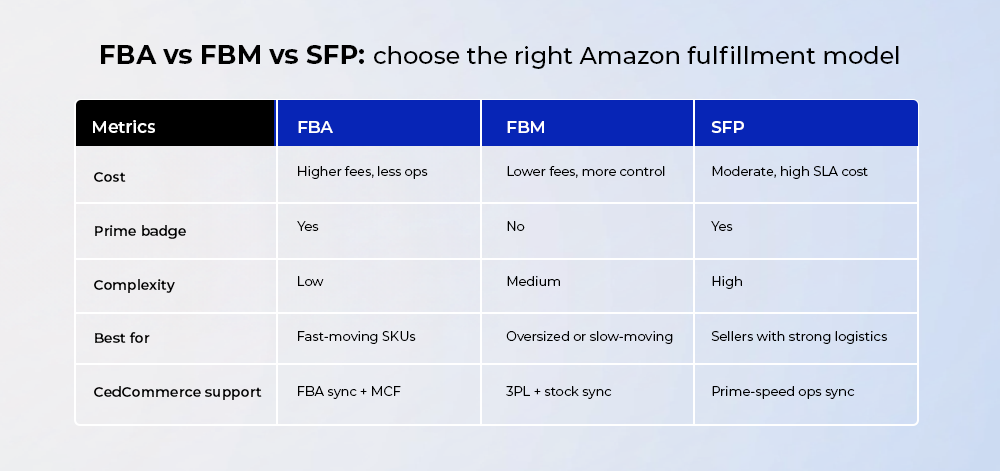
FBA is a fulfillment model where Amazon stores your products, ships orders, handles customer service, and processes returns.
FBM is a model where you store inventory and ship orders yourself or through your own logistics partner.
SFP is a model where you fulfill orders from your own warehouse but meet Amazon’s Prime delivery standards.
Choose FBA if:
Pick FBM if:
Opt for SFP if:
The three models are clear enough in isolation. Where sellers run into trouble is in applying them incorrectly to their catalog.
These issues show up as:
One more option worth knowing about, especially if you are selling across multiple channels:
Multi-Channel Fulfillment (MCF) allows you to use your Amazon FBA inventory to fulfill orders from other platforms like Shopify, Walmart, or TikTok Shop.
This is useful if you are already selling across channels and want to centralize fulfillment.
This helps reduce overselling, missed shipments, and fulfillment-related account issues.
If you are unsure which fulfillment model fits your catalog, do not decide at the account level. Decide at the product level.
Different SKUs often need different fulfillment strategies based on:
For a deeper breakdown of FBA vs FBM vs SFP, cost comparison, and real examples, refer to our detailed guide on Amazon fulfillment.
On Amazon, your products do not get consistent visibility without advertising. Even strong listings rely on ads to generate initial traffic, build sales velocity, and improve ranking over time.
If you are already running ads, you have probably noticed this pattern: sales come in, but margins keep tightening. That is usually a sign that campaigns are being optimised for the wrong number.
Sponsored Products (SP) are keyword-targeted ads for individual products (ASINs) that appear in Amazon search results and product pages.
When to use
Sponsored Brands (SB) are ads that appear at the top of search results and showcase your brand logo, headline, and multiple products.
When to use
Sponsored Display (SD) ads target shoppers based on their browsing behaviour and allow you to retarget users both on and off Amazon.
When to use
ACOS (Advertising Cost of Sales)
Ad spend ÷ ad-driven revenue
TACoS (Total Advertising Cost of Sales)
Ad spend ÷ total revenue (ads + organic)
Here is how to read it:
Most sellers optimise for ACOS alone. That is where profitability issues start. Moreover, ad problems on Amazon come from the same set of mistakes.
This leads to:
Amazon ads perform better when campaign structure, bids, search terms, and listing quality are reviewed together instead of in isolation.
That usually means:
For sellers already at scale, this is where expert campaign management starts making a measurable difference. CedCommerce-managed Amazon accounts have delivered 3-5 times ROAS and 20-30% lower ACOS, with 30-60% of sales driven through Sponsored Ads. The work behind that includes tighter bid governance, cleaner search-term control, and decisions made against total profitability, instead of ad revenue alone.
Before you put more money behind ads, run through this checklist. Ads amplify what is already there, whether good or bad.
Before scaling ads, check:
If any of these are weak, ads will amplify the problem instead of fixing it.
Everything covered so far, such as catalog structure, listing quality, fulfillment, and advertising, has a point of failure. This section explains where CedCommerce fits into each of those failure points.
What CedCommerce does
How this helps you
Once the catalog is structured correctly, the next challenge is keeping operations stable.
What goes wrong
What CedCommerce does
How this helps you
Stable operations create the foundation for profitability but only if the revenue side is managed properly too.
What goes wrong
What CedCommerce does
How this helps you
Improving ad efficiency helps margins, but conversion depends on what happens on the listing itself.
What goes wrong
What CedCommerce does
How this helps you
What goes wrong
What CedCommerce does
How this helps you
Already on Amazon, but not seeing the growth your investment should deliver? CedCommerce’s managed services team works on listing health, advertising performance, catalog governance, and account management.
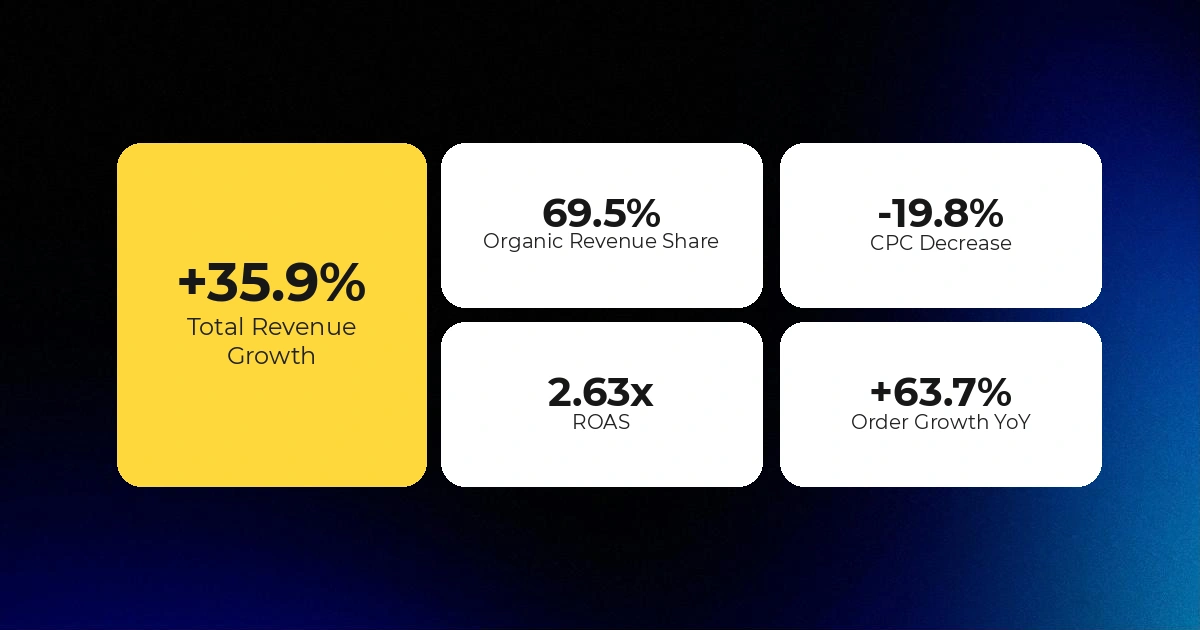
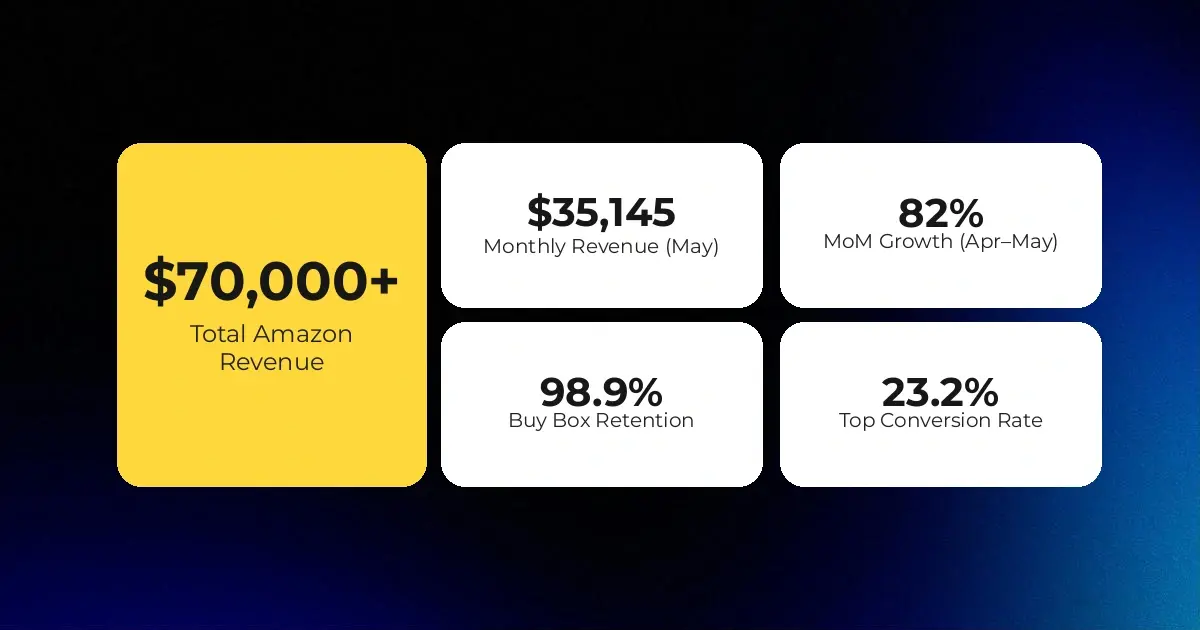
The problems described in this guide are not theoretical. Here are two brands that ran into them directly and what changed when operations, listings, and fulfillment were rebuilt properly.
The challenge
What CedCommerce did
Impact
The second case is a different kind of challenge as it’s about getting the fundamentals right.
The challenge
What CedCommerce did
Impact
Across both cases, the pattern is the same.
CedCommerce operates across both ends of that spectrum, from stabilising enterprise-level operations to rebuilding growth foundations for brands that are underperforming on Amazon. If you’re struggling with either or are getting started as a seller on Amazon and need help, get in touch today.
Selling on Amazon is not a single decision. It is a sequence of operational choices that determine whether the channel becomes a growth engine or a margin drain.
Depending on where you are in the process, here is the right next step.
If you are still evaluating Amazon as a channel, talk to CedCommerce about whether it is the right next move for your business and what your catalog will require before you commit.
Sell on Amazon with CedCommerce
If you are ready to connect your Shopify store and start selling, install the CedCommerce Amazon Channel and connect your store to begin catalog sync, listing setup, and go-live preparation.
Install the Shopify Amazon Integration by CedCommerce
If you are already selling on Amazon but not seeing consistent growth, CedCommerce’s managed services team works on listing health, advertising performance, catalog governance, and account stability to improve measurable outcomes.
Explore CedCommerce’s Expert Amazon Managed Services
Expanding beyond Amazon? See how CedCommerce supports Walmart marketplace growth.
Explore CedCommerce’s Walmart Integration
Selling on Amazon and TikTok Shop? CedCommerce manages both through a unified integration layer.
To set up an Amazon seller account, choose your selling plan, register through Amazon, submit your business and identity details, complete the tax interview, and finish shipping and return settings before listing products. Amazon currently offers an Individual plan at $0.99 per item sold and a Professional plan at $39.99 per month, and registration typically requires a government-issued ID, business information, bank account details, a chargeable credit card, and phone verification.
For most brands planning to build seriously on Amazon, the Professional plan is the practical choice because it supports the tools and workflows used for scale. Approval speed varies by documentation quality and verification complexity, especially for international sellers.
FBA means Amazon stores, picks, packs, ships, and handles returns for your products, while FBM means you fulfill orders yourself or through your own logistics setup. Amazon positions FBA as outsourced fulfillment through its network and FBM as merchant-managed fulfillment.
FBA usually makes more sense when Prime eligibility, delivery speed, and operational outsourcing matter most. FBM usually fits better when you have margin-sensitive products, oversized inventory, slow-moving SKUs, or a reliable 3PL already in place.
CedCommerce keeps your catalog compliant by combining automated attribute mapping, policy-aware catalog checks, and active catalog governance before and after listings go live.
As a trusted Amazon partner, CedCommerce aligns required safety fields, compliance attributes, and category-level requirements with Amazon’s current expectations, while the team monitors changes and updates catalogs before they become listing issues. This helps reduce suppressions, incomplete data, and structural compliance gaps that often affect Amazon sellers.
Yes, CedCommerce can optimise listings while protecting the ranking signals that are already working.
CedCommerce preserves indexed keywords, avoids unnecessary overwrites, and updates listings in structured phases so productive elements stay intact while weak areas improve. That approach helps strengthen conversion and discoverability without resetting what the listing has already built.
For a catalog of 2,000 variation products, CedCommerce’s benchmark is an import window of 1 to 5 hours, with variation structuring and cleanup included.
Actual go-live timing depends on catalog cleanliness, variation complexity, missing attributes, and whether category approvals or GTIN-related issues need to be resolved first. Most catalogs of this size are live in under a week when the data foundation is strong.
A+ Content is Amazon’s enhanced listing format that lets eligible brands add richer modules such as images, comparison charts, and branded storytelling, and yes, most branded sellers should treat it as a baseline requirement. Amazon says A+ Content requires a Professional selling account, and brand access is typically tied to Brand Registry permissions.
For CedCommerce-managed brands, A+ Content is not treated as an optional design layer. Missing A+ Content leads to an average 25 to 30 percent loss in potential conversions, which is why it should be built into the listing strategy early.
The Amazon Buy Box, now referred to by Amazon as the Featured Offer, is generally won by sellers with competitive pricing, strong fulfillment performance, and good account standing. Amazon says Featured Offer eligibility typically requires a Professional selling account in good standing, New-condition inventory, and pricing that remains competitive with major retailers outside Amazon.
FBA sellers often have a structural advantage because Amazon-managed fulfillment helps meet delivery-speed expectations more consistently. But fulfillment alone does not win the Featured Offer; pricing, availability, and account health still matter.
TACoS measures ad spend as a percentage of total revenue, while ACOS measures ad spend only against ad-attributed revenue, which is why TACoS gives the truer picture of profitability. Amazon’s advertising documentation describes TACoS as a signal of how efficiently advertising spend translates into overall sales revenue.
In practice, ACOS can look healthy while the business is still too dependent on paid traffic. TACoS shows whether advertising is helping build a stronger organic revenue base or merely subsidising sales.
CedCommerce supports Amazon integration for Shopify, WooCommerce, Magento, BigCommerce, PrestaShop, OpenCart, and Shopline.
That gives brands a practical path to connect their existing commerce stack to Amazon without rebuilding catalog operations from scratch.
CedCommerce handles ASIN suppression and variation errors through catalog cleanup, attribute correction, GTIN and variation logic fixes, and suppression recovery support.
The integration’s automated attribute mapping helps prevent the category, variation, and data-structure issues that commonly trigger suppression, while CedCommerce’s team works on reinstatement and error resolution when listings are already affected.
Yes, most Amazon listings require a product ID, usually a GTIN such as a UPC, EAN, ISBN, or JAN. Amazon states that sellers who do not have a product ID for an eligible listing can request a GTIN exemption during the listing creation flow, typically by submitting a product title and images showing all sides of the product and packaging.
This is one of the most common points where catalogs stall before launch. CedCommerce helps surface GTIN gaps and variation issues early so sellers are not discovering them midway through listing.
Yes, some Amazon product categories require approval before you can list and sell in them. Amazon says sellers may be prompted to apply during the listing process, and certain categories or products can also fall under restricted product rules.
This matters because category approval can affect launch timelines, catalog readiness, and compliance planning. CedCommerce factors category-level requirements into onboarding so sellers know where approval friction exists before go-live.

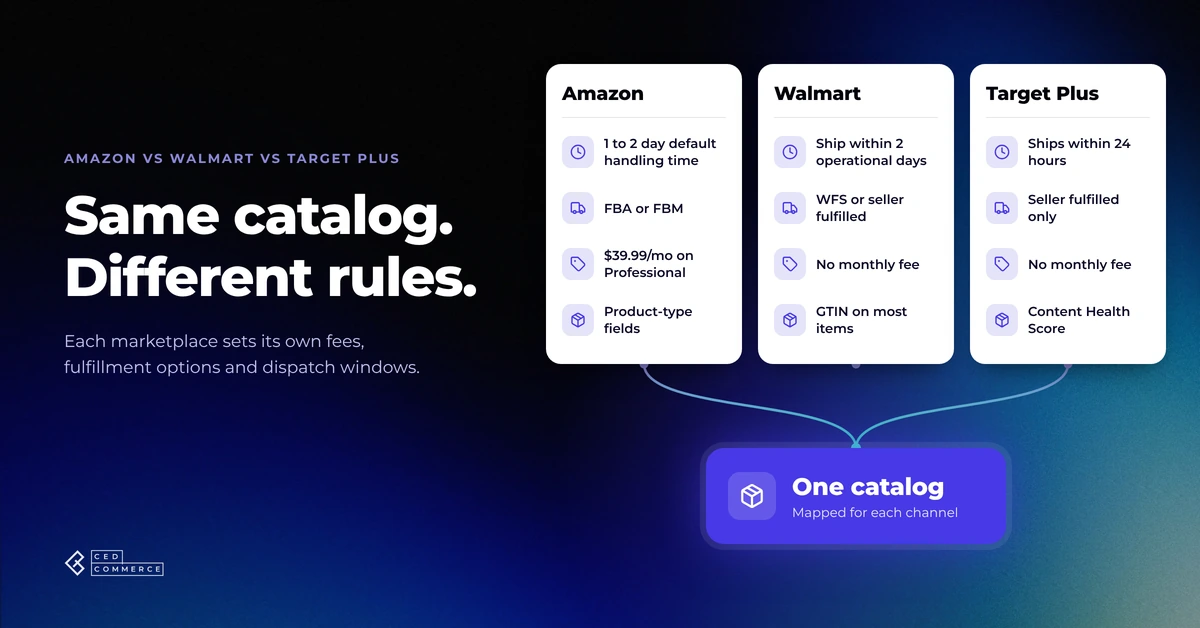
Reading Time: 11 minutes If you already sell on Amazon, adding Walmart or Target Plus…
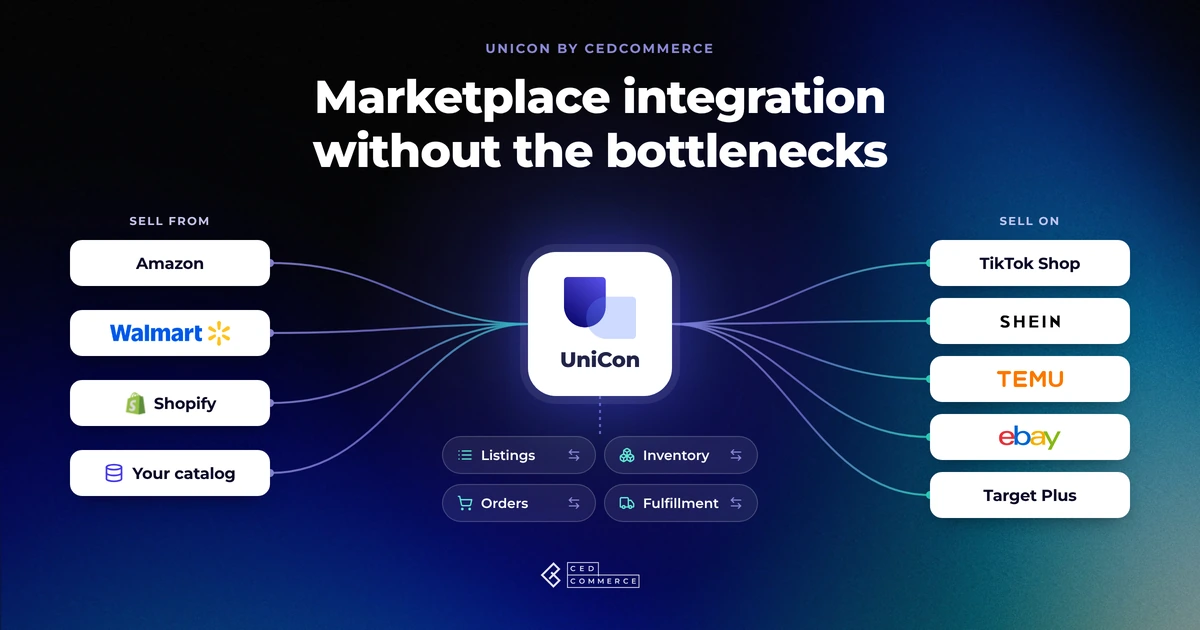
Reading Time: 13 minutes Selling on another marketplace sounds straightforward when you already have a…
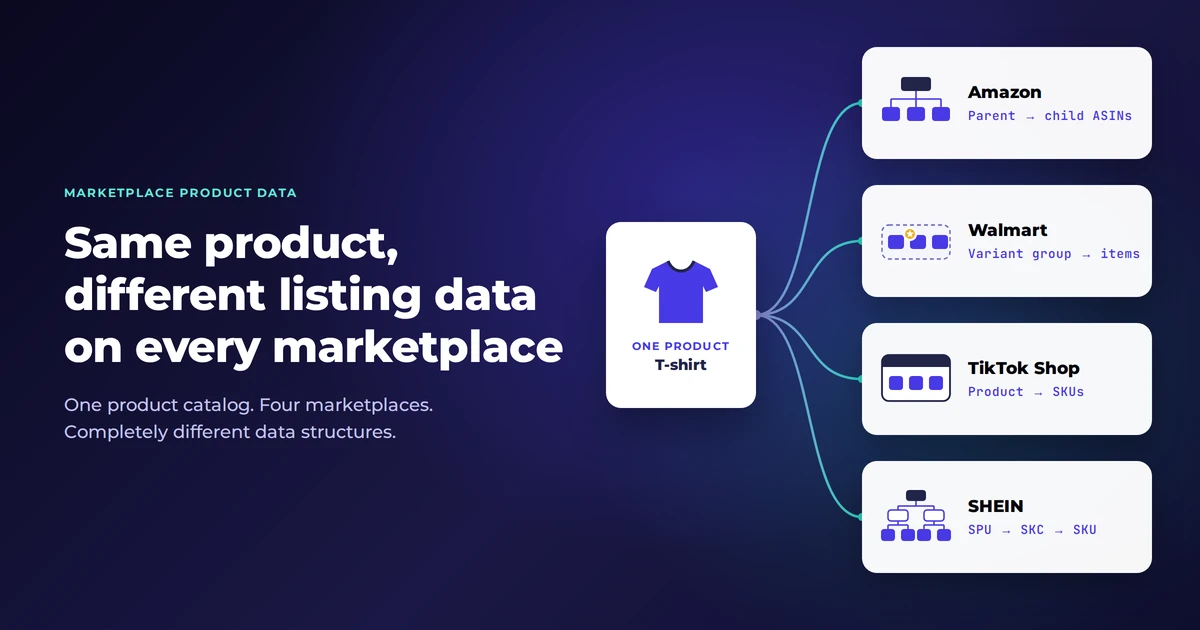
Reading Time: 11 minutes The same physical product can require a different listing structure on…
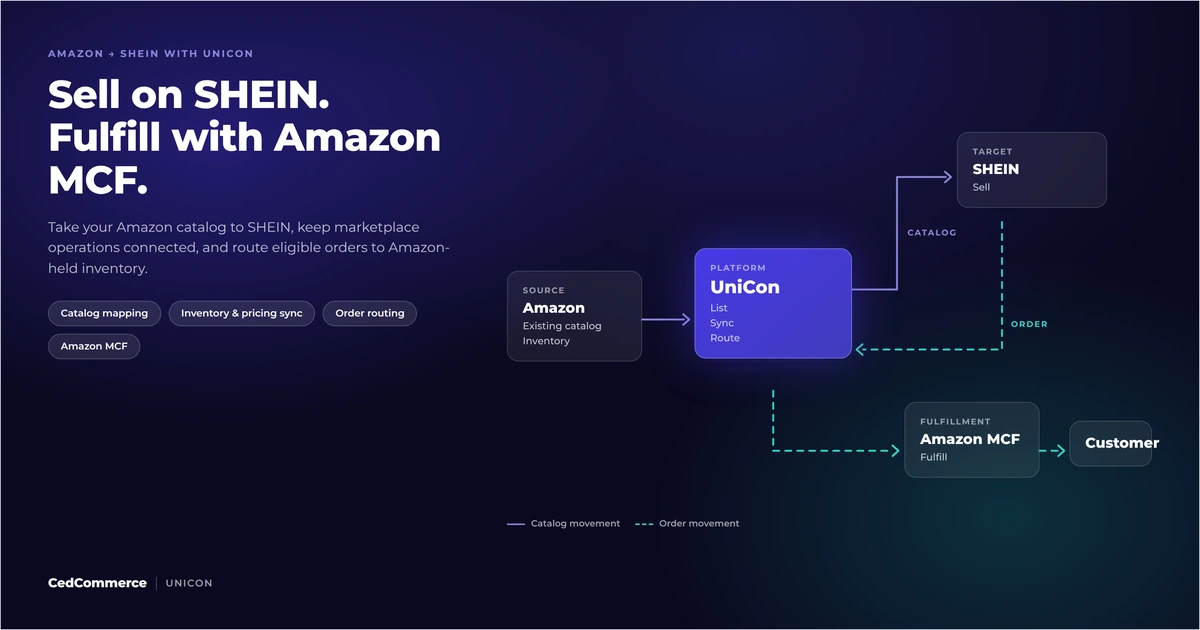
Reading Time: 12 minutes Looking to sell on SHEIN from Amazon? You could potentially tap…
Reading Time: 15 minutes Your marketplace app does not sync continuously. It syncs on a…
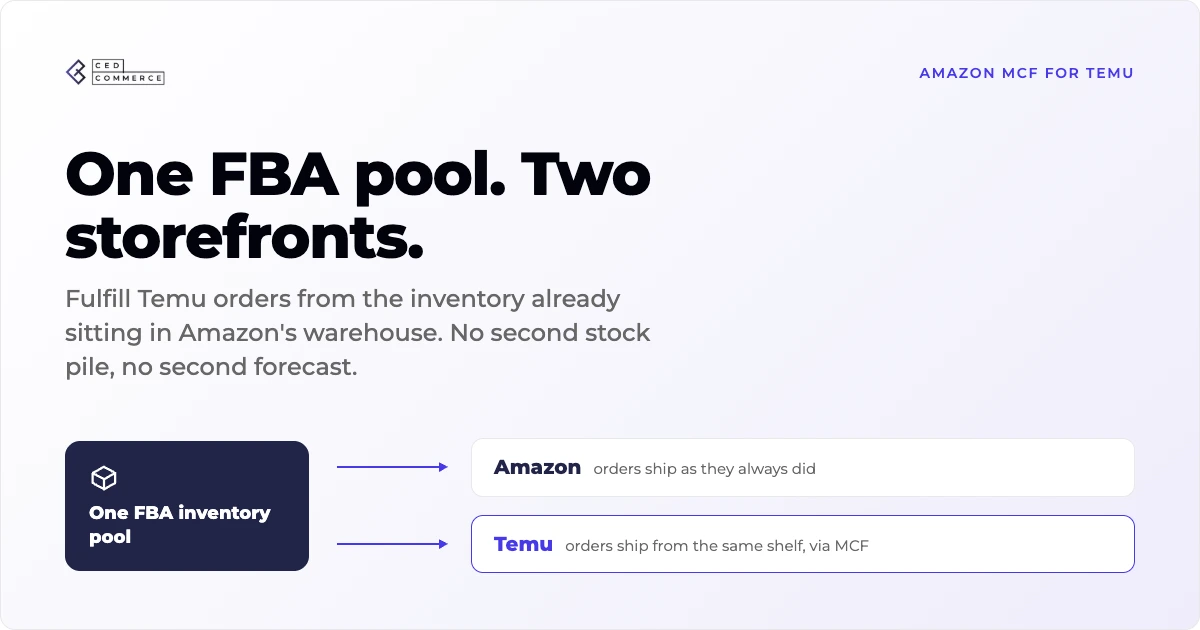
Reading Time: 19 minutes Ever wondered if your FBA inventory could turn Amazon into a…
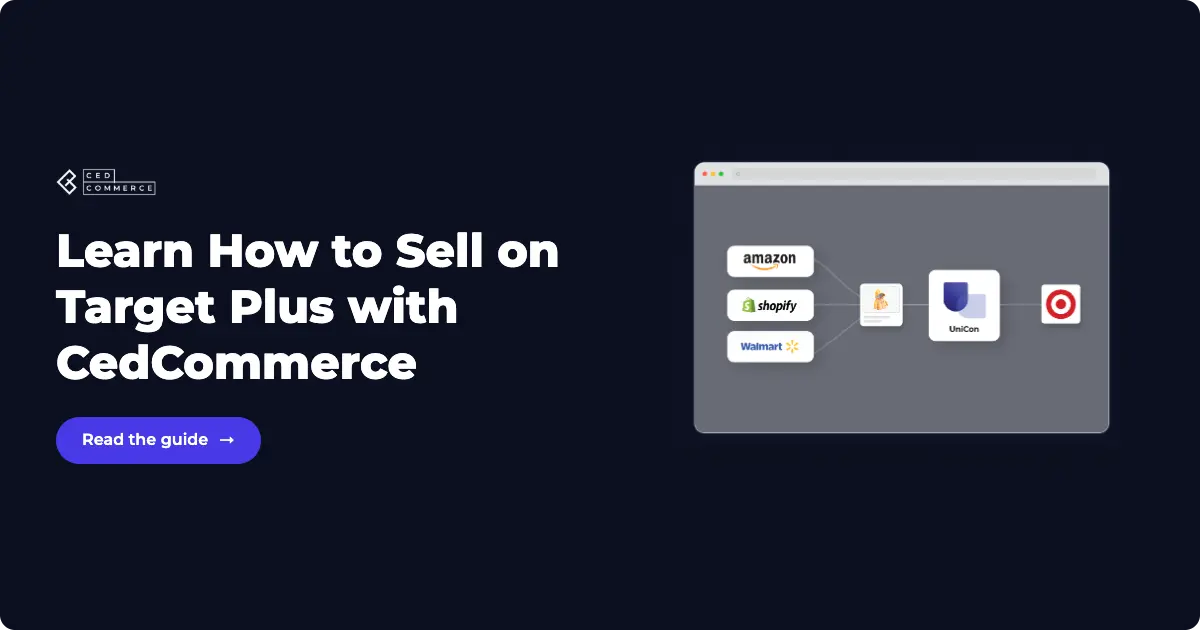
Reading Time: 18 minutes If you’re an established third-party brand or authorized reseller looking for…
Reading Time: 6 minutes Your marketplace stack may be connected, but your attention is still…
Reading Time: 3 minutes Section 1: About the Client Hat Country, operating as Deadwood Trading…
Reading Time: 3 minutes Section 1: About the Client Milky Mama is a leading maternal…