
Amazon vs Walmart vs Target Plus: What Changes Operationally for Sellers?
Reading Time: 11 minutes If you already sell on Amazon, adding Walmart or Target Plus…

Running short of time? Get PDF of the blog in your mail.
Are rising GS1 barcode and UPC fees making you think twice about listing new products on Amazon? For private label sellers, handmade creators, and those bundling products, barcode expenses can add up, slowing your ability to scale. Here’s a quick way to keep your profit margins intact: the Amazon GTIN Exemption.
With this process, eligible sellers can create new product listings without a UPC, EAN, or ISBN. If you’re just starting out or testing products, this helps save significant upfront costs on GS1 barcodes in the beginning. Understanding how and when to use this exemption can save you hundreds (or even thousands) each year, allowing you to list more and outpace hesitant competitors. Take back control of your catalogue growth and keep your listings costs lean.
By the end, you’ll know exactly how to list more products without overspending on barcodes, and how to sidestep the most frustrating listing pitfalls.
Before diving into Amazon’s exemption process, let’s break down GTIN and why it’s a cornerstone of product listing on Amazon in 2026.
A Global Trade Item Number (GTIN) is a universal identifier for products in the supply chain. It includes formats like:
When you scan a barcode at a store, you’re using a GTIN. On Amazon, GTINs ensure your product data aligns with their catalog, reducing duplicate listings and improving searchability.
Without a GTIN, your product may be flagged as incomplete or suppressed, impacting your sales visibility. But here’s the relief: not every product needs a GTIN to get listed.
Amazon lists GTIN exemptions for specific cases: private-label or handmade products; products that you manufacture, brand, or publish that don’t have barcodes; parts that don’t have a product ID; bundled products; and generic, unbranded products. If your item fits one of these buckets, you can request an exemption for the relevant category/brand combination. Approval is still required before you list. Head here to know more from Amazon.
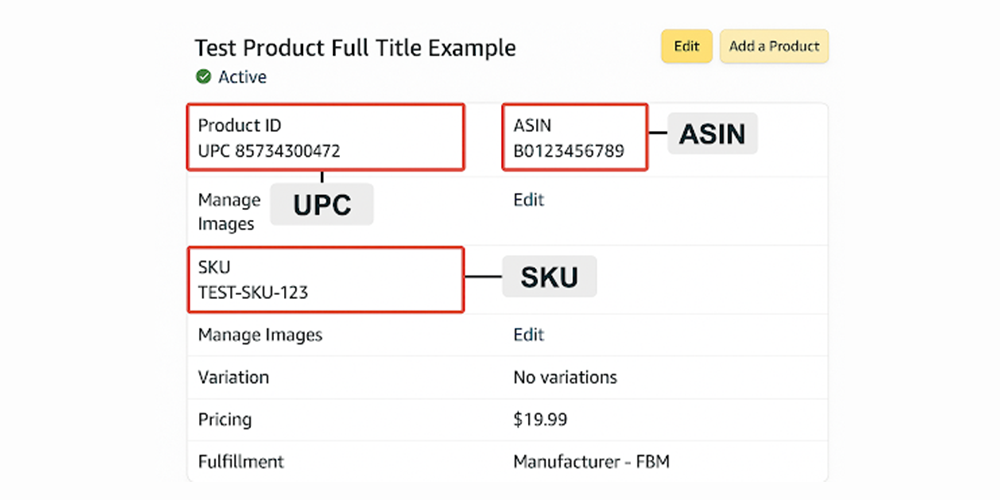
When listing on Amazon, you’ll often see terms like GTIN, UPC, ASIN, and SKU showing around listings. This alphabet soup can feel overwhelming.
Let’s simplify it.
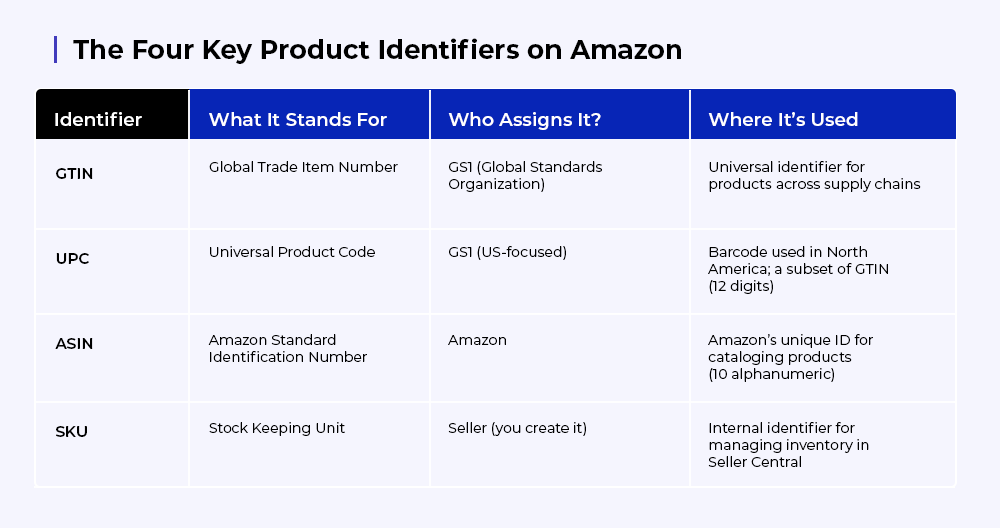
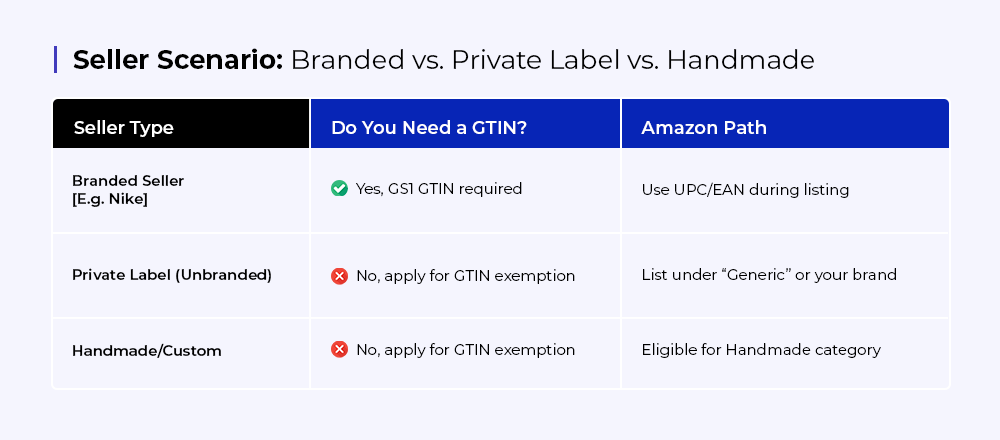
For private label or handmade items, avoid paying for barcodes unless you plan to scale globally. Amazon’s GTIN exemption lets you bypass this step while still protecting your listings.
You don’t need to purchase GS1 barcodes if you fall into one of these categories:
1. Private Label Products – If you manufacture your own product line without a registered trademark, you can apply for exemption and list under your brand or as “Generic.”
Key Listing Tactic: Apply for exemption under your intended brand name, even without a trademark, to future-proof your listings.
2. Handmade or Custom Products – Handmade jewelry, artwork, or any one-of-a-kind creation qualifies for exemption under the Handmade category.
Key Listing Tactic: Leverage Amazon Handmade’s category-level exemption. No branding? You can still list under “Generic” if truly unbranded.
3. Product Bundles or Multi-Packs – Custom product sets created by you that aren’t packaged by the original manufacturer.
Key Listing Tactic: Clearly show all bundled items together in one photo with visible branding. List as a new unique product rather than tying to an existing ASIN.
Additionally,
Yes, Amazon allows you to list products under a Generic brand name during exemption. However:
Looking to register your brand on Amazon? Get the step-by-step brand registry checklist and access brand protections faster with CedCommerce.
Pro tip: Ensure your brand name and product images align perfectly—mismatches are a common reason requests get rejected.
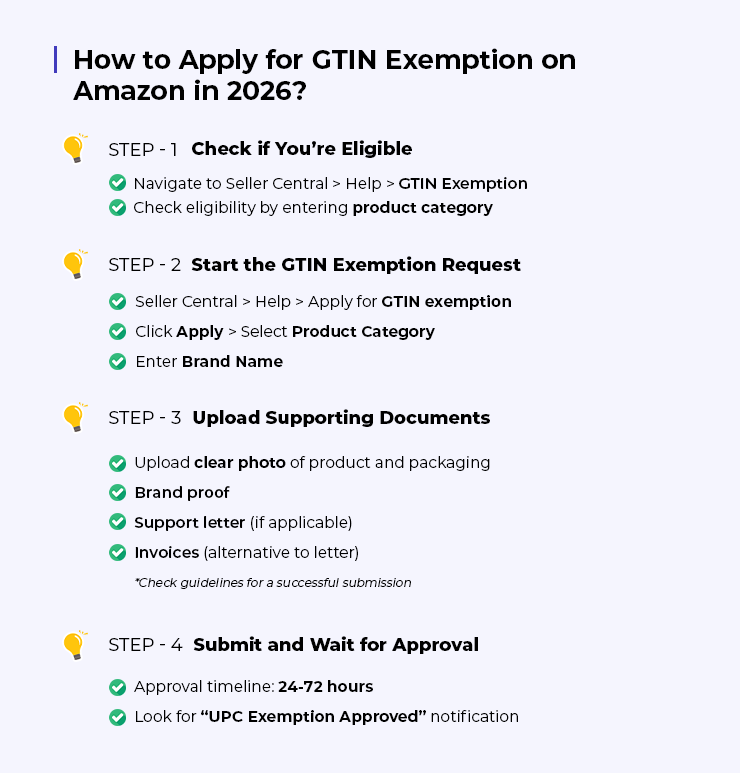 Ready to list products without buying UPCs? Follow this updated GTIN exemption process to get approval faster and avoid common pitfalls.
Before applying, confirm your product qualifies:
Amazon requires product images or packaging photos proving your brand name is present and non-removable.
Checklist for Images:
If not approved, check for:
Troubleshooting: If approval doesn’t reflect immediately, save your listing as a draft and retry later.
To avoid costly delays, use this seller-tested checklist before uploading.
Your Product Images Must:
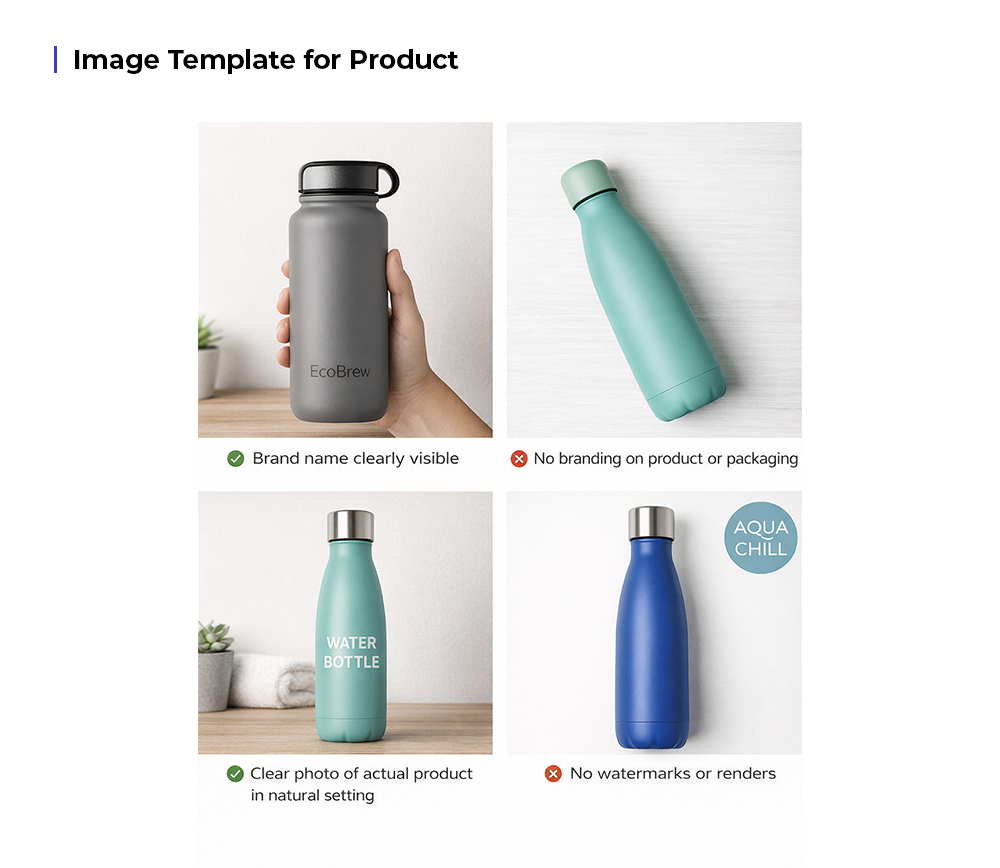
Pro Tip: If your product has variants (sizes, colors), include images for each to avoid Amazon rejecting child ASINs later.
Want a click-by-click Seller Central walkthrough? Refer to this visual guide to apply for GTIN exemption
You’ve applied. You’ve been approved. What happens next?
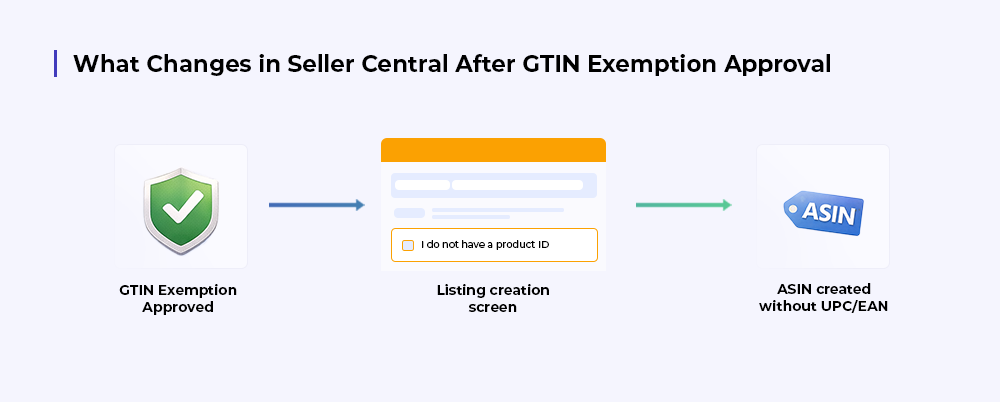
Once your GTIN exemption request is approved, Amazon will send you a “UPC Exemption Approved” notification in Seller Central.
Pro Tip: Save time by bulk-creating listings with exemption applied if you’re scaling a catalog of private label SKUs.
Even experienced sellers can hit roadblocks when applying for GTIN exemption. Here’s how to sidestep them and secure approval on your first try.
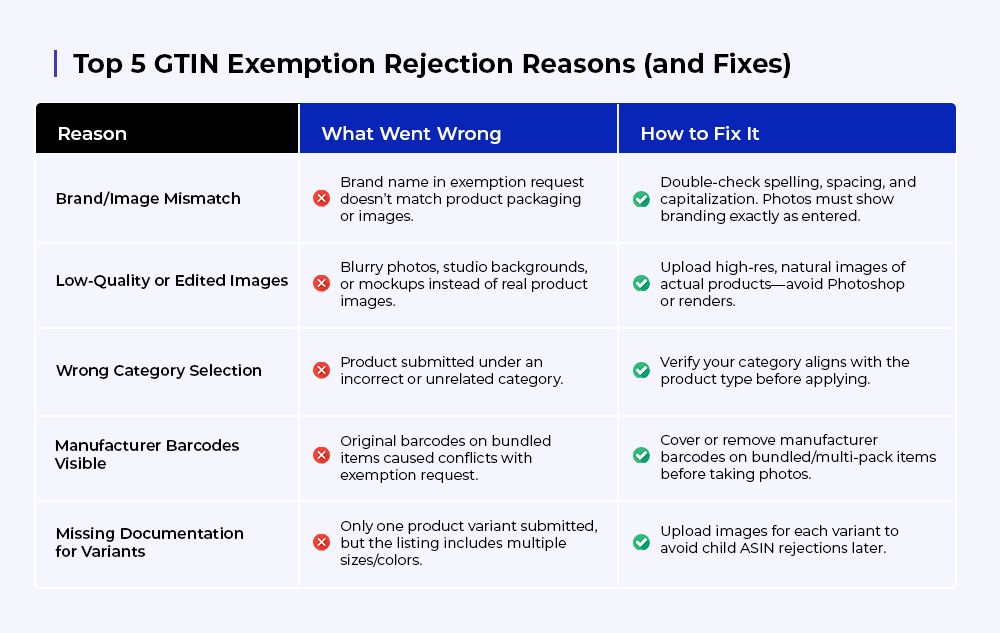
Pro Tip: If denied, you can reapply immediately after fixing the issue, no waiting period required.
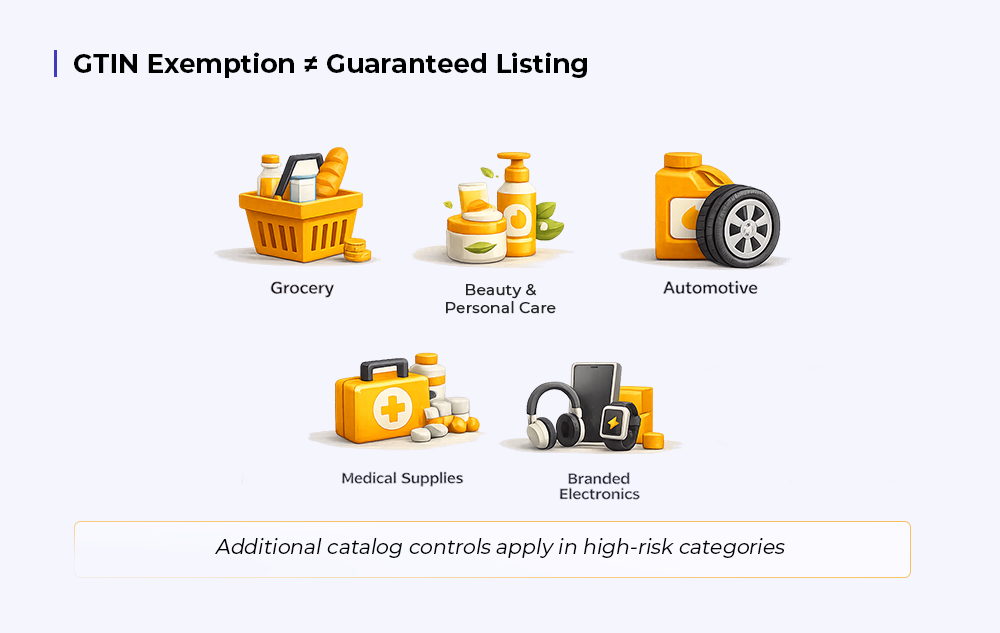
Short answer, yes. GTIN exemption is a legitimate Amazon process; however, it isn’t a blanket pass across your catalog. There are situations where an exemption is approved, yet the listing still fails to publish or later gets suppressed.
Here’s when that typically happens:
Even with an approved exemption, categories like Grocery, Automotive, Beauty, Medical supplies, and branded electronics often have additional catalog controls. In these cases, Amazon may still require a valid product ID to complete or maintain the listing.
If Amazon’s system identifies an existing ASIN that closely matches your product and that ASIN uses a GS1-backed GTIN, then your GTIN-exempt listing may be blocked, merged, or suppressed to avoid duplicate catalog entries.
Using multiple brand names across listings, changing packaging frequently, or reusing the same product images under different brands can trigger a manual review later. Even if the exemption was approved initially, inconsistent brand signals can cause future listing issues.
GTIN exemption does not override Amazon’s variation policies. Using size, color, or bundle variations incorrectly is one of the most common reasons GTIN-exempt listings get partially or fully suppressed after launch.
Choosing between GTIN exemption and GS1 barcodes is more about timing, intent, and how far you plan to take the product, than just listing on Amazon.
Here’s a simple way to decide.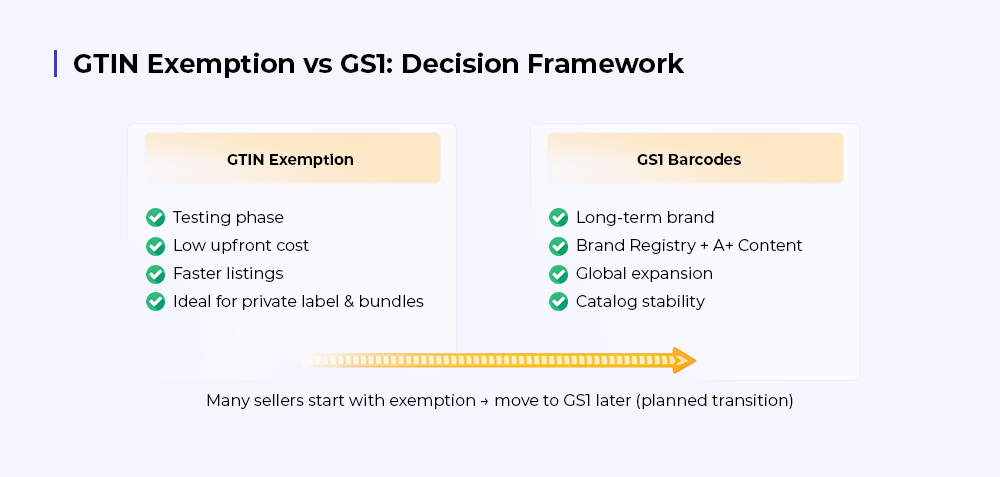
When you’re launching a small catalog, testing demand, or validating a private label idea, GTIN exemption makes sense. It keeps upfront costs low and lets you move fast without committing to barcodes before you know the product will scale.
For seasonal products, niche SKUs, or bundles that aren’t core to your long-term brand, GTIN exemption remains a practical choice. It allows flexibility without locking you into GS1 costs for products you may later discontinue.
Once you’re investing in Brand Registry, A+ Content, ads at scale, and global expansion, GS1 barcodes are the cleaner foundation. They reduce catalog friction, make future ASIN creation easier, and support long-term brand protection across marketplaces.
GTIN exemption is ideal for speed and experimentation, whereas GS1 barcodes are ideal for stability and scale.
Many sellers start with exemption and move to GS1 later. However, that transition should be planned, not reactive.
Leveraging GTIN Exemption helps you list faster, cut down on upfront costs, and focus on scaling your catalog instead of buying barcodes. But for many sellers, navigating brand approvals, listing compliance, and post-approval challenges can still feel overwhelming.
That’s where CedCommerce comes in. As a trusted Amazon partner, our Managed Marketing Services cover every stage of your marketplace journey:
Your Next Step: Skip the stress of GTIN exemption and product uploads. Let CedCommerce take care of it all so you can focus on growing your brand.
👉 Talk to Our Experts Today to get started.
Cross-list your Amazon catalog across 6+ marketplaces and manage them all from one dashboard.

Reading Time: 11 minutes If you already sell on Amazon, adding Walmart or Target Plus…
Reading Time: 13 minutes Selling on another marketplace sounds straightforward when you already have a…
Reading Time: 11 minutes The same physical product can require a different listing structure on…
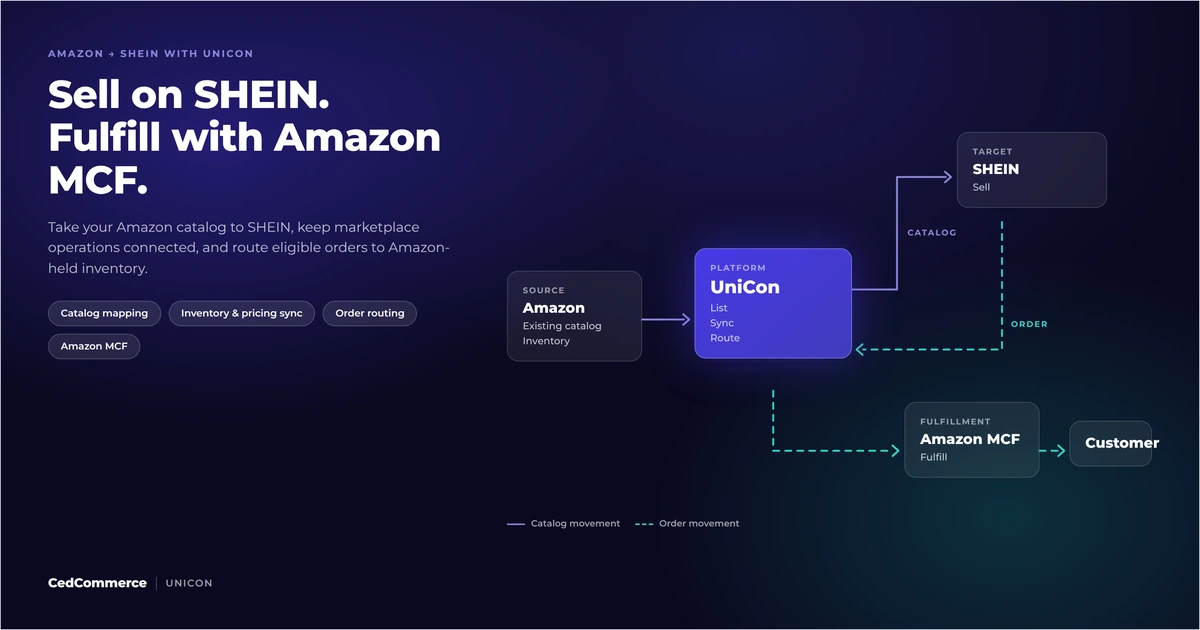
Reading Time: 12 minutes Looking to sell on SHEIN from Amazon? You could potentially tap…
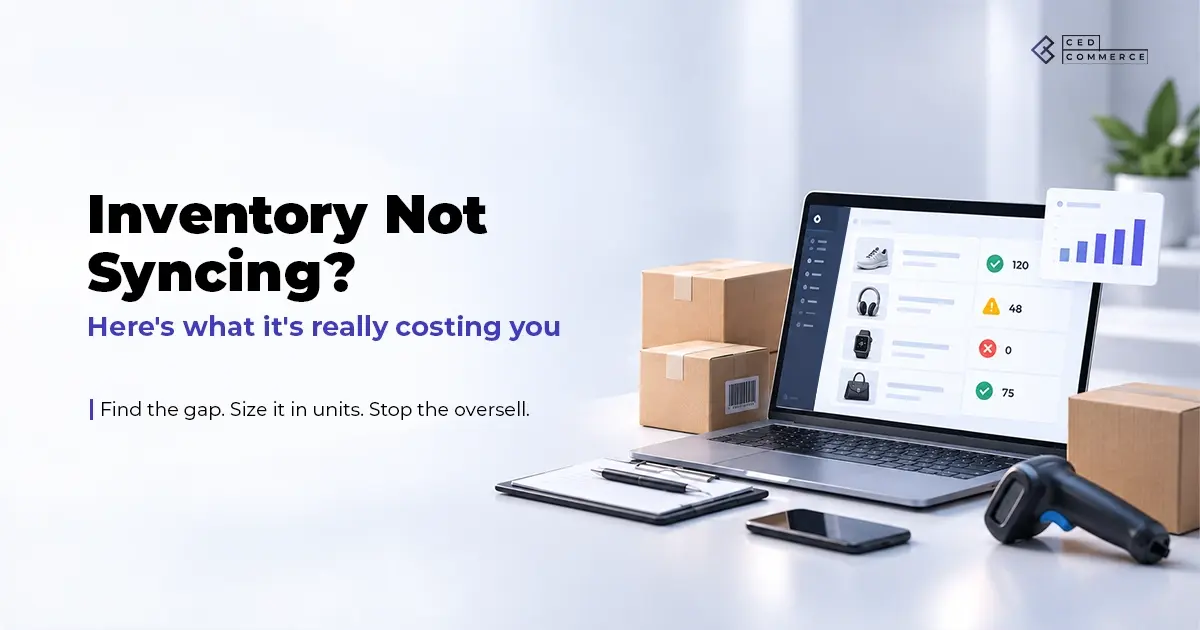
Reading Time: 15 minutes Your marketplace app does not sync continuously. It syncs on a…
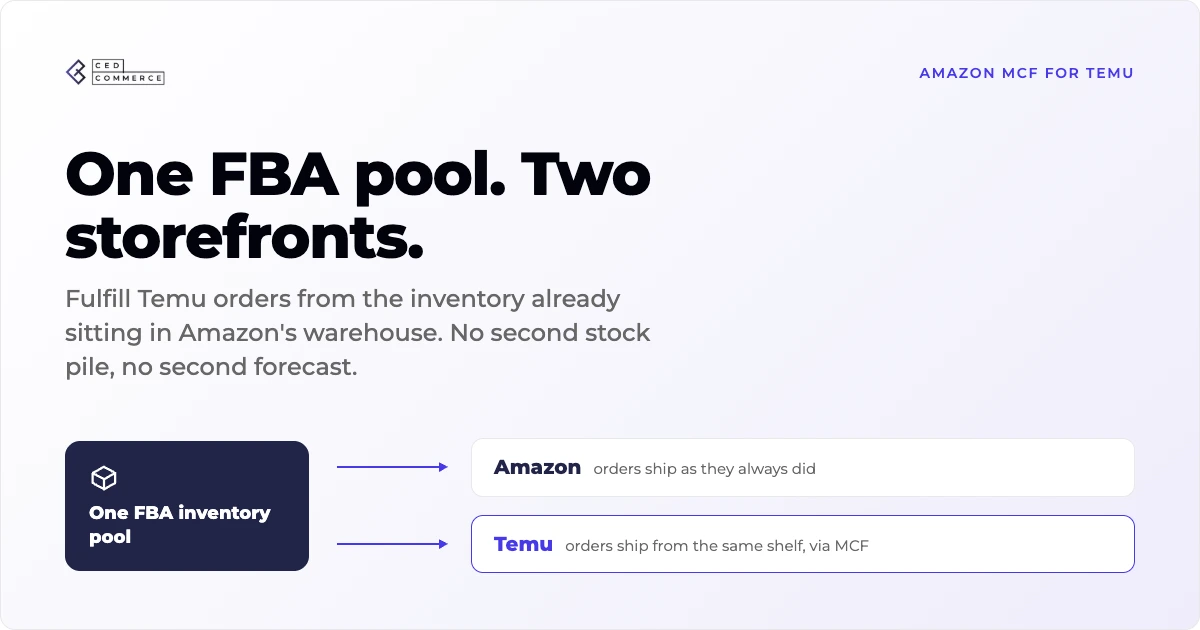
Reading Time: 19 minutes Ever wondered if your FBA inventory could turn Amazon into a…

Reading Time: 18 minutes If you’re an established third-party brand or authorized reseller looking for…
Reading Time: 6 minutes Your marketplace stack may be connected, but your attention is still…
Reading Time: 3 minutes Section 1: About the Client Hat Country, operating as Deadwood Trading…
Reading Time: 3 minutes Section 1: About the Client Milky Mama is a leading maternal…