
SHEIN Fulfillment Options Compared: How to Choose the Right Option
Reading Time: 10 minutes SHEIN Marketplace sellers work with two underlying fulfillment models: seller-managed fulfillment,…

Running short of time? Get PDF of the blog in your mail.
Recently viewed and most viewed product is a extension by CedCommerce team which provides you an extra feature to display recently viewed and most viewed product on product detail page or any where through out the site.
Generally there are no any section for showing recently seen or most viewed products in WooCommerce so this extension provide this feature.
After successfully activating the extension ,the extension will show you a new setting as Recently and most viewed settings under WooCommerce admin menu from where you can save the settings for the plugin.
Recently viewed setting
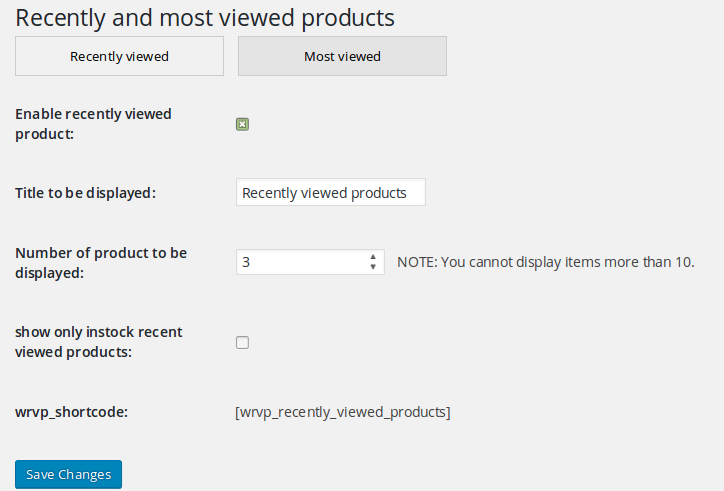
Enable recently seen products:
This option is for enabling the recently viewed products option.
Title to be displayed:
It is the title which is to be displayed when recently viewed products are shown.
Number of products to be displayed:
It is the number of posts which is to be displayed on the product detail page.
show only instock recently viewed products:
It will provide an option for displaying only ‘instock‘ products only.
wrvp_shortcode:
It is the shortcode which can be used to display the recently seen products anywhere in the site.
Most viewed setting

Enable most viewed products:
This option is for enabling the most viewed products option.
Title to be displayed:
It is the title which is to be displayed when most viewed products are shown.
Number of products to be displayed:
It is the number of posts which is to be displayed on the product detail page.
show only instock most viewed products:
By this setting you can show only instock products.
wmvp_shortcode:
It is the shortcode which can be used to display the recently viewed products anywhere in the site.
Product detail page
After saving the admin settings products will be displayed on your frontend product detail page.
Here you can see 3 recently seen products are displayed.
Here most viewed products are displayed according the settings you saved.
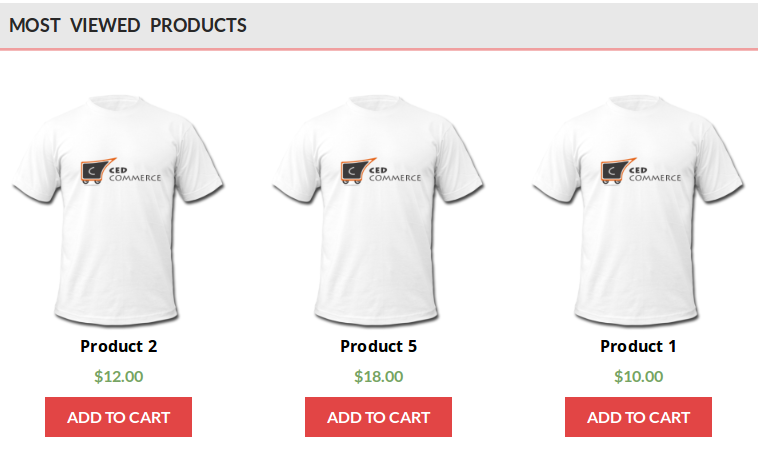
Here most viewed products are displayed according the settings you saved.
I have tried to clearly explain all the points related to this extension by CedCommerce Team. Recently viewed and most viewed products extension come up with a solution of the displaying recently viewed and most viewed products through out your site.
Have a look at our product gallery .
How do you like the POST? Feel free to express your ideas with us in the comment section. Any suggestions or opinions would be greatly appreciated 🙂
If you like this post, share it with your friends!!

Reading Time: 10 minutes SHEIN Marketplace sellers work with two underlying fulfillment models: seller-managed fulfillment,…

Reading Time: 2 minutes Exciting news for WooCommerce sellers! WooCommerce 10.2 is officially launching on…

Reading Time: 2 minutes Release Highlights WooCommerce’s latest updates bring WCAG 2.2 compliance, shareable checkout…

Reading Time: 6 minutes Storytime – Jane, a successful WooCommerce store owner, knew she couldn’t…

Reading Time: 9 minutes As the holiday season approaches, eCommerce businesses are gearing up for…

Reading Time: 7 minutes Imagine this: You’re a WooCommerce store owner in full control of…

Reading Time: 6 minutes According to Morgan and Stanley, the eCommerce market is expected to…

Reading Time: 5 minutes Imagine this: Your fantastic product is all set to take flight…

Reading Time: 4 minutes The potential benefits of multichannel eCommerce are vast if you do…

Reading Time: 5 minutes As technology continues to shape consumer behavior and shopping habits, mastering…