
Inventory Not Syncing? Here’s What It’s Really Costing You and How to Fix it
Reading Time: 15 minutes Your marketplace app does not sync continuously. It syncs on a…
Running short of time? Get PDF of the blog in your mail.
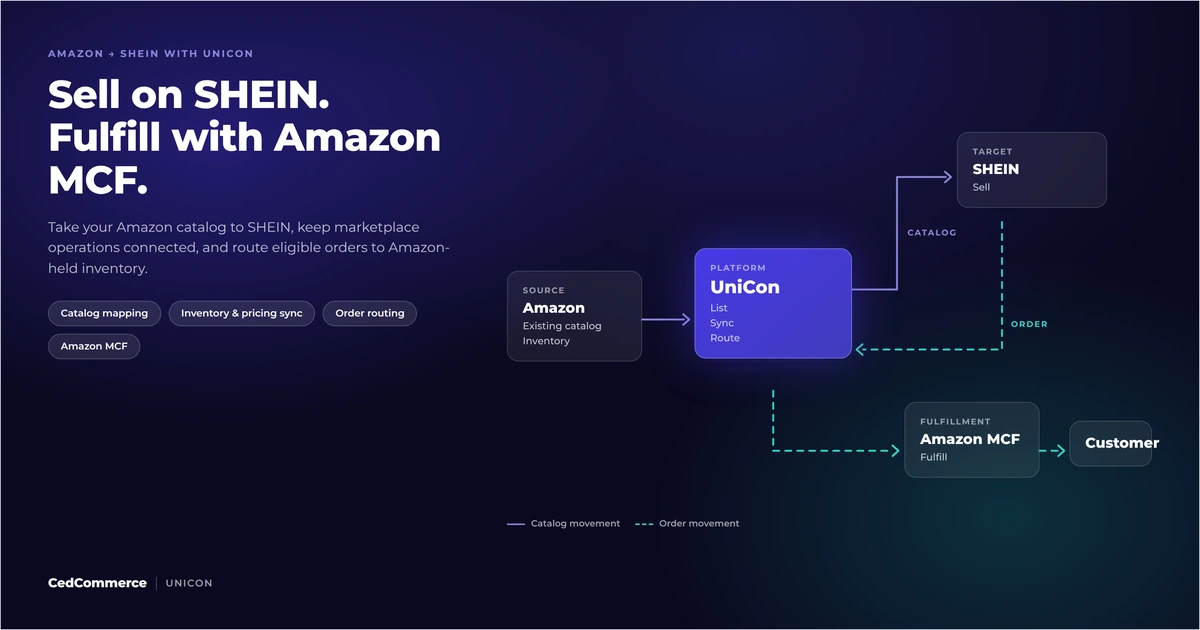
Looking to sell on SHEIN from Amazon? You could potentially tap into 100M+ active global shoppers while using Amazon MCF to fulfill eligible SHEIN orders from inventory already sitting in Amazon’s fulfillment network.
That removes one major expansion hurdle, but the operational work does not stop at fulfillment. Your Amazon catalog still has to fit SHEIN’s category and attribute structure, SKUs need to stay matched, inventory and pricing need to remain current, and every order needs the right route.
UniCon connects Amazon as the source and SHEIN as the target, bringing catalog import, product matching, target configuration, and order routing into one workflow.
This guide shows how to connect the pieces, from your existing Amazon catalog to SHEIN listing readiness and fulfillment.
TL;DR: You can bring your existing Amazon catalog to SHEIN and use Amazon MCF to fulfill eligible SHEIN orders from inventory already stored in Amazon’s fulfillment network. The key is getting catalog mapping, product matching, inventory and pricing settings, and order routing configured correctly before you go live.
This Amazon-to-SHEIN workflow fits established sellers that already have structured catalog and fulfillment operations.
It is most relevant when you already manage products through Amazon and want to add SHEIN without maintaining a second disconnected product and order process.
You should have:
For U.S. sellers, SHEIN’s current onboarding requirements should be checked before implementation because seller eligibility and regional rules can change.
This setup is less suitable when you are still testing product-market fit, do not meet SHEIN’s seller requirements, or have inconsistent SKUs across your existing catalog.
The first question is therefore: can your current catalog, inventory, and identifiers support another marketplace without creating conflicting records?
A successful setup depends on the accounts, catalog data, stock, and operational decisions being ready before you publish products. 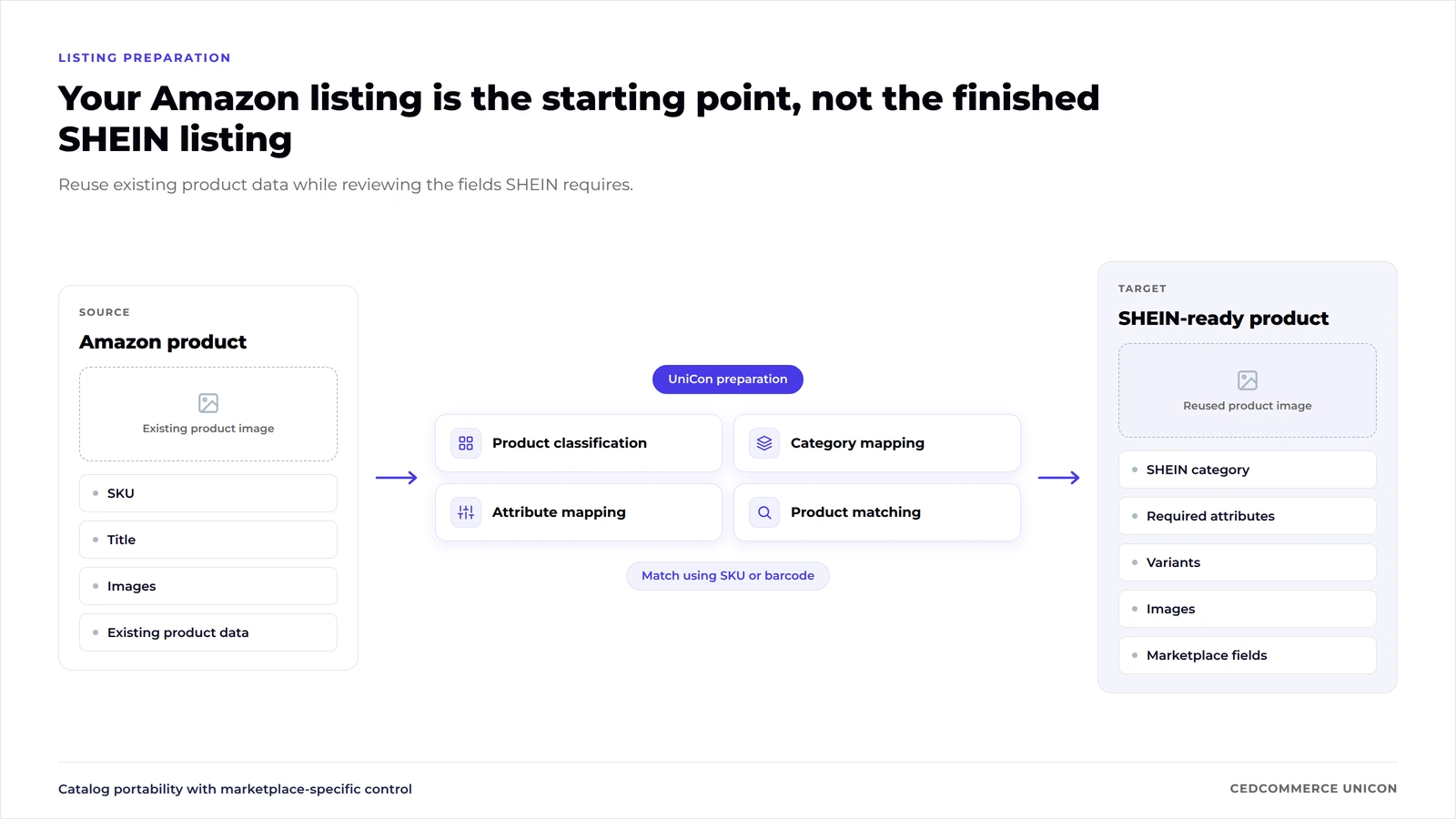
Your SHEIN account needs to be approved for the region where you want to sell. Treat marketplace approval separately from UniCon onboarding or listing preparation.
Marketplace approval determines whether you can sell. UniCon determines how the approved account connects to the wider catalog and order workflow.
Amazon requires a Seller Central account for MCF access. You can use MCF for eligible off-Amazon orders even when the customer did not buy that product on Amazon.
You also need fulfillable inventory available in Amazon’s fulfillment network for the products you expect Amazon to ship.
Product identity is one of the highest-risk points in any multichannel launch.
UniCon can use SKU or barcode to recognize matching products across connected channels. At least one identifier must be configured.
If the Amazon product and the SHEIN product cannot be reliably matched, order routing and inventory management become harder to control.
An Amazon listing cannot be treated as a finished SHEIN listing.
Categories, required attributes, product structure, images, and other marketplace-specific fields need to be reviewed for SHEIN.
The goal is catalog portability with controlled translation, rather than copying an Amazon record without checking the target requirements.
Decide where target orders should be fulfilled before go-live.
FBA and MCF can draw from Amazon-held inventory, but they serve different order origins.
| Area | FBA | MCF |
|---|---|---|
| Order origin | Amazon marketplace | Eligible off-Amazon channels |
| Inventory | Inventory in Amazon’s fulfillment network | Inventory in Amazon’s fulfillment network |
| Core role | Fulfill Amazon orders | Fulfill eligible external-channel orders |
| Marketplace listing | Amazon listing | Managed by the external sales channel |
| Fulfillment request | Triggered through Amazon order flow | Submitted through the relevant external workflow or integration |
This distinction matters when a SHEIN customer buys a product that is physically stored in Amazon’s network.
The customer order originates on SHEIN. Amazon’s role is fulfillment. SHEIN remains the marketplace where the listing, customer transaction, and marketplace requirements apply.
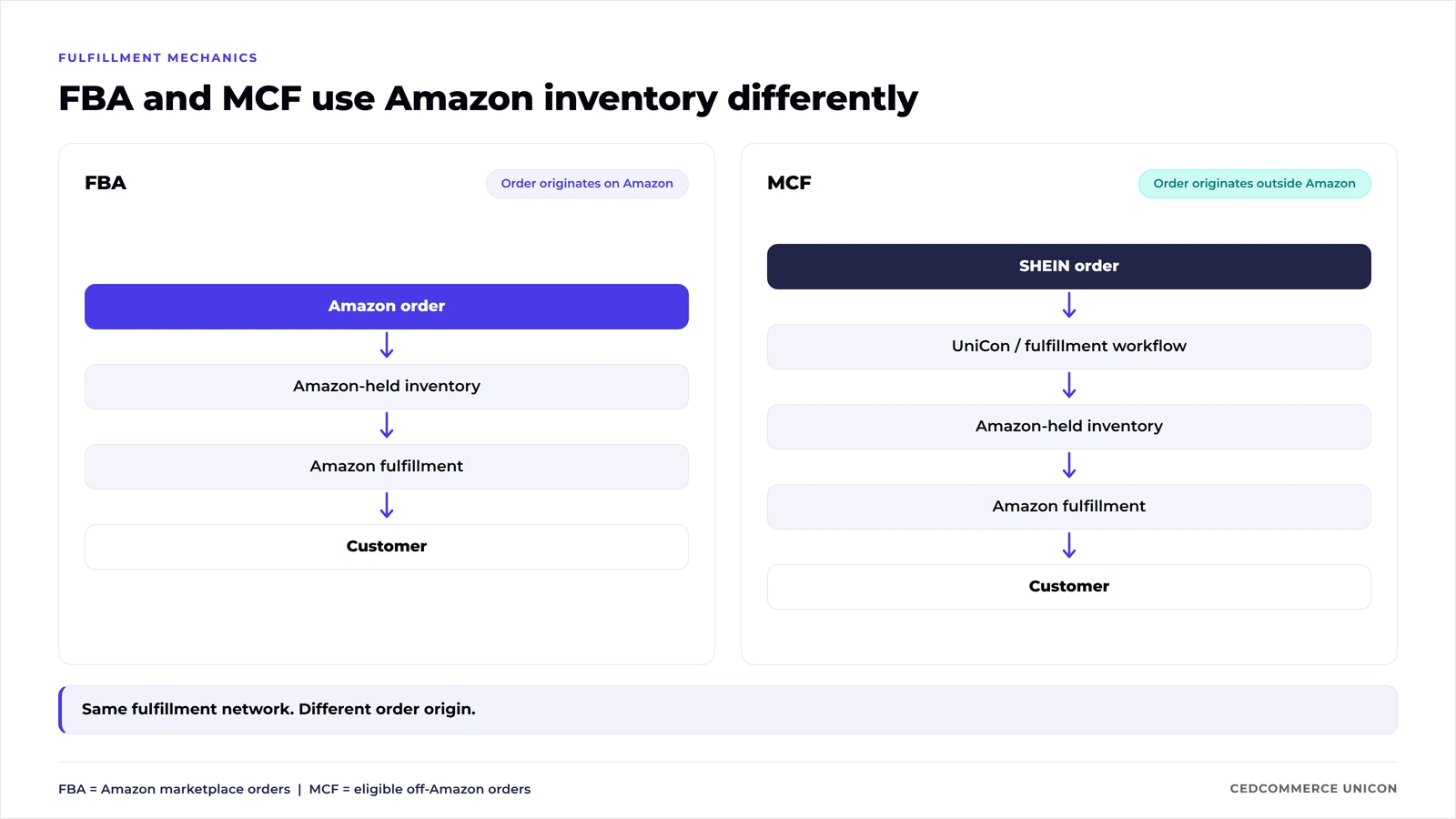
Keeping those responsibilities separate makes it easier to diagnose problems later.
Sellers who also need to move an Amazon catalog into SHEIN and coordinate listing preparation, product matching, inventory, pricing, orders, and fulfillment have a broader workflow to manage.
UniCon is designed for that broader Amazon-to-SHEIN path.
| Need | Direct fulfillment path | UniCon workflow |
|---|---|---|
| Fulfill eligible SHEIN orders from Amazon stock | Yes | Yes |
| Import Amazon as source catalog | Outside the fulfillment-only job | Supported |
| Prepare products for SHEIN | Separate process | Supported target setup |
| Map SHEIN categories and attributes | Separate process | Supported |
| Match products by SKU/barcode | Separate process | Supported |
| Configure SHEIN inventory settings | Separate process | Supported |
| Configure SHEIN price settings | Separate process | Supported |
| Map warehouses and carriers | Separate process | Supported |
| Manage target orders in the same workflow | Separate operational process | Supported |
| Choose another documented fulfillment route | Different setup required | Available where configured |
The right choice depends on the work you need to control. If you are expanding an Amazon catalog into SHEIN, catalog translation and target operations become part of the same launch decision.
Do you need to link your Amazon listings to SHEIN to use Amazon MCF? Not if you are already live on SHEIN and the same products are available in your FBA inventory, you can still use UniCon to route eligible SHEIN orders to Amazon MCF. The important part is ensuring the products are correctly matched and the required fulfillment and order-routing configuration is in place.
UniCon can use Amazon as the source channel for the products you want to take to SHEIN.
A source is the account from which UniCon imports the existing product catalog. Connecting Amazon as the source does not modify the existing live Amazon listings.
The setup follows this sequence:
When Continuous sync is enabled, newly added source-channel products can be brought into UniCon automatically.
If an existing MCF connection is already associated with the Amazon source account, UniCon can also import that fulfillment connection when the source is connected. The source catalog now becomes the foundation for the target setup for SHEIN.
The Amazon catalog provides the source data, while SHEIN still determines what the target listing requires.
This translation step is where many multichannel launches become operationally difficult. A product can represent the same physical item across both marketplaces while requiring different classifications, attributes, images, and listing fields.
After connecting SHEIN as the target, UniCon’s setup can include:
UniCon uses an AI product identifier to recognize matching records across the connected channels.
Core Amazon information gives you a starting catalog rather than an empty SHEIN setup. Depending on the product listing requirements, that can include product identity and existing source data that can be prepared for SHEIN.
Questions? Talk to a marketplace expert →
SHEIN-specific requirements still need attention, including:
This is why “syncing a catalog” describes only part of the work. The operational question is whether every source record can be translated into a valid target record and remain linked to the correct physical SKU afterwards.
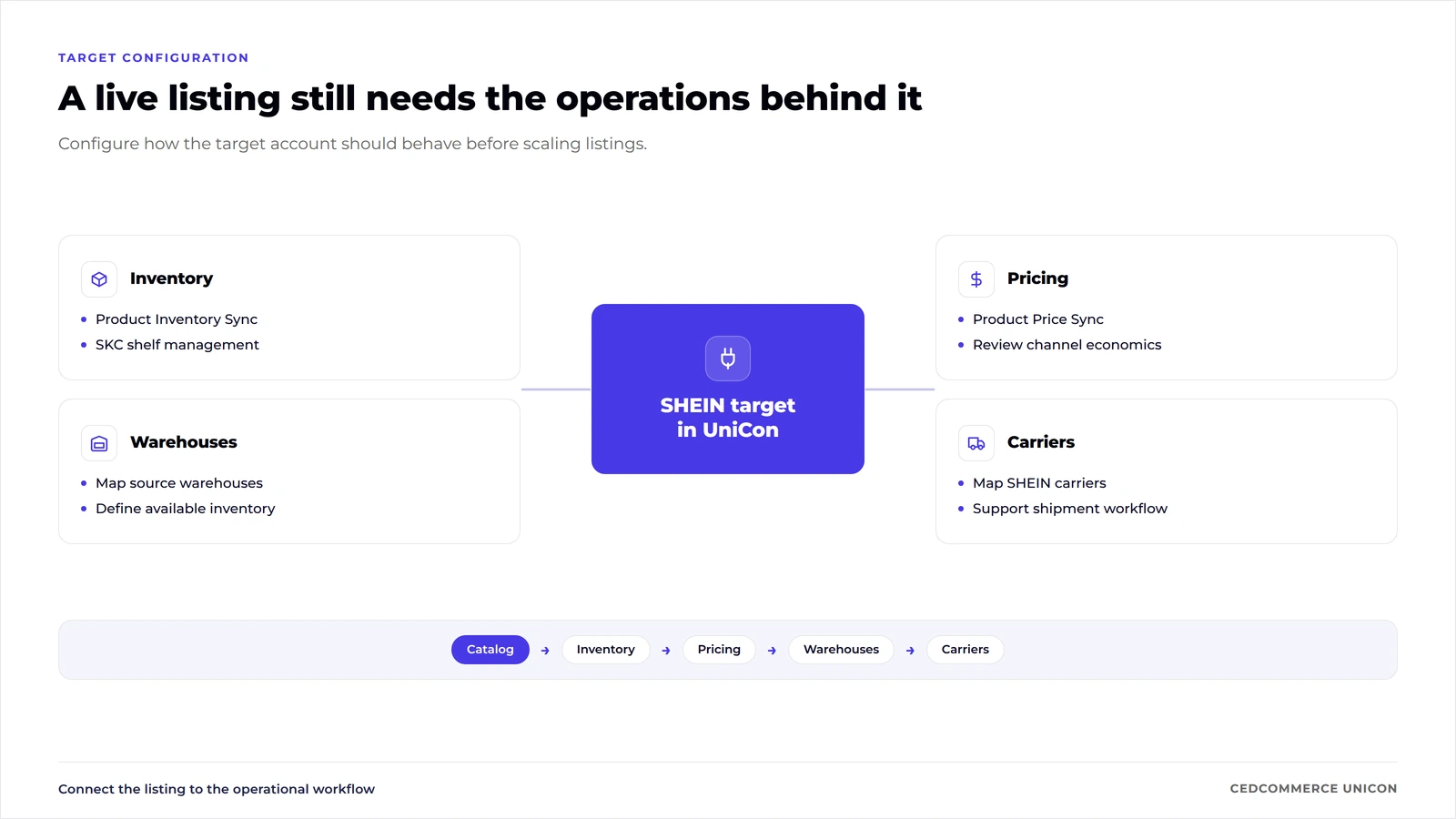
A published listing needs inventory, pricing, warehouses, and carriers configured around it.
Inventory Sync can be enabled to keep SHEIN inventory connected with UniCon.
UniCon also supports Auto SKC shelf management. An SKC, or Standard Key Code, is SHEIN’s product-level identifier for grouping related SKUs. Shelf status determines whether that product is available for sale.
The important decision is which inventory locations should contribute to the quantities you expose on SHEIN. Avoid publishing stock until your warehouse mapping reflects that decision.
Price Sync can be enabled for the SHEIN target.
Price still needs commercial review before go-live. A price that works on Amazon may produce a different contribution margin after SHEIN marketplace costs and the chosen fulfillment route are included.
Map every source warehouse you want to use to the corresponding SHEIN location.
An unmapped warehouse can create a gap between the stock your systems hold and the stock the target marketplace should consider available.
SHEIN carrier names also need to be mapped to their UniCon equivalents. Carrier mapping helps the workflow recognize the appropriate carrier when a target order is shipped.
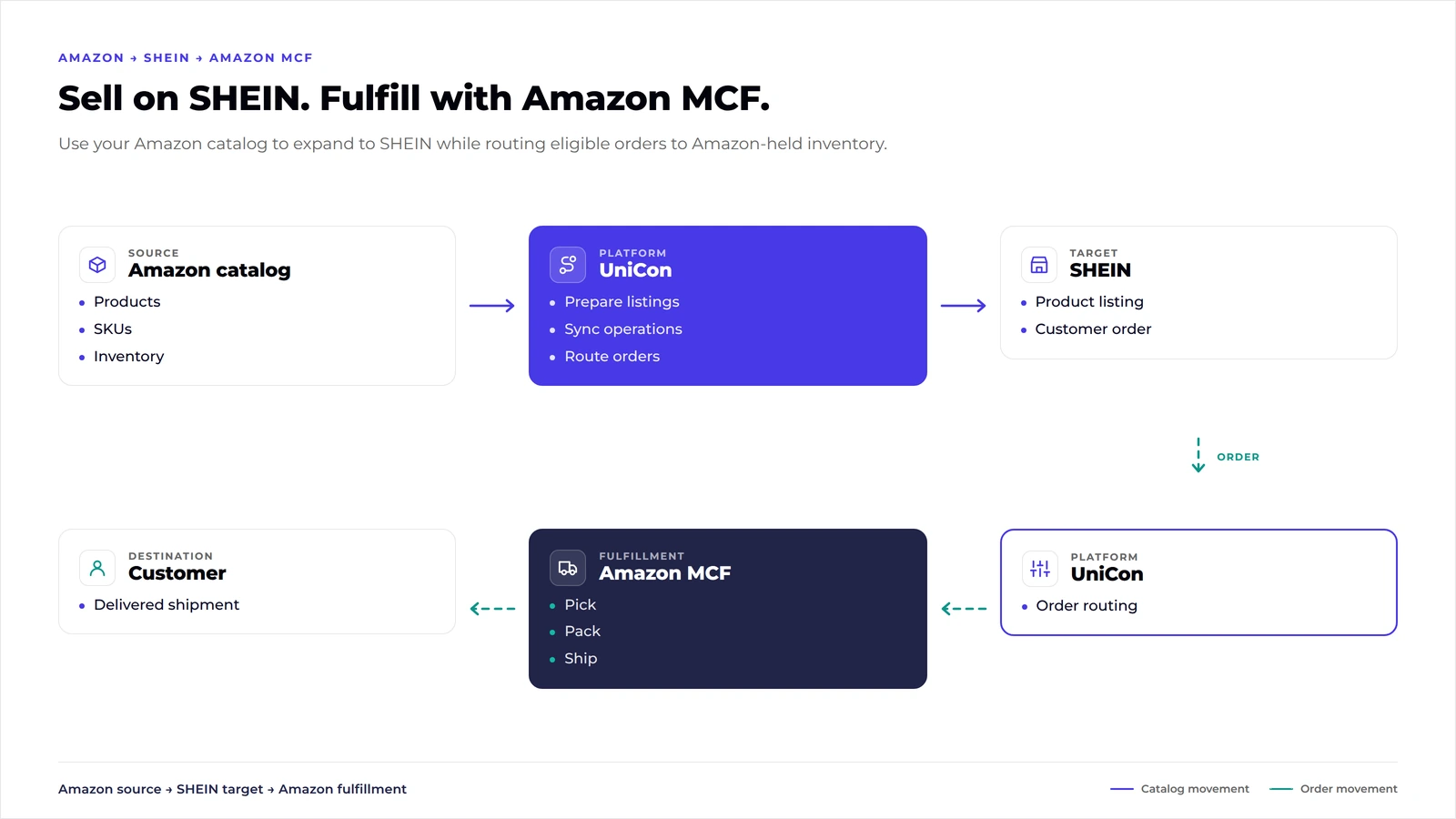
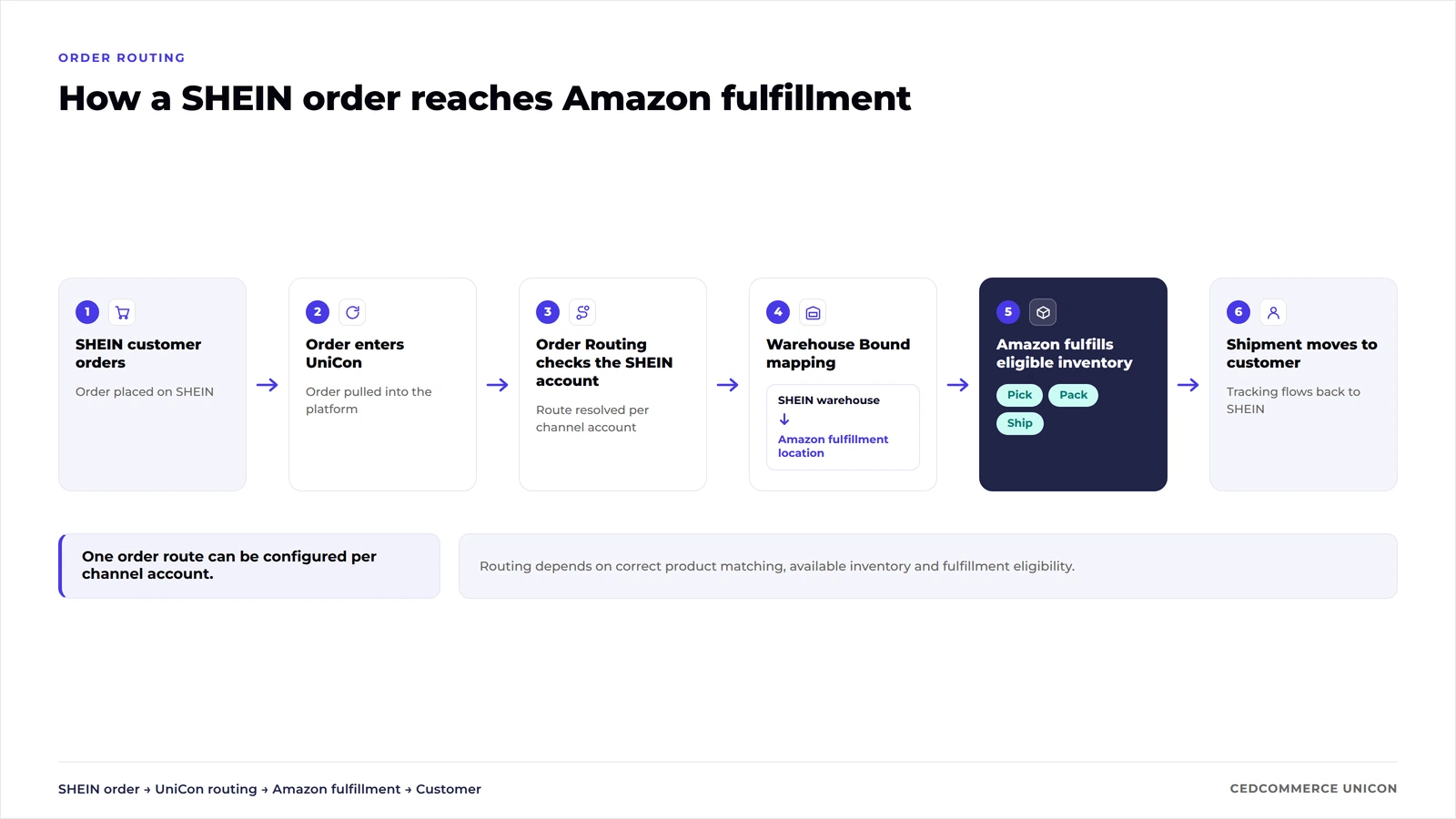
In UniCon, Order Routing determines which fulfillment location should handle incoming orders from a connected target account.
When an eligible SHEIN order enters the connected workflow, UniCon can evaluate that account route and send it toward the mapped fulfillment location. Amazon then handles the fulfillment work for inventory it can fulfill.
The route still depends on correct product matching, available stock, valid target configuration, and fulfillment eligibility.
Even if you’re operating 2 separate SHEIN accounts, you can configure a route for each account.
A fulfillment workflow needs information to travel back after the warehouse ships the order. Hence, clear ownership matters when something fails.
| Owner | Responsibility |
|---|---|
| Seller | Marketplace eligibility, product fit, identifiers, inventory decisions and exceptions |
| SHEIN | Marketplace listing, customer order and marketplace requirements |
| UniCon | Catalog preparation, matching, supported target sync, orders and routing |
| Amazon | Fulfillment of eligible inventory and shipment execution |
A missing tracking update should not automatically be treated as a catalog problem. An unavailable SKU should not automatically be treated as a carrier problem. Instead, check the part of the workflow that owns the failed event.
Using existing Amazon inventory can reduce the need to establish a separate fulfillment footprint, but it does not automatically make every SHEIN SKU profitable.
Calculate the contribution margin for the target channel before publishing at scale:
SHEIN selling price
− marketplace costs
− MCF fulfillment cost
− product cost
− expected return cost
− operational cost
= contribution margin
Run that calculation at SKU level.
A product with strong Amazon economics may have a different outcome on SHEIN because target pricing, promotions, fulfillment charges, product dimensions, return behavior, and marketplace costs can change the equation.
Most Amazon-to-SHEIN failures can be traced to product identity, stock, mapping, or route configuration.
| Symptom | Likely cause | First check |
|---|---|---|
| Product cannot be matched | SKU or barcode differs | Compare identifiers across source and target |
| Target inventory looks wrong | Warehouse or inventory configuration | Review mapped warehouses and target inventory settings |
| Order does not follow expected route | Route or warehouse mapping | Review the target account’s Order Routing configuration |
| Product stays unavailable | Inventory or SKC shelf state | Review available inventory and shelf configuration |
| Carrier cannot be recognized | Missing carrier mapping | Sync and review SHEIN carrier mappings |
| Amazon cannot fulfill | Inventory is not fulfillable | Check available Amazon inventory |
| Large order cannot proceed | Fulfillment limits may apply | Check Amazon’s current order limits |
| Tracking does not appear as expected | Shipment or carrier workflow | Verify shipment state and carrier mapping |
Do not begin troubleshooting by reconnecting every account.
Start with the event that failed, identify which system owns it, and check the mapping immediately before and after that event. That approach reduces the risk of changing a working catalog or target configuration while investigating an isolated fulfillment issue.
UniCon reduces repeated operational work across the Amazon-to-SHEIN workflow while keeping seller review in the places where marketplace decisions still matter.
| Seller task | Disconnected workflow | With UniCon |
|---|---|---|
| Catalog ingestion | Export or recreate source data | Import Amazon source catalog |
| Product matching | Reconcile records separately | SKU/barcode recognition |
| SHEIN categories | Configure target records independently | Target category workflow |
| Attributes | Translate fields separately | Target attribute mapping |
| Inventory | Maintain target stock separately | Supported inventory sync and warehouse mapping |
| Pricing | Maintain target price separately | Supported target price sync |
| Orders | Monitor a separate order workflow | Manage connected target orders |
| Fulfillment request | Handle separately | Apply configured target-account route |
| Tracking | Re-enter shipment details across systems | Connected carrier and tracking workflow |
| Exceptions | Investigate across each system | Review the relevant catalog, order and routing state |
Seller control still matters. Product selection, target-market fit, catalog approval, margin decisions, compliance, and exception handling remain business decisions. The value of a connected workflow is that those decisions sit on top of a clearer operational path.
A controlled SKU pilot is safer than moving the entire Amazon catalog on day 1.
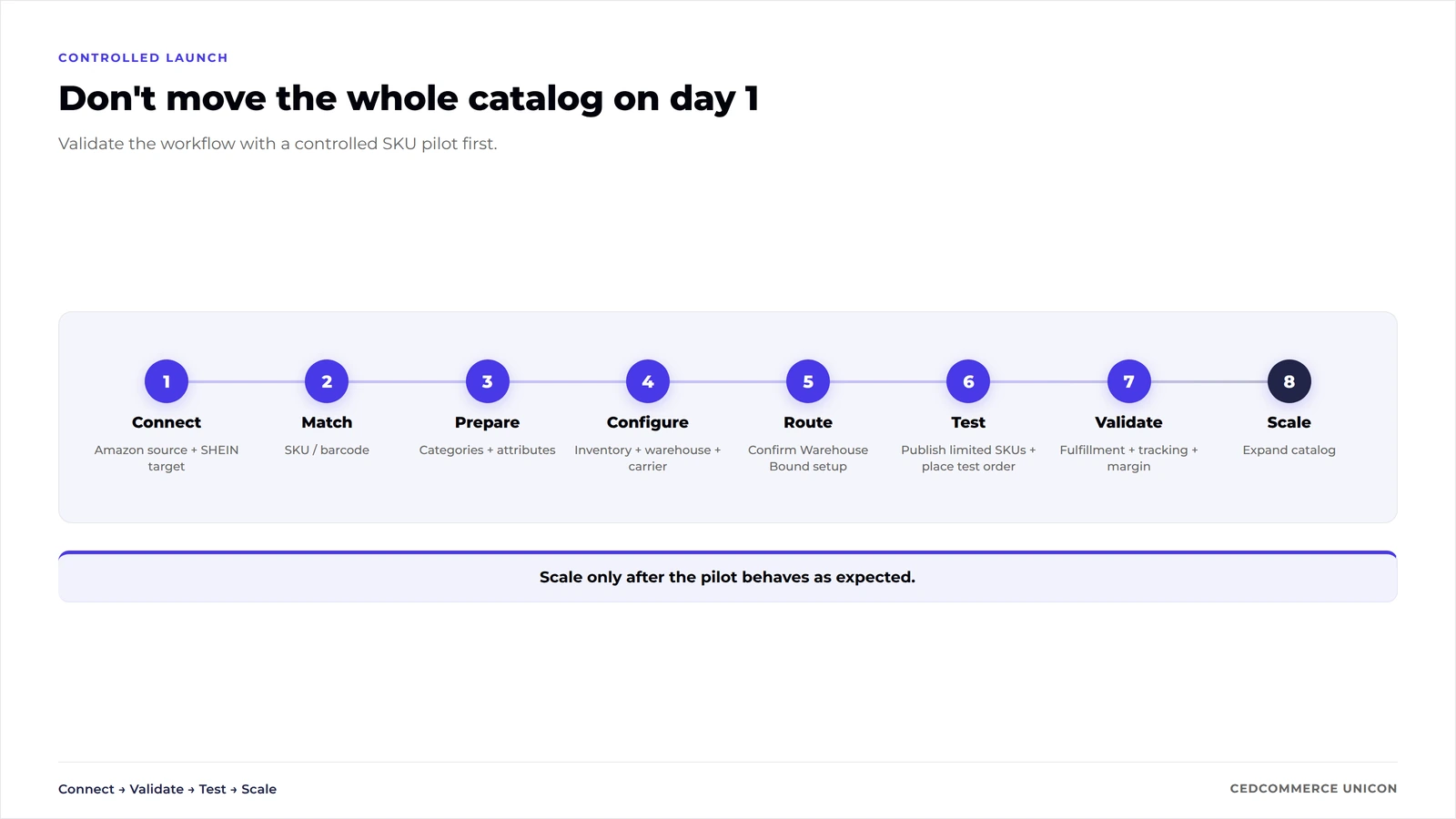
Start with products that are approved for the target market, have stable identifiers, sufficient fulfillable stock, strong product data, and enough margin to absorb the target-channel economics.
Before expanding the catalog:
This sequence gives your team a defined checkpoint between catalog preparation and scaled marketplace operations.
Ready to take your Amazon catalog to SHEIN?
Expand to SHEIN today → Talk to a marketplace expert →
Yes. Eligible orders placed outside Amazon can be fulfilled from inventory available in Amazon’s fulfillment network through MCF. The marketplace order remains a SHEIN order while Amazon handles the eligible fulfillment request.
No. FBA is the fulfillment model for Amazon marketplace orders, while MCF extends Amazon fulfillment to eligible orders originating from other sales channels. Both can use inventory stored within Amazon’s fulfillment network.
Yes. UniCon supports Amazon as a source channel and can import the existing source catalog for preparation on a supported target such as SHEIN.
Connecting Amazon as a source does not automatically publish products to SHEIN. The target account still requires configuration, including product classification, target categories, target attributes, warehouses, and order settings.
UniCon can use SKU or barcode to recognize matching products across connected channels. Using consistent identifiers reduces the risk of target products being linked to the wrong source inventory.
UniCon provides a supported Product Inventory Sync setting for the SHEIN target. Your warehouse mapping and source-of-truth decisions still need to be configured correctly before relying on the target quantity.
Order Routing determines which configured fulfillment location handles incoming orders for a connected target account.
Resolve the product identity before relying on automated routing or inventory workflows. Compare the source and target SKU or barcode and correct the product relationship before go-live.
Amazon cannot fulfill an order from inventory that is unavailable for fulfillment. Monitor inventory and keep a defined exception process for orders that cannot follow the expected route.
Start with a controlled group of SKUs. Validate catalog mapping, inventory, warehouse configuration, routing, fulfillment, tracking, and margin before moving the larger catalog.

Reading Time: 15 minutes Your marketplace app does not sync continuously. It syncs on a…
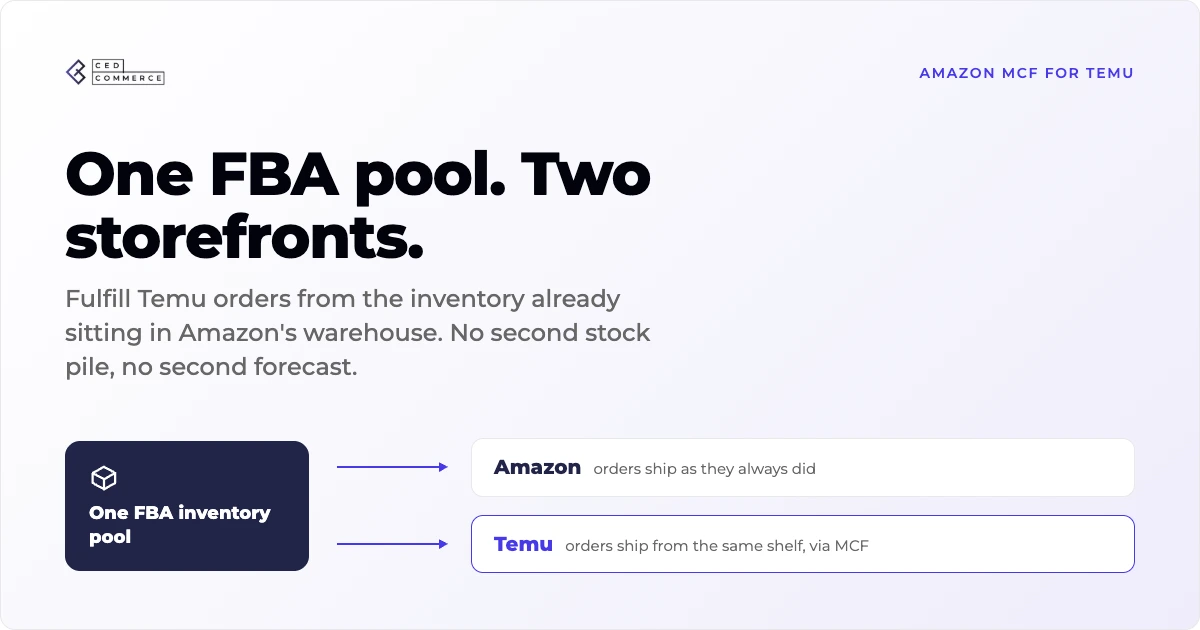
Reading Time: 19 minutes Ever wondered if your FBA inventory could turn Amazon into a…

Reading Time: 2 minutes Amazon has announced a 3.5% surcharge for sellers using its fulfilment network…
Reading Time: 11 minutes The eCommerce shift you actually need to act on Multi-channel fulfillment…
Reading Time: 15 minutes The 2025 Fulfillment Shift Every Amazon Seller Should Know In 2025,…